ZTE / ZTE

ZTE ZXSDR B8300 BBU Unit Equipment information & support

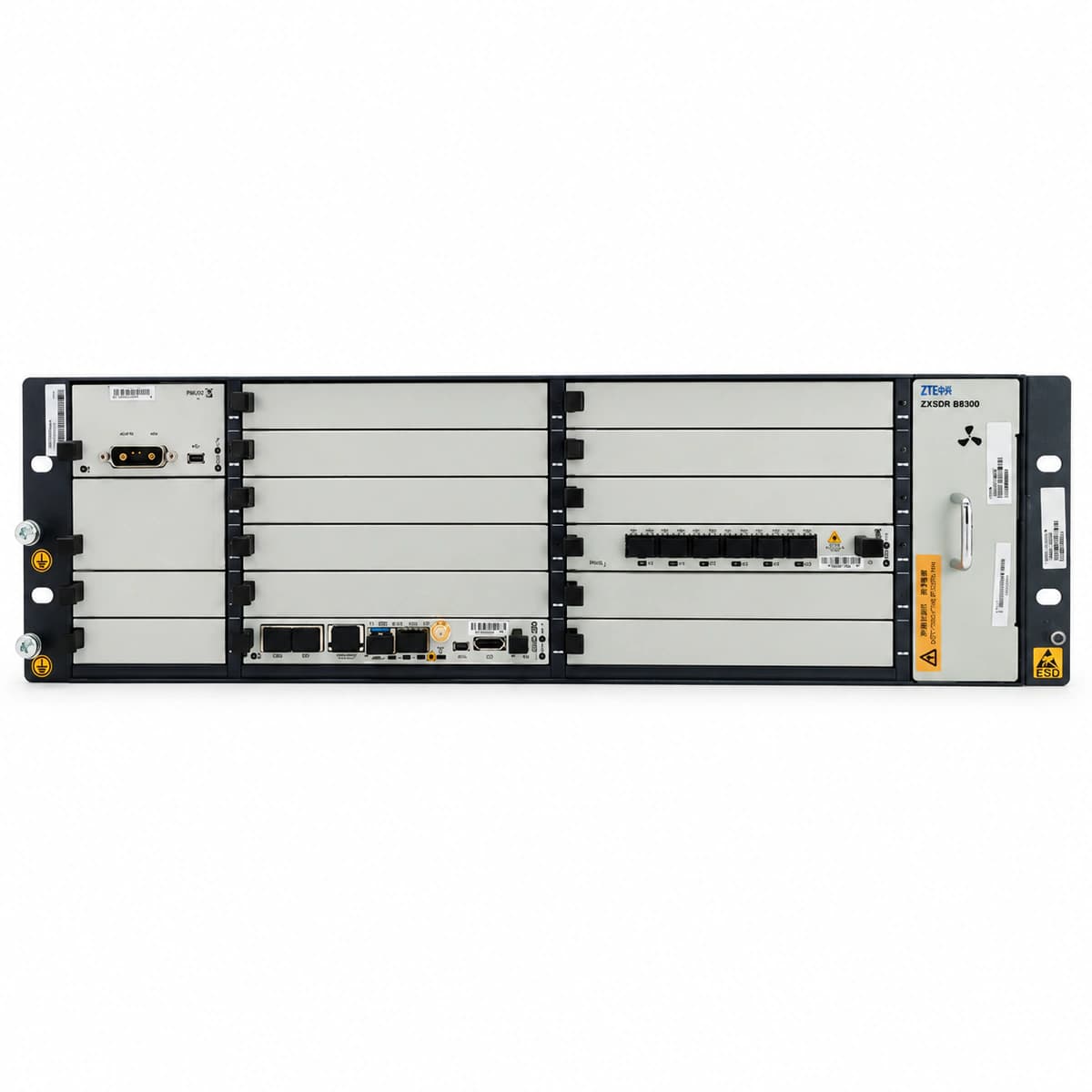
The ZTE ZXSDR B8300 is a compact 3U 19-inch rack-mount multi-mode indoor Baseband Unit (BBU) engineered for distributed cellular base stations, supporting GSM, UMTS, LTE, and 5G co-sited deployments with high slot density and optical CPRI interfaces.

Equipment information

Brand
ZTE
Equipment model
ZTE ZXSDR B8300 BBU Unit
Equipment type
ZTE
Controller / software version
Confirm against the installed equipment
View full product specifications
ZTE ZXSDR B8300 BBU Unit Official Product View 1

Information below comes from the current product catalogue. Confirm the controller, software version and configuration of the installed equipment separately.

Board Type
Standard 3U rack-mounted carrier-grade wireless distributed base station indoor baseband unit (BBU) chassis
Port Density & Specs
Multi-slot modular high-density backplane architecture (supports hot-swapping of the main control and switching board, baseband board, and power module)
Supported Chassis
Supports smooth evolution with GSM / UMTS / LTE / 5G multimode operation in one chassis
Subscriber Capacity
Long-distance fiber-optic extension of the RRU radio frequency unit, significantly reducing equipment-room footprint and feeder loss
Typical Power Consumption
Dual Redundant DC Power Supply (-48V DC) W
Operating Temperature
-20°C ~ +55°C

Alarms & troubleshooting

OPT_LOS (Optical Receiver Loss of Signal)
Board ALM LED steady red; target SFP LNK/ACT LED OFF
Fiber patch cord severed/excessively bent, peer RRU/AAU powered down, SFP RX sensor degraded, or dust cap obscuring optical interface.
1. Inspect optical patch route; verify bend radius exceeds 40 mm with no pinching. 2. Measure RX optical power at the BBU end using an optical power meter, ensuring it meets SFP sensitivity limits (typically -15 dBm to -3 dBm). 3. Clean LC fiber ferrules and SFP optical bore; if optical power remains absent, replace patch cord or remote RRU SFP.
SFP_TEMP_HIGH (SFP Module Temperature Exceeded)
Board ALM LED flashing yellow or red (1 Hz); port LED steady amber
B8300 subrack fan tray failure/stall, dust filter clogged, cabinet ambient temperature exceeding 55°C, or internal SFP DDM sensor failure.
1. Check B8300 fan status and SFP DDM temperature telemetry via EMS/LMT (standard industrial threshold: -40°C to +85°C). 2. Remove and clean the subrack air filter; ensure unobstructed airflow. 3. If temperature anomaly is isolated to a single SFP (>90°C), hot-swap and replace with a certified industrial-temperature ZTE SFP module.
LASER_BIAS_HIGH (Transmitter Laser Bias Current Degradation)
Board ALM LED slow-flashing amber (0.5 Hz); port LED blinking amber or steady green
Semiconductor Laser Diode (LD) aging inside the SFP transmitter, driver IC degradation, or end-of-life condition threatening imminent link drop.
1. Access LMT/EMS to read DDM telemetry; verify if Tx Bias Current exceeds threshold (typically >80 mA). 2. Cross-reference Tx Output Power to verify optical power output degradation. 3. Schedule maintenance window and hot-swap the degraded SFP transceiver before catastrophic optical path loss occurs.
CPRI_SYNC_FAIL (CPRI Optical Interface Loss of Frame Synchronization)
Board ALM LED steady red; optical port ACT/LNK LED flashing red slowly
CPRI rate mismatch (e.g., 2.4G/4.9G/9.8G misconfiguration), optical jitter causing high Bit Error Rate (BER), baseband clock PLL loss-of-lock, or faulty SFP/SerDes serializer.
1. Verify CPRI rate configuration (e.g., Option 3/7/8) matches between the B8300 baseband board and peer RRU in the EMS. 2. Perform SFP local and remote loopback tests to isolate whether the fault is optical path attenuation, transceiver-related, or board SerDes hardware failure. 3. Replace the SFP module with a verified high-speed optical module, or swap the baseband processing card (e.g., UBPG/UBFI).
SFP_TYPE_MISMATCH (Optical Module Type or Rate Incompatible)
Board ALM LED steady yellow; optical port LNK/ACT LED flashing amber rapidly (2 Hz)
Installation of non-ZTE certified optical transceiver with unreadable/locked EEPROM, wavelength mismatch (e.g. 1310nm single-mode mixed with 850nm multi-mode), or 1.25Gbps module inserted into 10G/25G port without auto-negotiation.
1. Execute EMS command to query port SFP Vendor Name, Part Number, and EEPROM manufacturing data. 2. Verify cable medium matches transceiver optical wavelength (single-mode yellow patch for 1310 nm/1550 nm; multi-mode orange/aqua for 850 nm). 3. Replace the unrecognized transceiver with an official ZTE-qualified SFP/SFP+ module compliant with B8300 hardware compatibility specifications.

Access Complete Maintenance & Full Alarm Troubleshooting Manual

This page lists high-frequency critical alarm codes commonly encountered in field maintenance. Comprehensive manufacturer troubleshooting matrices, board-level repair guides, detailed electrical schematics, and firmware commissioning manuals are delivered alongside equipment upon formal project procurement, accompanied by dedicated FAE technical support.

Share on-site information

  1. 01

    Identify the exact model

    Record the nameplate, system model and controller or module model.

  2. 02

    Keep the alarm details

    Record the full alarm text, indicator colour, timing and whether it persists.

  3. 03

    Describe recent changes

    Note recent replacements, software updates or configuration changes.

Record information visible in the existing interface. Electrical measurements, disassembly and replacement should follow the applicable manufacturer's manual and be performed by qualified personnel.

Your model and these details will be added to the enquiry form for you to review before sending.

Related technical articles

Browse the technical guides or send a question about this model.

View all articles

Need a replacement module or supporting equipment?

Confirm the full model, system configuration and compatibility requirements before enquiring about suitable products.

Ask about suitable products

Have a model and an on-site issue?

Share the exact model, alarm text and observed symptoms to help identify relevant information and compatibility requirements.

Request technical support