Vertiv / Precision air conditioning

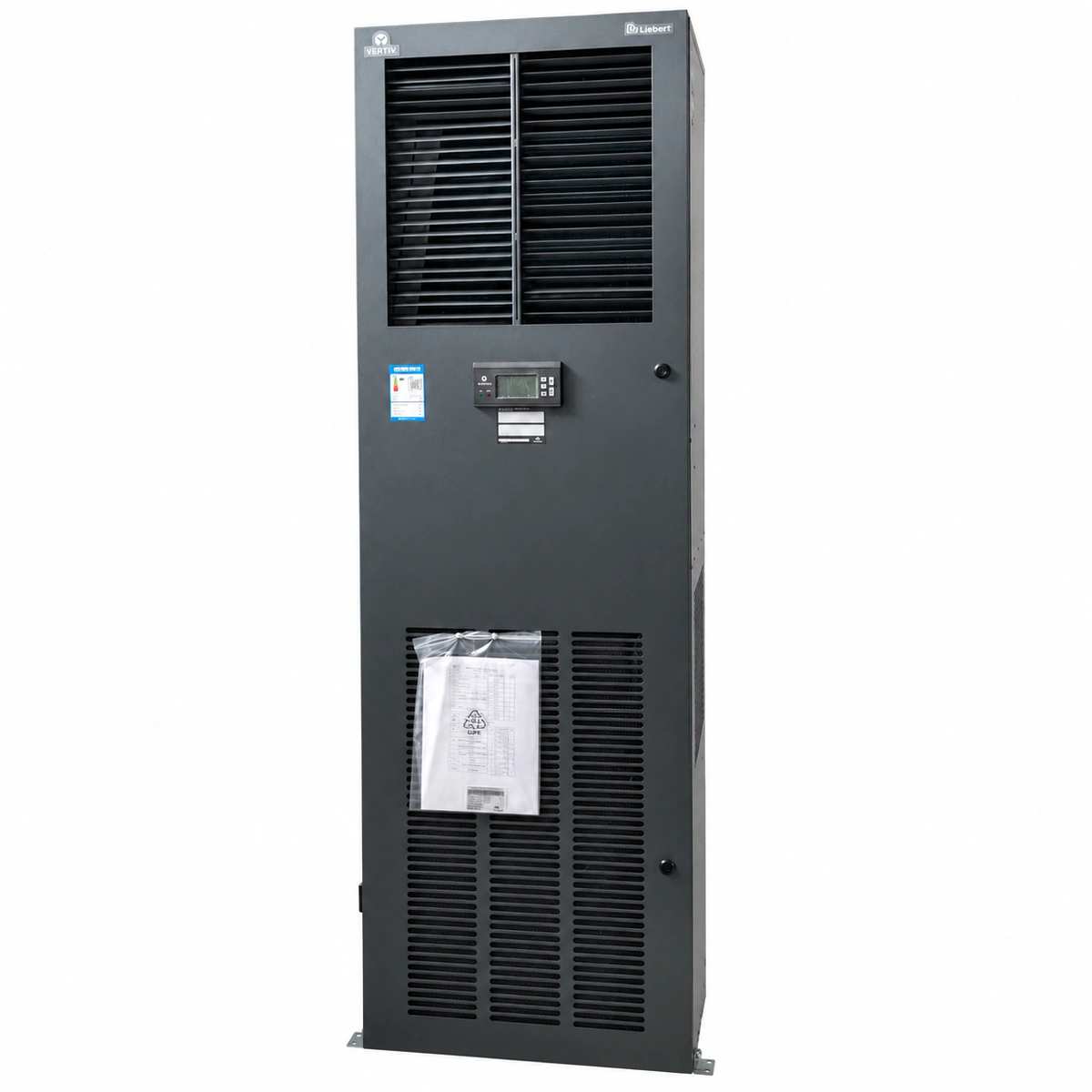
Liebert DME12MCP5 Precision Air Conditioner Equipment information & support

The Vertiv Liebert DME12MCP5 is a high-reliability direct expansion (DX) air-cooled precision air conditioner engineered for mission-critical IT infrastructure, featuring high airflow, low enthalpy difference cooling, an SHR ≥ 0.90, and an electronically commutated (EC) backward-curved centrifugal fan for continuous 24/7/365 thermal regulation.

Equipment information

Brand
Vertiv
Equipment model
Liebert DME12MCP5 Precision Air Conditioner
Equipment type
Precision air conditioning
Controller / software version
Confirm against the installed equipment
View full product specifications
Vertiv Liebert DME12MCP5 Precision Air Conditioner 12.5kW 380V-400V 3Ph (800×500×1950mm)

Information below comes from the current product catalogue. Confirm the controller, software version and configuration of the installed equipment separately.

Sensible Heat Ratio SHR
SHR ≥ 0.90 Premium Data Center Sensible Heat Ratio
Rated Cooling Capacity
12.5kW Nominal Sensible Cooling Capacity (High Airflow, Low Enthalpy)
Fan Drive Technology
Fully Digital Stepless Variable-Speed Inverter EC Centrifugal Fan
AC Operating Voltage
380V / 400V AC 3-Phase 50Hz/60Hz Auto-Sensing
Refrigerant Type
R410A Eco-Friendly High-Pressure Refrigerant
Controller System
Liebert Intelligent Microprocessor Controller with Diagnostics & Teamwork

Alarms & troubleshooting

HP_ALM (High Discharge Pressure Alarm)
Red Alarm LED solid ON, buzzer active, controller displays HP LOCK
Outdoor condenser coil fouled/blocked, condenser fan speed controller failed or motor stalled, refrigerant overcharged, high-pressure switch defective, or discharge service valve closed
1. Inspect outdoor condenser coils and remove dust, debris, or foreign obstructions. 2. Measure condenser fan supply voltage and speed controller signal to verify proper motor rotation. 3. Connect manifold gauges to verify discharge pressure (cutout at ~2.8–3.0 MPa for R410A), press manual reset on HP switch, and clear alarm on controller.
LP_ALM (Low Suction Pressure Alarm)
Red Alarm LED blinking, controller displays LP alarm, compressor shuts down after delay
Refrigerant undercharge due to leak, expansion valve (TXV/EEV) orifice blocked or closed, liquid line filter-drier restricted, or severely clogged return air filter causing evaporator freezing
1. Inspect indoor return air filters and evaporator coil; clean filters and defrost if frosted. 2. Measure temperature drop across the filter-drier; replace if temperature difference exceeds 2°C. 3. Conduct electronic leak detection along piping joints, braze/repair leaks, evacuate system to <500 microns, and recharge R410A to nameplate weight.
AIR_FAIL (Loss of Airflow / Fan Failure)
Red Alarm LED solid ON, amber Warning LED ON, electric heaters and compressors interlocked OFF
Indoor blower motor thermal overload tripped, differential airflow pressure switch sensing tube disconnected/kinked, fan contactor coil damaged, or motor supply phase failure
1. Disconnect main power, check the blower thermal overload relay and circuit breaker, and reset if tripped. 2. Inspect the high/low ports of the differential air pressure switch and ensure flexible tubes are intact and clear. 3. Manually rotate the fan wheel to verify smooth bearing operation; power on and measure motor three-phase current against nameplate values.
WATER_ALM (Condensate High Level / Water Leak)
Red Alarm LED solid ON, audible alarm active, cooling and dehumidification inhibited
Condensate drain pan outlet clogged with algae/scale, condensate pump motor failed or power lost, float switch stuck in high position, or perimeter water leak rope detecting floor moisture
1. Inspect the drain pan, flush and blow out the condensate line with low-pressure nitrogen/water to remove obstructions. 2. Check power supply to the condensate pump, toggle the float level switch manually to confirm pump activation, and clean the pump check valve. 3. Inspect the floor water leak detection rope, dry the base pan and sensor cable, and verify resistance on the controller terminals returns to normal (>1 MΩ).
HI_TEMP (High Return Air Temperature Alarm)
Amber Warning LED solid ON, temperature reading on controller flashes red
Data center IT thermal load exceeds equipment rated cooling capacity, return air NTC/PT1000 temperature sensor drifted/faulty, compressor failed to load, or cycling off due to safety trips
1. Measure return air temperature using a calibrated handheld thermometer; recalibrate or replace the NTC sensor if reading offset exceeds ±1.5°C. 2. Verify compressor contactor is energized and inspect the liquid line sight glass to ensure solid liquid column without excessive bubbles. 3. Measure evaporator delta-T (supply vs return air, typical ΔT should be 6°C–10°C); if low, assess refrigerant charge and expansion valve superheat.

Access Complete Maintenance & Full Alarm Troubleshooting Manual

This page lists high-frequency critical alarm codes commonly encountered in field maintenance. Comprehensive manufacturer troubleshooting matrices, board-level repair guides, detailed electrical schematics, and firmware commissioning manuals are delivered alongside equipment upon formal project procurement, accompanied by dedicated FAE technical support.

Share on-site information

  1. 01

    Identify the exact model

    Record the nameplate, system model and controller or module model.

  2. 02

    Keep the alarm details

    Record the full alarm text, indicator colour, timing and whether it persists.

  3. 03

    Describe recent changes

    Note recent replacements, software updates or configuration changes.

Record information visible in the existing interface. Electrical measurements, disassembly and replacement should follow the applicable manufacturer's manual and be performed by qualified personnel.

Your model and these details will be added to the enquiry form for you to review before sending.

Related technical articles

Browse the technical guides or send a question about this model.

View all articles

Need a replacement module or supporting equipment?

Confirm the full model, system configuration and compatibility requirements before enquiring about suitable products.

Ask about suitable products

Have a model and an on-site issue?

Share the exact model, alarm text and observed symptoms to help identify relevant information and compatibility requirements.

Request technical support