Huawei / DC power systems

R4850G6 Equipment information & support

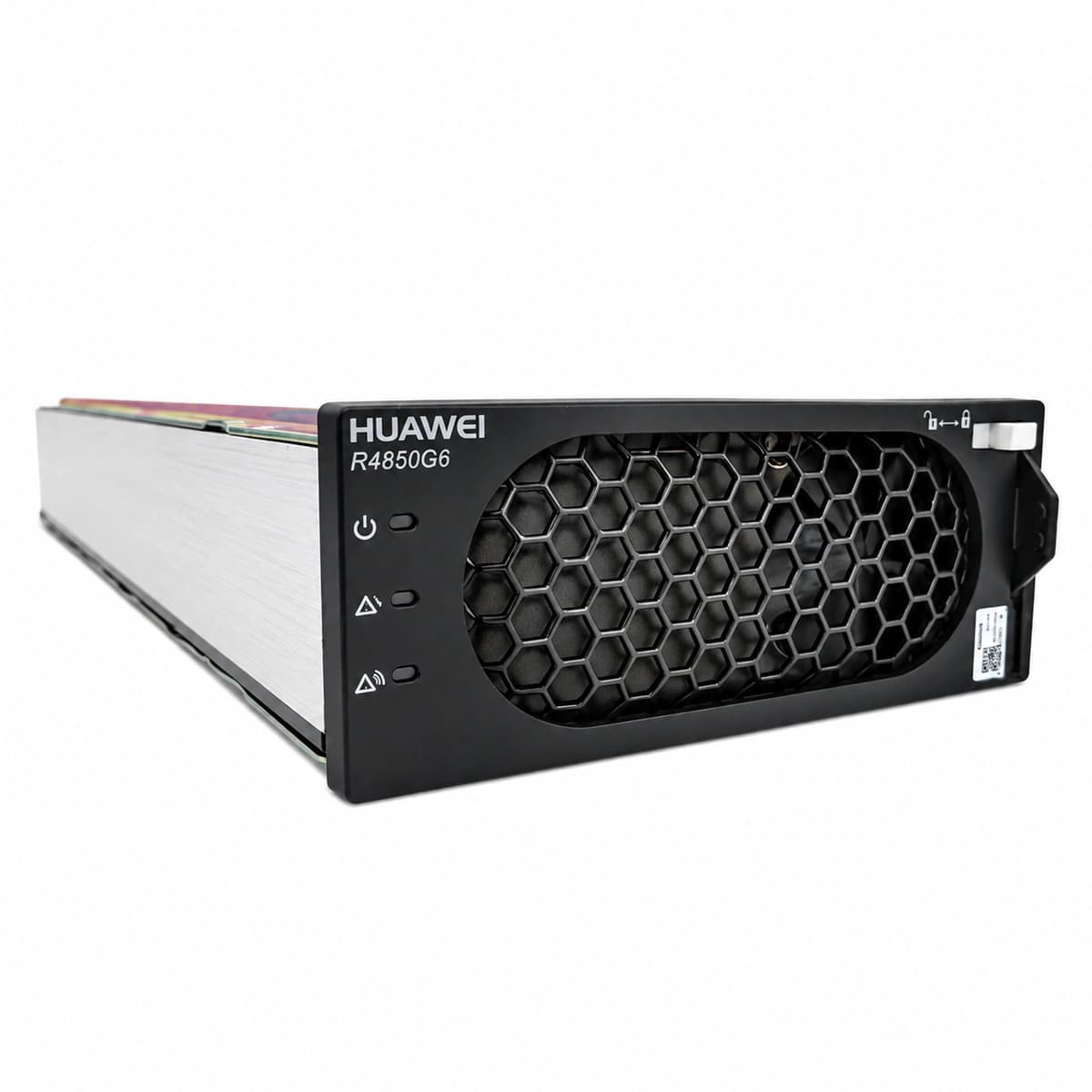
Huawei R4850G6 is a flagship 3000W (-48V/50A) rectifier module featuring top-tier 96.8% efficiency, digital soft-switching topology, and ultra-low standby power.

Equipment information

Brand
Huawei
Equipment model
R4850G6
Equipment type
DC power systems
Controller / software version
Confirm against the installed equipment
View full product specifications
R4850G6 Official Product View 1

Information below comes from the current product catalogue. Confirm the controller, software version and configuration of the installed equipment separately.

AC Input Voltage Range
85VAC ~ 300VAC (Nominal 220VAC) VAC
Nominal DC Output Voltage
-48 V DC
Cooling Method
Built-in intelligent continuously variable-speed fan
Physical Dimensions Spec
40.8 (1U) × 105 × 281 mm

Alarms & troubleshooting

AC_IN_FAIL (AC Input Failure/Abnormal)
Power LED (Green) OFF, Protection LED (Yellow) ON or OFF
Grid power outage, AC breaker tripped, input voltage outside operating range (85-300 VAC), or loose AC input terminal wiring.
1. Measure AC voltage across L/N terminals on the rectifier backplane slot with a DMM (verify 85-300 VAC); 2. Check if the dedicated AC circuit breaker on the ACDU tripped; inspect for short circuits and reclose; 3. Reseat the module into an alternate verified slot to eliminate backplane connector pin damage; 4. If AC voltage is verified but the module remains dead, internal auxiliary power or PFC stage failed; replace module.
OUT_OVP (DC Output Overvoltage Lockout)
Fault LED (Red) solid ON, Power LED (Green) OFF
Internal DC/DC control loop runaway, damaged PWM regulation circuit, lightning surge, or bus voltage exceeding hardware threshold (58.5-60.5 VDC), triggering latch-off lockout.
1. Disconnect the AC circuit breaker of the faulty rectifier; wait 1 minute for internal high-voltage capacitors to fully discharge; 2. Reclose the AC breaker to execute a cold hardware reboot; observe if the green LED recovers; 3. Check the SMU controller settings to ensure system overvoltage threshold is not configured incorrectly (>58.5 VDC); 4. If the red LED turns solid on immediately after restart, internal primary/secondary components are shorted; replace the unit immediately.
OVER_TEMP (Rectifier Thermal Derating/Shutdown)
Protection LED (Yellow) solid ON during derating; Fault LED (Red) solid ON upon thermal shutdown
Ambient temperature exceeds +55°C, front air intake/dust mesh clogged, blocked exhaust channel, inadequate cabinet clearance, or fan airflow degradation.
1. Inspect site air conditioning to restore ambient intake temperature to the rated range (-40°C to +55°C); 2. Inspect and clear lint/dust accumulations from module front intake louvers and cabinet rear exhaust grills; 3. Query internal module temperature readings via the SMU controller to ensure temperature drops below the recovery threshold; 4. If ambient conditions and airways are optimal but overheating persists, check fan speed or replace the module with faulty internal thermistors.
FAN_FAIL (Rectifier Fan Fault/Locked Rotor)
Fault LED (Red) blinking (0.5 Hz) or solid ON, Power LED (Green) solid ON or OFF
Physical obstruction in fan blades, bearing mechanical seizure, open circuit on fan tachometer/PWM control line, or burned internal fan driver circuit.
1. Visually check fan intake/exhaust apertures for foreign debris (e.g., zip ties, loose labels, foam) pinning the blades; 2. With AC isolated, spin fan blades gently using an insulated non-conductive tool to verify free mechanical rotation without bearing friction; 3. Hot-swap/reseat the rectifier module to verify if the fan performs its full-speed POST spin-up sequence upon power-up; 4. If unobstructed but the fan fails to spin or produces harsh grinding noises accompanied by a red alarm, replace the fan assembly or swap the module.
COMM_FAIL (CAN Bus Communication Loss & Current Imbalance)
Protection LED (Yellow) slow blinking (0.5 Hz), Power LED (Green) solid ON
Bent/oxidized CAN pins on backplane connector, SMU controller port failure, CAN bus termination mismatch, or damaged module transceiver IC causing autonomous default-voltage operation without active load sharing.
1. Check the SMU controller to verify whether other parallel rectifiers report normal communication and slot positions; 2. Remove the module and inspect gold fingers and backplane CAN signal pins for oxidation, bend damage, or contamination; 3. Reseat the module firmly and secure the front extraction latches to ensure solid backplane engagement; 4. If yellow LED continues flashing at 0.5 Hz and SMU reports offline, re-poll CAN addresses via SMU menu; replace rectifier if transceiver is defective.

Access Complete Maintenance & Full Alarm Troubleshooting Manual

This page lists high-frequency critical alarm codes commonly encountered in field maintenance. Comprehensive manufacturer troubleshooting matrices, board-level repair guides, detailed electrical schematics, and firmware commissioning manuals are delivered alongside equipment upon formal project procurement, accompanied by dedicated FAE technical support.

Share on-site information

  1. 01

    Identify the exact model

    Record the nameplate, system model and controller or module model.

  2. 02

    Keep the alarm details

    Record the full alarm text, indicator colour, timing and whether it persists.

  3. 03

    Describe recent changes

    Note recent replacements, software updates or configuration changes.

Record information visible in the existing interface. Electrical measurements, disassembly and replacement should follow the applicable manufacturer's manual and be performed by qualified personnel.

Your model and these details will be added to the enquiry form for you to review before sending.

Related technical articles

Browse the technical guides or send a question about this model.

View all articles

Need a replacement module or supporting equipment?

Confirm the full model, system configuration and compatibility requirements before enquiring about suitable products.

Ask about suitable products

Have a model and an on-site issue?

Share the exact model, alarm text and observed symptoms to help identify relevant information and compatibility requirements.

Request technical support