Huawei / Outdoor power systems

Huawei TP48600B 2.1m Outdoor Telecom Cabinet Equipment information & support

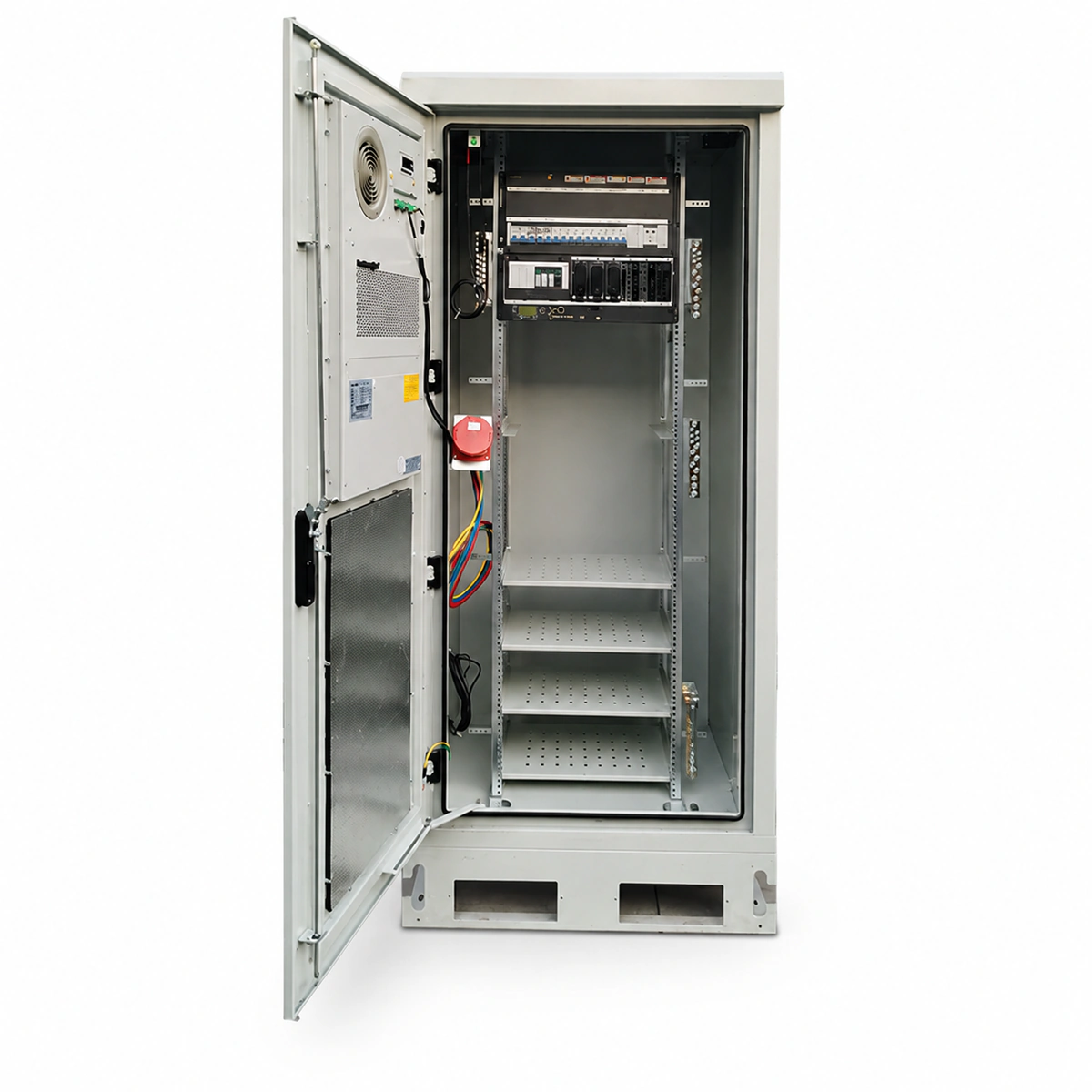
The Huawei TP48600B 2.1m Outdoor Telecom Power Cabinet is an integrated -48V DC power feeding infrastructure engineered for high-density 5G macro sites. It houses AC/DC distribution, power conversion, environment monitoring, and energy storage within an IP55 dual-compartment enclosure, delivering up to 600A continuous output for rugged outdoor telecom networks.

Equipment information

Brand
Huawei
Equipment model
Huawei TP48600B 2.1m Outdoor Telecom Cabinet
Equipment type
Outdoor power systems
Controller / software version
Confirm against the installed equipment
View full product specifications
Huawei TP48600B 2.1m Outdoor Telecom Power Cabinet (600A -48V DC, IP55 Dual-Compartment, 12x R4850G2 Slots)

Information below comes from the current product catalogue. Confirm the controller, software version and configuration of the installed equipment separately.

Cabinet Structure Spec
2.1m Standard Outdoor Integrated Base Station Power Cabinet (IP55)
System Output Capacity
600A (-48V DC) Continuous Output Capacity
Zoned Cooling Tech
Equipment Door Heat Exchanger + Intelligent Battery DC Ventilation
Controller System
SMU02C Supervisory Unit with Graphical LCD Telemetry
Rectifier Module Slots
12 Slots (Compatible with Huawei R4850G2 50A HE Rectifiers)
DC Distribution Branches
Supports 2 High-Current Battery Inputs + Critical/Non-Critical DC Branches

Alarms & troubleshooting

AC_FAIL (AC Mains Failure / Phase Loss)
SMU ALM LED steady red; Rectifier green RUN LEDs off
Upstream grid blackout, AC input circuit breaker tripped, or phase voltage drop/loss below operating threshold
1. Measure phase-to-phase and phase-to-neutral voltages at AC terminals to ensure 85V AC-300V AC nominal range; 2. Check upstream ATS and cabinet main AC breaker status; 3. Restore AC feed, reset breaker, and verify SMU clears the alarm and rectifiers resume soft-start.
REC_FAULT (Rectifier Fault / HVSD Overvoltage Lockout)
Faulty rectifier red FAULT LED solid on; SMU yellow ALM LED on
Internal PFC circuit damage, output overvoltage hardware shutdown (HVSD) triggered, DC bus short-circuit, or severe internal fan stall
1. Identify the faulty slot ID via SMU active alarms and read error parameters; 2. Unlock the handle, pull the module halfway, wait 3 minutes for capacitor discharge, and reseat firmly; 3. If the red FAULT LED persists after reseating, replace the unit with a matching model (e.g., R4850G/R4875G).
DC_LOW_VOLT (DC Under-Voltage / LLVD Disconnect)
SMU ALM LED steady red with audible buzzer; LLVD contactors tripped open
Prolonged AC mains outage causing battery string to discharge below critical low voltage threshold (default -47V DC), triggering LLVD/BLVD trip
1. Deploy emergency mobile generator immediately to restore power to critical telecom equipment; 2. Check remaining battery state of charge (SOC) and real-time bus voltage on the SMU interface; 3. Once AC is restored, ensure rectifiers enter boost charging and verify LLVD contactors automatically latch back.
CAB_FAN_FAIL (Cabinet Heat Exchanger / Fan Stall Fault)
TCU climate control board alarm LED red; SMU displays yellow alarm prompt
Foreign object obstruction in internal/external circulation fan, bearing seizure, blown TCU fan fuse, or PWM/tachometer feedback cable disconnection
1. Isolate TCU power, open cabinet compartment door, and inspect fan impeller for debris or physical jam; 2. Measure with a DMM if 48V DC power and Hall pulse feedback reach the fan connector; 3. Rotate fan blades by hand; if mechanical resistance or bearing roughness is detected, replace the DC 48V fan assembly.
SPD_FAULT (Surge Protective Device Degradation / Fault)
SPD module mechanical inspection window turned from green to red; SMU SPD amber LED solid
Lightning strike or heavy grid surge energy absorbed causing MOV thermal degradation/burnout, or remote signaling microswitch wiring disconnected
1. Visually check AC/DC SPD modules in the cabinet to locate which plug-in cartridge turned red; 2. Inspect the SPD protection breaker and verify cabinet earth ground bar bonding resistance (<10 ohms); 3. Hot-swap the damaged plug-in surge cartridge with a matching spare (e.g., 20kA/40kA) and confirm the SMU alarm clears.

Access Complete Maintenance & Full Alarm Troubleshooting Manual

This page lists high-frequency critical alarm codes commonly encountered in field maintenance. Comprehensive manufacturer troubleshooting matrices, board-level repair guides, detailed electrical schematics, and firmware commissioning manuals are delivered alongside equipment upon formal project procurement, accompanied by dedicated FAE technical support.

Share on-site information

  1. 01

    Identify the exact model

    Record the nameplate, system model and controller or module model.

  2. 02

    Keep the alarm details

    Record the full alarm text, indicator colour, timing and whether it persists.

  3. 03

    Describe recent changes

    Note recent replacements, software updates or configuration changes.

Record information visible in the existing interface. Electrical measurements, disassembly and replacement should follow the applicable manufacturer's manual and be performed by qualified personnel.

Your model and these details will be added to the enquiry form for you to review before sending.

Related technical articles

Browse the technical guides or send a question about this model.

View all articles

Need a replacement module or supporting equipment?

Confirm the full model, system configuration and compatibility requirements before enquiring about suitable products.

Ask about suitable products

Have a model and an on-site issue?

Share the exact model, alarm text and observed symptoms to help identify relevant information and compatibility requirements.

Request technical support