Huawei / Outdoor power systems

Huawei 5G Micro Power Supply Equipment information & support

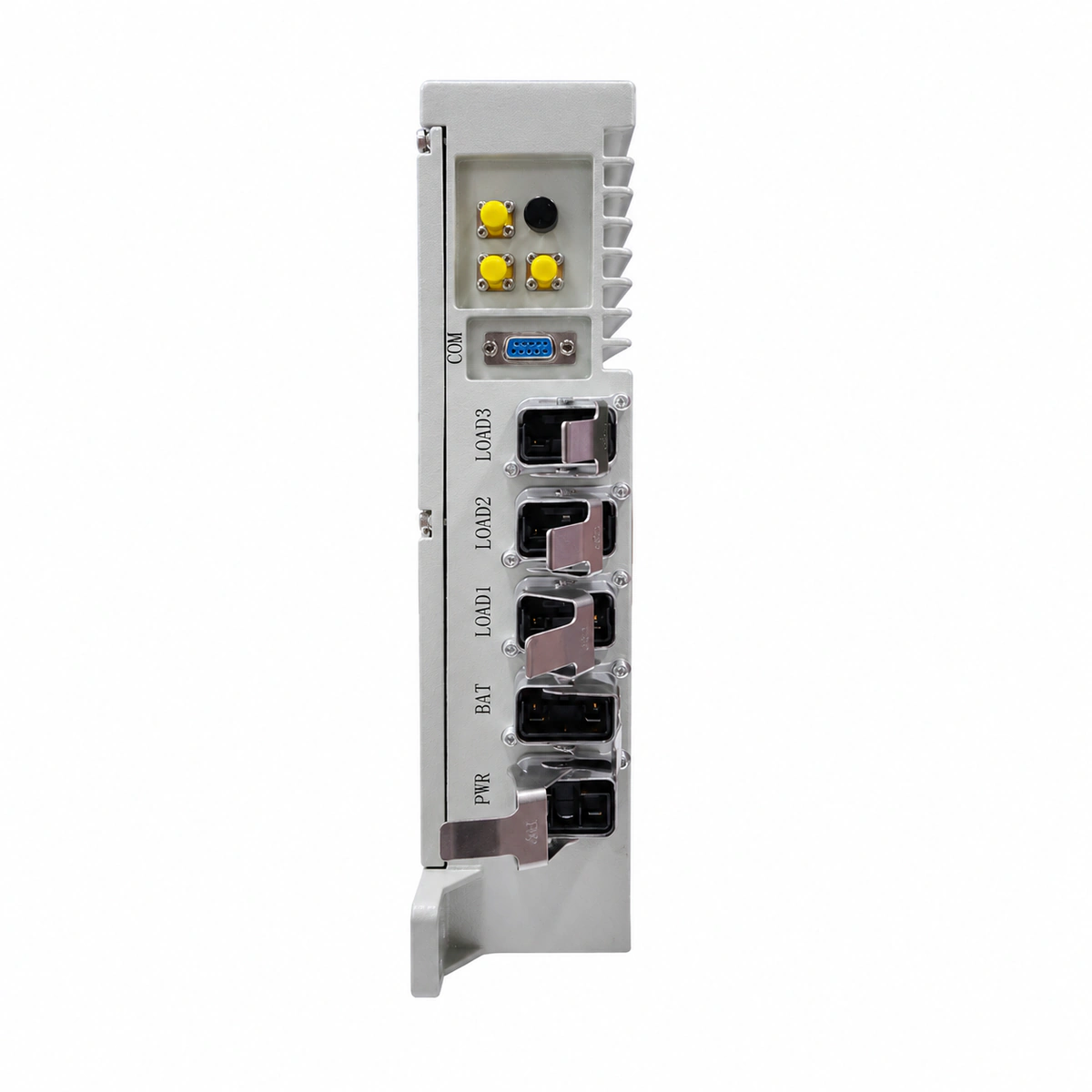
The Huawei 5G Micro Power is an ultra-compact IP65-rated outdoor blade DC power supply designed for simplified 5G pole-mounted sites, delivering reliable -48V DC power with natural fanless heat dissipation.

Equipment information

Brand
Huawei
Equipment model
Huawei 5G Micro Power Supply
Equipment type
Outdoor power systems
Controller / software version
Confirm against the installed equipment
View full product specifications
Huawei 5G Micro Power Supply Official Product View 1

Information below comes from the current product catalogue. Confirm the controller, software version and configuration of the installed equipment separately.

System Output Capacity
60 A
Nominal Output Voltage
-48 VDC
Output Voltage Range
-42 ~ -58 VDC
AC Input Voltage Range
85 ~ 300 VAC (ultra-wide mains compatibility)
Rectifier Module Slots
Integrated blade-type 3000W rectifier unit Slots
System Monitoring Controller
Built-in intelligent Bluetooth/Ethernet monitoring module

Alarms & troubleshooting

AC_FAIL (AC Input Outage/Abnormal)
RUN LED is off, ALM LED is steady red
Grid power outage, AC circuit breaker tripped, loose/poor AC terminal wiring, or AC voltage below 85 VAC undervoltage threshold.
1. Measure L/N line voltage at the AC input terminal using a DMM to ensure it is within 85–300 VAC. 2. Inspect the upstream AC miniature circuit breaker (MCB); reset it after clearing any short-circuit faults. 3. Verify and retighten AC input terminals/connectors to the specified torque. 4. If the input voltage is nominal but the alarm persists, replace the micro power module.
DC_VOLT_HIGH (DC Output Overvoltage Lockout)
ALM LED is steady red, RUN LED is off or alternating red/green
Internal voltage regulation loop failure, external reverse voltage backfeed, or DC bus voltage exceeding the hardware protection threshold (>58.5–60 VDC).
1. Disconnect all RRU/AAU loads and lithium battery packs from the micro power supply. 2. Power off the AC input breaker completely, wait 3 minutes for internal DC bus capacitors to discharge, then power on again. 3. Measure the open-circuit output voltage with a DMM to confirm it stabilizes within -48 to -57 VDC. 4. If overvoltage protection latches again immediately, the internal rectifier is defective; replace the unit.
OVER_TEMP (High Temperature Derating & Shutdown)
ALM LED blinks amber or red (0.5 Hz / 2 Hz), steady amber during derating
Ambient temperature exceeding limit (>55°C), heatsink fins blocked by debris/dust, solar radiation without sunshield, or continuous severe overload.
1. Clear dust, leaves, and debris from heatsink fins to restore natural convection airflow. 2. Inspect site installation; install the genuine Huawei solar radiation cover if exposed to direct sunlight. 3. Check the load ratio on NMS/Web UI; reduce non-critical loads or expand capacity if load exceeds 100%. 4. Verify the alarm clears automatically and full power restores once internal temperature drops below normal operating thresholds.
SPD_FAULT (Surge Protective Device Failure)
ALM LED is steady amber, SPD mechanical status window turns red
AC or DC port subjected to severe lightning surges, MOV degradation/puncture, triggering the built-in dry contact alarm.
1. Check if the mechanical status window of the SPD module on the micro power supply has turned red. 2. Power off the unit via the input breaker, unscrew and extract the damaged plug-in SPD cartridge. 3. Install a replacement SPD module with matching ratings (e.g., AC 20 kA / 40 kA) and torque properly. 4. Power on the system; verify the status window displays green and the alarm clears on the NMS.
BAT_COMM_FAIL (Lithium Battery BMS Communication Failure)
Micro power ALM LED blinks amber (0.5 Hz), Lithium battery COM LED is off or red
CAN/RS485 communication cable damaged/loose between micro power and lithium battery (ESU), water ingress in outdoor RJ45 connector, or battery BMS address DIP switch conflict/unpowered.
1. Inspect the communication cable between the power supply COM port and battery COM_IN; verify pins for corrosion and reseat the waterproof RJ45 connector. 2. Verify the DIP switch address on the lithium battery pack in accordance with the user manual (e.g., standard master address). 3. Test the communication cable continuity; replace with an outdoor shielded twisted pair cable if broken or improperly pinned. 4. Check if the battery BMS is in sleep mode due to deep discharge; press the MANUAL ON/OFF button to wake it up.

Access Complete Maintenance & Full Alarm Troubleshooting Manual

This page lists high-frequency critical alarm codes commonly encountered in field maintenance. Comprehensive manufacturer troubleshooting matrices, board-level repair guides, detailed electrical schematics, and firmware commissioning manuals are delivered alongside equipment upon formal project procurement, accompanied by dedicated FAE technical support.

Share on-site information

  1. 01

    Identify the exact model

    Record the nameplate, system model and controller or module model.

  2. 02

    Keep the alarm details

    Record the full alarm text, indicator colour, timing and whether it persists.

  3. 03

    Describe recent changes

    Note recent replacements, software updates or configuration changes.

Record information visible in the existing interface. Electrical measurements, disassembly and replacement should follow the applicable manufacturer's manual and be performed by qualified personnel.

Your model and these details will be added to the enquiry form for you to review before sending.

Related technical articles

Browse the technical guides or send a question about this model.

View all articles

Need a replacement module or supporting equipment?

Confirm the full model, system configuration and compatibility requirements before enquiring about suitable products.

Ask about suitable products

Have a model and an on-site issue?

Share the exact model, alarm text and observed symptoms to help identify relevant information and compatibility requirements.

Request technical support