HEFENGQI / DC power systems

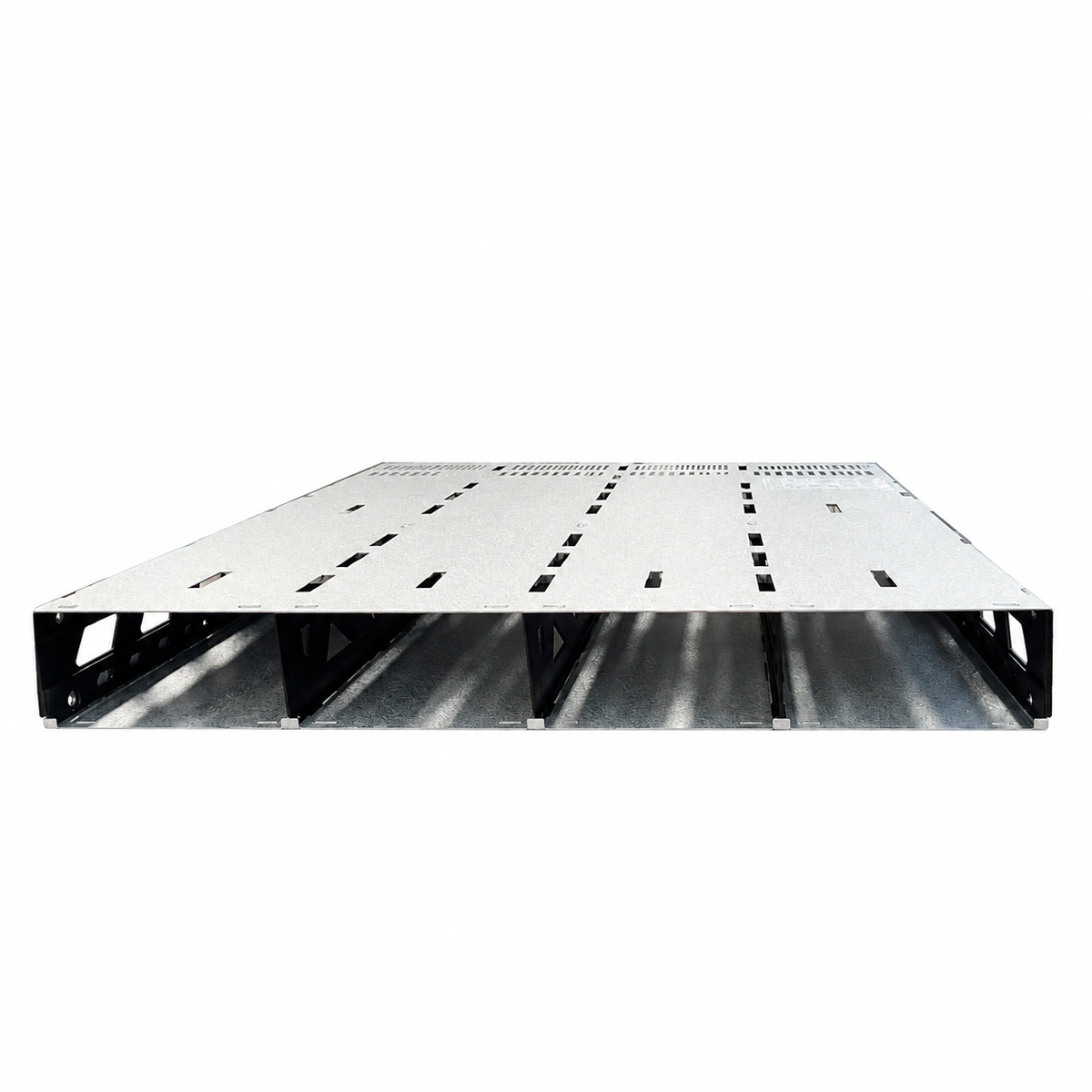
Eltek 268035 Flatpack2 4AC HC HVDC Power Shelf Equipment information & support

The Eltek 268035 is an industrial 19-inch 1U high-density Flatpack2 4AC HC power shelf designed for mission-critical telecom and HVDC power systems. It features 4 dedicated AC input feeds and accommodates up to 4 Flatpack2 HE rectifiers, delivering up to 12kW / 240A DC power across -48V or HVDC bus architectures, with CAN-bus integration for Smartpack controllers.

Equipment information

Brand
HEFENGQI
Equipment model
Eltek 268035 Flatpack2 4AC HC HVDC Power Shelf
Equipment type
DC power systems
Controller / software version
Confirm against the installed equipment
View full product specifications
Eltek 268035 Flatpack2 4AC HC 19-inch 1U High-Density Power Shelf (12kW/240A HVDC/-48V)

Information below comes from the current product catalogue. Confirm the controller, software version and configuration of the installed equipment separately.

AC Input Wiring Spec
4 Independent AC Feed Terminals (4AC Input Isolation)
DC Output Bus Spec
Compatible with Standard -48V DC Telecom Output & HVDC Distribution
System Output Capacity
Supports 4x Flatpack2 Rectifiers (Up to 12kW / 240A Total)
Monitoring Controller Configuration
Integrated Dedicated Slot for Smartpack2 / Smartpack S Controllers
Hot-Swap Live Maintenance
Full Blind-Mate Hot-Pluggable Design with Front-to-Back Airflow
Operating Temperature
-40°C ~ +75°C (Harsh Industrial Wide Temperature Operation)

Alarms & troubleshooting

AC_FAIL (AC Mains Failure / Undervoltage)
Rectifier Green Power LED OFF, Yellow Alarm LED solid or Red LED ON
Upstream AC breaker tripped, phase loss, input voltage below 85VAC, or loose shelf AC input screw terminals.
1. Verify status of the upstream AC distribution box breaker and input surge arrestor. 2. Measure line-to-line and line-to-neutral AC voltages at the rear shelf input terminals with a DMM. 3. If input voltage is verified normal, reseat the rectifier module firmly into the slot.
HVSD_LOCKOUT (High Voltage Shutdown / Output Overvoltage Lockout)
Rectifier Red Alarm LED solid ON, Green Power LED OFF, DC output disabled
Internal voltage loop malfunction causes output to exceed HVSD threshold, triggering selective hardware latching shutdown.
1. Check Smartpack controller event log and HVSD threshold configuration. 2. Disconnect AC input to the affected module for 2 minutes to discharge bulk capacitors, then reapply AC to clear latch. 3. If HVSD recurs immediately upon power-up, diagnose internal power stage fault and replace the rectifier.
TEMP_HIGH (Module Over-Temperature Derating / Thermal Shutdown)
Yellow LED solid during power derating; Yellow OFF and Red LED solid upon thermal shutdown
Ambient temperature exceeds 55°C, front air intake filters severely clogged, restricted rear exhaust airflow, or NTC sensor drift.
1. Inspect site HVAC cooling and verify rack intake ambient air temperature is within limits (<45°C). 2. Clean front dust grilles and ensure at least 100mm clearance behind the shelf for unrestricted exhaust airflow. 3. Query internal heatsink temperature on the controller; if reading is erratic at normal room temperature, replace the module.
FAN_FAIL (Rectifier Cooling Fan Failure / Rotor Blocked)
Red Alarm LED flashing (1Hz) or solid, Yellow Alarm LED solid, module output current derated
Foreign debris blocking fan blades, mechanical bearing seizure, loss of tachometer pulse feedback, or defective PWM drive circuit.
1. Eject affected module and visually inspect the front fan grill for foreign objects or cable debris. 2. Gently spin the fan blades with an insulated tool to verify free rotation without mechanical binding. 3. Reseat module; if the fan fails to start during power-up self-test or alarm persists, replace the fan assembly or module.
CAN_COMM_FAIL (CAN Bus Communication Interruption / Current Share Fault)
Yellow Alarm LED flashing slowly (0.5Hz), Green Power LED solid, Controller reports module missing
Poor contact on backplane CAN pin connectors, missing 120-ohm termination resistor, cable discontinuity, or damaged module CAN transceiver.
1. Check RJ45 and ribbon CAN interconnect cables between the 268035 power shelf and the Smartpack controller. 2. Measure resistance between CAN_H and CAN_L with system powered off; it should read approximately 60 ohms (two 120-ohm resistors in parallel). 3. Swap the affected module into an adjacent slot; if the issue follows the module, replace the module's control board or the rectifier.

Access Complete Maintenance & Full Alarm Troubleshooting Manual

This page lists high-frequency critical alarm codes commonly encountered in field maintenance. Comprehensive manufacturer troubleshooting matrices, board-level repair guides, detailed electrical schematics, and firmware commissioning manuals are delivered alongside equipment upon formal project procurement, accompanied by dedicated FAE technical support.

Share on-site information

  1. 01

    Identify the exact model

    Record the nameplate, system model and controller or module model.

  2. 02

    Keep the alarm details

    Record the full alarm text, indicator colour, timing and whether it persists.

  3. 03

    Describe recent changes

    Note recent replacements, software updates or configuration changes.

Record information visible in the existing interface. Electrical measurements, disassembly and replacement should follow the applicable manufacturer's manual and be performed by qualified personnel.

Your model and these details will be added to the enquiry form for you to review before sending.

Related technical articles

Browse the technical guides or send a question about this model.

View all articles

Need a replacement module or supporting equipment?

Confirm the full model, system configuration and compatibility requirements before enquiring about suitable products.

Ask about suitable products

Have a model and an on-site issue?

Share the exact model, alarm text and observed symptoms to help identify relevant information and compatibility requirements.

Request technical support