Delta / DC power systems

Delta ESR-48/56CN Equipment information & support

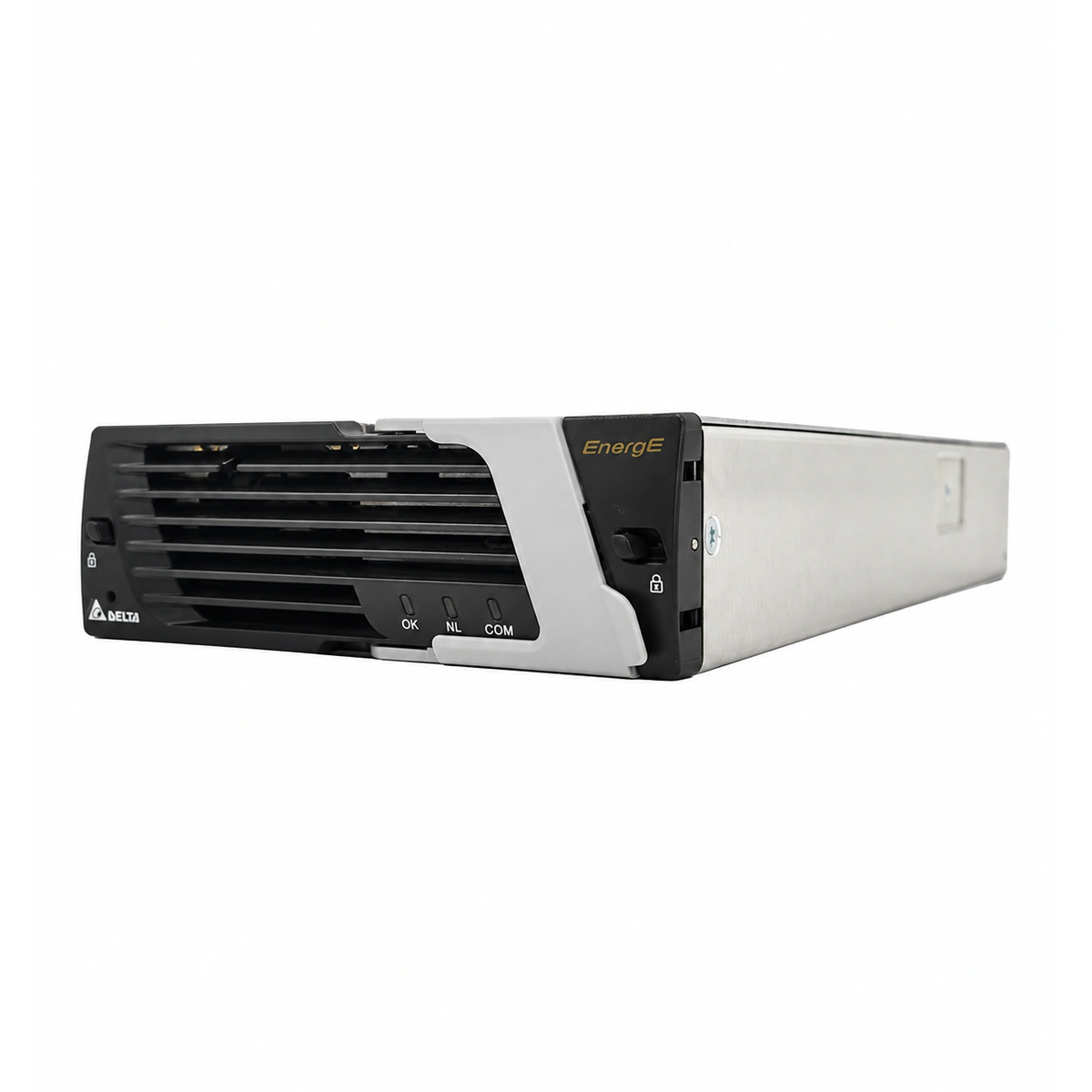
The Delta ESR-48/56CN is a high-performance, 3000W industrial-grade hot-swappable switch-mode rectifier module engineered for carrier-grade telecom macro stations and DC power systems. Featuring an advanced soft-switching topology and active digital PFC, it converts ultra-wide AC inputs ranging from 88V AC to 300V AC into a highly stabilized -48V DC (adjustable 42V~58V) output at 56A with an efficiency exceeding 94%, delivering superior power density and rugged environmental resilience.

Equipment information

Brand
Delta
Equipment model
Delta ESR-48/56CN
Equipment type
DC power systems
Controller / software version
Confirm against the installed equipment
View full product specifications
Delta ESR-48/56CN 3000W 56A Telecom Switch Rectifier Module (-48V DC) Official Studio Photo 1

Information below comes from the current product catalogue. Confirm the controller, software version and configuration of the installed equipment separately.

Rated Output Power
3000W High Efficiency Output Power
Nominal DC Output Voltage
-48V DC (Adjustment Range: 42V ~ 58V DC)
Rated Output Current
56A (-48V DC Continuous Constant Current)
AC Input Voltage Range
88V AC ~ 300V AC (Nominal 220V AC)
Power Conversion Efficiency
≥ 94% (Industrial Robust Reliable Efficiency)
Cooling Method
Built-in Temperature Controlled DC Exhaust Fan

Alarms & troubleshooting

AC_FAIL (AC Mains Failure / Out of Range)
Green Power LED OFF, Amber/Yellow Alarm LED solid ON
Mains outage, tripped AC feeder circuit breaker, input voltage dropping below UV threshold (<85VAC) or exceeding OV limit (>300VAC).
1. Measure AC phase voltage at the slot backplane with a DMM to ensure it is within 85-300VAC; 2. Inspect the upstream rectifier breaker in the AC distribution unit to verify it is closed and seated; 3. Reseat the module and verify backplane gold-finger connector pins are clean and undamaged; 4. If AC supply is normal and connection is firm, replace the faulty rectifier.
DC_OVP (DC Output Overvoltage Lockout / HVSD)
Red Fault LED solid ON, Green Power LED OFF
Internal PWM loop regulation failure, severe current share imbalance driving bus high, or external transient voltage surge exceeding hardware trip limit (>59.5VDC).
1. Unlock and extract the module from the subrack to disconnect AC and DC paths; 2. Wait 5 minutes for the internal bulk capacitors to completely discharge; 3. Re-insert the module firmly to reboot the control logic; 4. If the module triggers red LED lockout immediately upon power-up, internal power semiconductor breakdown has occurred; replace the module.
OTP_SHUTDOWN (Over-Temperature Protection & Shutdown)
Amber/Yellow Alarm LED solid ON, Green Power LED blinking or OFF
HVAC system failure causing high ambient room temperature (>65°C), dust blockage on air inlet grilles, or obstructed exhaust airflow.
1. Inspect room HVAC to ensure rectifier inlet ambient temperature is restored within -40°C to +55°C; 2. Clean dust and debris accumulated on the module front air grilles; 3. Verify that the rear exhaust is unobstructed with adequate clearance; 4. The rectifier will auto-recover once internal heatsink temperature drops; if ambient is cool but alarm persists, replace the module due to a failing NTC sensor.
FAN_FAIL (Cooling Fan Stalled / RPM Abnormal)
Amber/Yellow Alarm LED solid ON, Green Power LED solid ON (operating in derated state)
Mechanical bearing wear-out, foreign objects jamming fan blades, loose fan header connector, or Hall-sensor circuit defect; output derates to ~50%.
1. Visually check fan blades through the front bezel for foreign objects or trapped cables; 2. De-energize the unit and gently spin the blades using an insulated probe to verify smooth rotation; 3. Reseat the module and verify internal harness seating if accessible; 4. If fan rotation is mechanically stiff or fails to spin under load, replace the fan assembly or swap out the rectifier.
COMM_FAIL (CAN-Bus Communication Loss & Current Share Fault)
Amber/Yellow Alarm LED blinking at 0.5Hz, Green Power LED solid ON
Severed CAN link between rectifier and controller (CSU), oxidized/bent signal pins on backplane slot, missing 120-ohm bus termination resistor, or failed active current sharing loop causing >10% current deviation.
1. Access the CSU controller interface to verify module slot addressing and check for ID conflicts; 2. Pull the module and inspect/clean the CAN_H and CAN_L communication pins on the connector using electrical contact cleaner; 3. Measure line resistance across CAN_H and CAN_L with system de-energized (nominal is ~60Ω with both terminating resistors in place); 4. Swap the module to an adjacent known-good slot; if communication still fails, replace the rectifier module.

Access Complete Maintenance & Full Alarm Troubleshooting Manual

This page lists high-frequency critical alarm codes commonly encountered in field maintenance. Comprehensive manufacturer troubleshooting matrices, board-level repair guides, detailed electrical schematics, and firmware commissioning manuals are delivered alongside equipment upon formal project procurement, accompanied by dedicated FAE technical support.

Share on-site information

  1. 01

    Identify the exact model

    Record the nameplate, system model and controller or module model.

  2. 02

    Keep the alarm details

    Record the full alarm text, indicator colour, timing and whether it persists.

  3. 03

    Describe recent changes

    Note recent replacements, software updates or configuration changes.

Record information visible in the existing interface. Electrical measurements, disassembly and replacement should follow the applicable manufacturer's manual and be performed by qualified personnel.

Your model and these details will be added to the enquiry form for you to review before sending.

Related technical articles

Browse the technical guides or send a question about this model.

View all articles

Need a replacement module or supporting equipment?

Confirm the full model, system configuration and compatibility requirements before enquiring about suitable products.

Ask about suitable products

Have a model and an on-site issue?

Share the exact model, alarm text and observed symptoms to help identify relevant information and compatibility requirements.

Request technical support