ZTE / ZTE

ZTE ZXSDR R8862 S9000 Equipment information & support

Ultra-wideband 2-channel 900MHz RRU offering 2x60W output and 35MHz IBW for multi-standard GSM/LTE modernization.

Equipment information

Brand
ZTE
Equipment model
ZTE ZXSDR R8862 S9000
Equipment type
ZTE
Controller / software version
Confirm against the installed equipment
View full product specifications
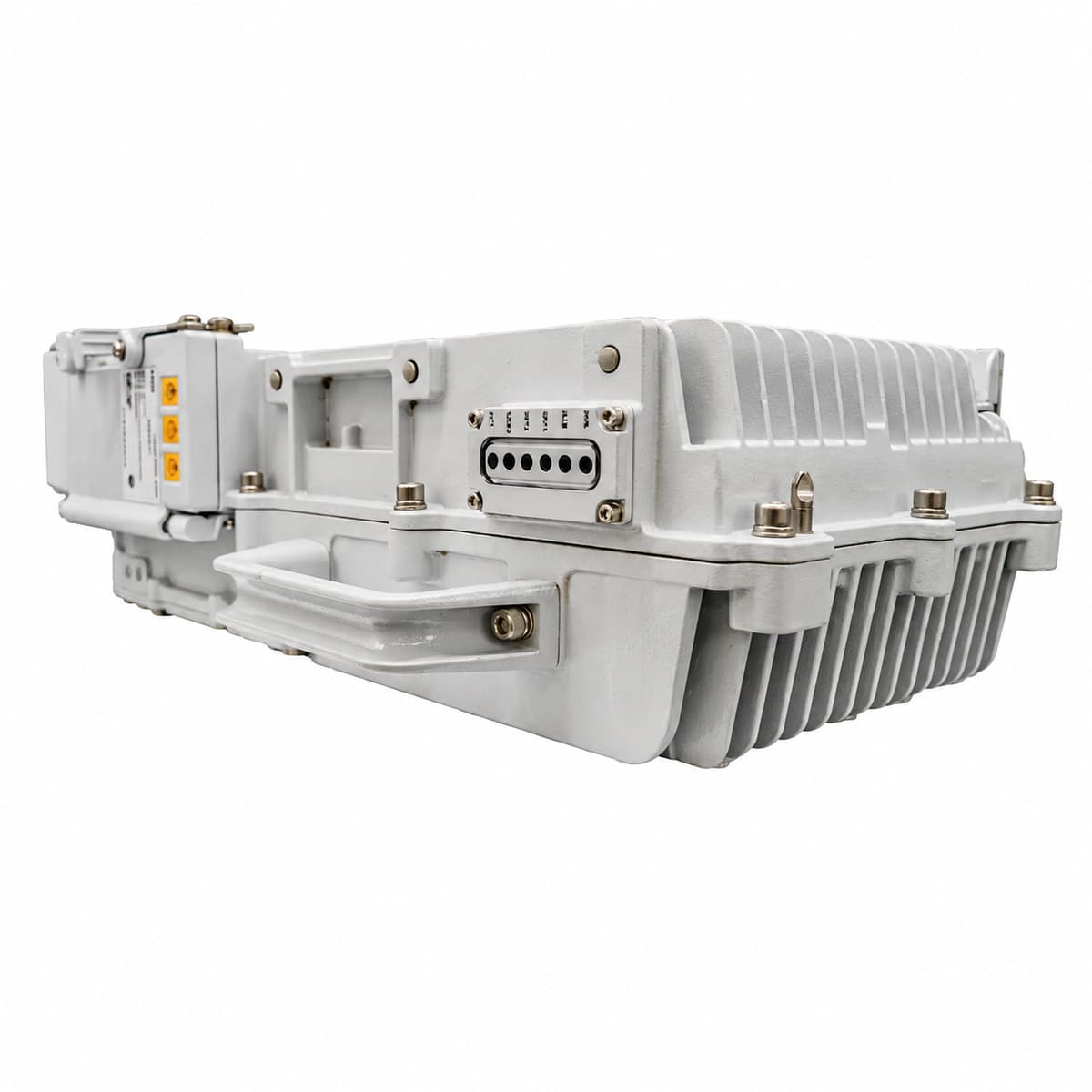
ZTE ZXSDR R8862 S9000 authentic hardware perspective 3

Information below comes from the current product catalogue. Confirm the controller, software version and configuration of the installed equipment separately.

Nominal Frequency Range
900MHz (3GPP Band 8)
Instantaneous Bandwidth (IBW)
35MHz instantaneous bandwidth (IBW)
RF Output Power
2 × 60W high-efficiency DPD output
CPRI Optical Interfaces
Dual SFP+ CPRI ports up to 10Gbps
Structural Weight
Ultra-light approx 15kg single-person mount
Thermal & Environmental Design
IP65 fanless natural convection thermal cooling

Alarms & troubleshooting

CPRI_LOS (CPRI Optical Interface Loss of Signal)
ALM LED steady red, OPT1/OPT2 LED off or blinking red
Optical fiber broken or bent beyond minimum radius between BBU and RRU, contaminated LC connector, or remote SFP laser disabled/damaged
1. Inspect OPT1/OPT2 outdoor waterproof connector sealing and optical fiber bending radius. 2. Measure downlink optical Rx power using an optical power meter to confirm it falls within the nominal -14 dBm to -1 dBm range. 3. Clean the LC connector end-faces and SFP ceramic ferrule with an optical cleaning pen. 4. Check the BBU baseband port TX status via LMT/OMC, and replace the SFP module if optical power remains below threshold.
OPT_PWR_LOW (SFP Low Optical Receive Power Alarm)
ALM LED slow blinking yellow or red, OPT LED blinking green
Excessive optical path insertion loss, dirty connector end-face, high fusion splice loss, or remote SFP transmitter laser aging
1. Query SFP Digital Diagnostic Monitoring (DDM) data via OMC to check real-time Rx power and threshold values. 2. Use an OTDR to detect high-attenuation bend points, damaged patch panels, or degraded splices. 3. Clean all optical LC mating surfaces and recheck if Rx power rises above -12 dBm. 4. If the opposite Tx output power is abnormally degraded, replace the BBU-side optical transceiver.
SFP_TEMP_HIGH (SFP Transceiver Over-Temperature Alarm)
ALM LED steady or slow blinking yellow, RUN LED steady green
RRU chassis heatsink blocked or under intense solar radiation, ambient temperature exceeding +55°C, or deployment of non-industrial grade (commercial 0-70°C) SFP transceivers
1. Verify the installed SFP module model to ensure it meets the industrial temperature grade requirement (-40°C to +85°C). 2. Clear dust, debris, and foreign matter from the R8862 cooling fins to restore convective airflow. 3. Install an RRU solar sunshade shield if the unit is mounted in direct unshaded sunlight. 4. If internal DDM temperature remains above 85°C, replace the transceiver with a ZTE-certified industrial SFP module.
CPRI_BER_EXC (CPRI Bit Error Rate Exceeded / Sync Loss)
ALM LED blinking yellow, OPT LED intermittently flashing yellow or green
CPRI rate negotiation mismatch (e.g. 2.4576G vs 9.8304G), optical dispersion/wavelength drift, or micro-cracks in optical fiber causing severe phase jitter
1. Verify CPRI line rate parameters and link topology configuration between BBU and RRU in OMC. 2. Confirm that transceivers on both sides share the same optical wavelength (e.g., 1310 nm single-mode) and nominal rate capability. 3. Check optical patch cables for structural pinching, mechanical strain, or micro-bending. 4. If CPRI frame error counters continue incrementing, replace the SFP modules as a matched pair.
SFP_FAULT (SFP Transceiver Hardware / I2C Bus Fault)
ALM LED steady red, OPT LED steady off
SFP edge connector oxidation/damage, internal EEPROM/MCU firmware crash, I2C bus lockup, or insertion of an unsupported/non-genuine transceiver
1. Eject the SFP module from the R8862 slot and inspect the golden finger contacts for scratches, corrosion, or contamination. 2. Clean the module gold fingers and the internal cage pins using an isopropyl alcohol cleaning swab. 3. Reseat the SFP firmly until latched, then trigger an optical port reset via the management system. 4. If transceiver inventory information and DDM registers remain unreadable, replace with a genuine ZTE-qualified industrial module.

Access Complete Maintenance & Full Alarm Troubleshooting Manual

This page lists high-frequency critical alarm codes commonly encountered in field maintenance. Comprehensive manufacturer troubleshooting matrices, board-level repair guides, detailed electrical schematics, and firmware commissioning manuals are delivered alongside equipment upon formal project procurement, accompanied by dedicated FAE technical support.

Share on-site information

  1. 01

    Identify the exact model

    Record the nameplate, system model and controller or module model.

  2. 02

    Keep the alarm details

    Record the full alarm text, indicator colour, timing and whether it persists.

  3. 03

    Describe recent changes

    Note recent replacements, software updates or configuration changes.

Record information visible in the existing interface. Electrical measurements, disassembly and replacement should follow the applicable manufacturer's manual and be performed by qualified personnel.

Your model and these details will be added to the enquiry form for you to review before sending.

Related technical articles

Browse the technical guides or send a question about this model.

View all articles

Need a replacement module or supporting equipment?

Confirm the full model, system configuration and compatibility requirements before enquiring about suitable products.

Ask about suitable products

Have a model and an on-site issue?

Share the exact model, alarm text and observed symptoms to help identify relevant information and compatibility requirements.

Request technical support