ZTE / ZTE

ZTE ZXSDR B8200 Equipment information & support

Compact 2U rack-mounted multi-mode Baseband Unit supporting GSM/UMTS/LTE/5G, dual-redundant DC power, and modular board expansion.

Equipment information

Brand
ZTE
Equipment model
ZTE ZXSDR B8200
Equipment type
ZTE
Controller / software version
Confirm against the installed equipment
View full product specifications
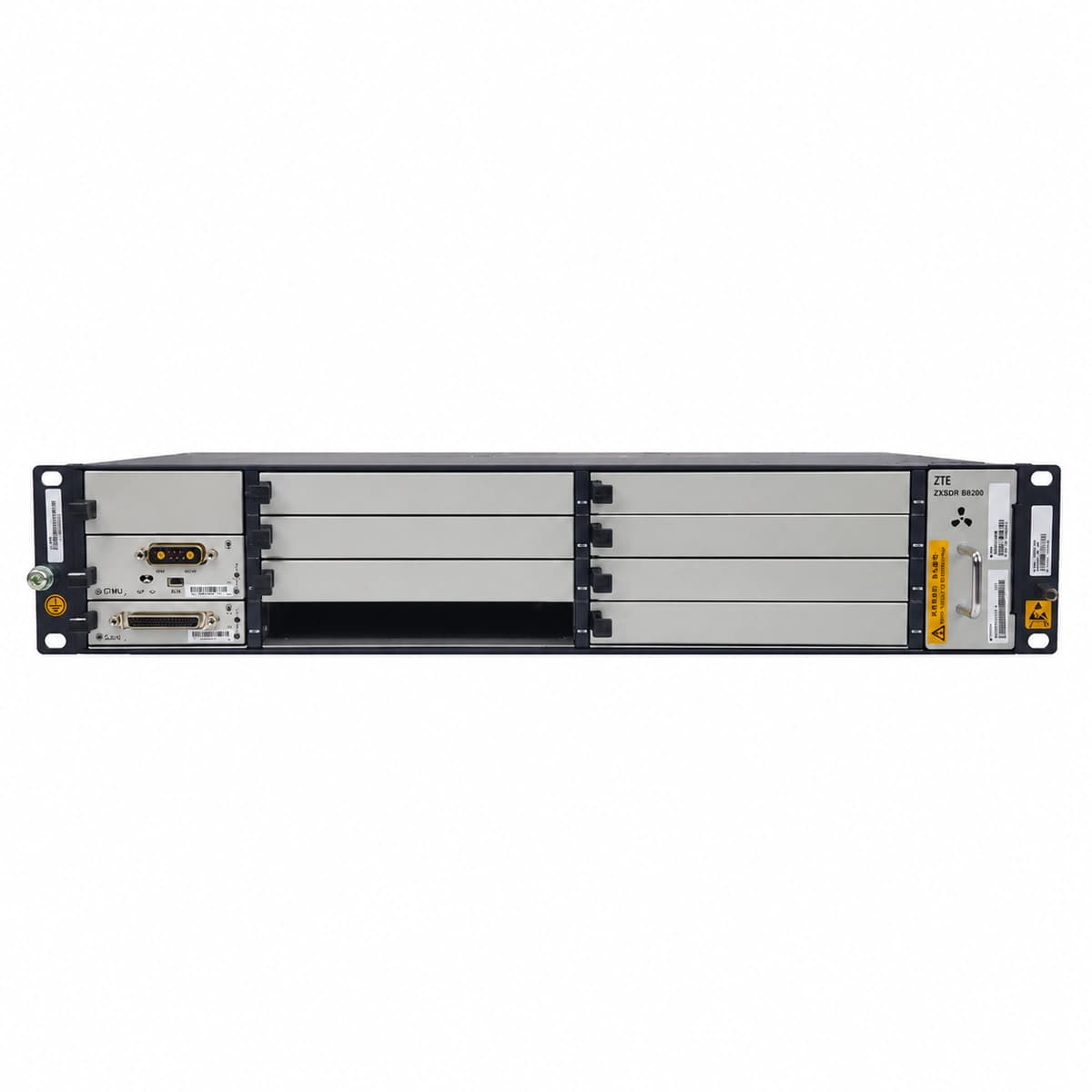
ZTE ZXSDR B8200 authentic hardware perspective 1

Information below comes from the current product catalogue. Confirm the controller, software version and configuration of the installed equipment separately.

Chassis Form Factor
Standard 19-inch 2U rack-mounted chassis
Multi-Mode Capability
Multi-mode GSM / UMTS / LTE / 5G deployment
Power Input Redundancy
Dual-redundant -48V DC power feeds
Clock Synchronization
GPS / BeiDou / IEEE 1588v2 / SyncE clock synchronization
Fan Cooling System
Intelligent multi-fan speed-controlled fan tray
Network Uplink Interfaces
Gigabit & 10GE optical/electrical hybrid backhaul

Alarms & troubleshooting

CPRI_LOS (CPRI Optical Rx Loss of Signal)
Board ALM LED solid red, corresponding SFP port LINK/ACT LED off, OFI LED solid red
Fiber break between BBU and RRU, SFP module unseated or removed, optical Rx power below receiver sensitivity threshold (<-15 dBm), or remote RRU laser transmitter disabled.
1. Verify the SFP module is firmly latched in the baseband/fabric interface board (e.g., FS/UBPG). 2. Measure the received optical power at the fiber connector using an optical power meter, verifying it is within the nominal range (-12 dBm to -3 dBm). 3. Clean the LC/PC optical connector end-faces and the SFP internal optical bore using a one-click fiber cleaner. 4. If no light is detected, verify remote RRU power and Tx status; replace the SFP+ transceiver if damaged.
OPT_TEMP_HIGH (SFP Module Over-Temperature Alarm)
B8200 FAN tray LED solid red, baseband board ALM LED flashing amber rapidly, SFP port LED solid amber
SFP internal DDM temperature sensor exceeds safety threshold (>85°C), B8200 air filter blocked causing severe thermal buildup, fan tray failure, or equipment room HVAC breakdown.
1. Log into the LMT/EMS management system to inspect real-time SFP DDM temperature telemetry and thresholds. 2. Remove and clean the B8200 dust filter at the air intake to restore proper convection. 3. Verify the FAN unit operation and ensure fans spin at maximum speed (100% PWM); replace fan tray if RPM fault persists. 4. If ambient cooling is normal but a specific SFP remains overheated, replace it with an industrial-temperature-rated (-40°C to +85°C) SFP+ transceiver.
OPT_TX_BIAS_HIGH (Laser Bias Current High Alarm)
Baseband board optical port LED flashing amber slowly (1Hz), ALM LED solid amber, RUN LED normal green
Degradation and end-of-life of internal DFB/FP semiconductor laser diode; automatic power control (APC) circuit drives excessive bias current to maintain target Tx power, exceeding safety threshold (>60-80 mA).
1. Query optical DDM parameters via EMS to check real-time Tx Bias Current and Tx Output Power. 2. Verify whether output optical power has dropped near or below operational thresholds. 3. Measure actual Tx launch power at the optical port using an optical power meter during a maintenance window. 4. Perform scheduled replacement of the degraded SFP/SFP+ module before laser emission fails completely.
CPRI_BER_EXC (CPRI Bit Error Rate Exceeded & Link Flapping)
SFP LINK LED flashing green rapidly, ALM LED intermittently flashing red, board ACT LED flapping off and on
Severe optical micro-bending/macro-bending loss, contaminated or scratched LC optical ferrule, marginal SFP optical alignment, or clock jitter causing frame synchronization bit errors.
1. Inspect optical cable routing from outdoor to indoor; eliminate micro-bends and ensure minimum bend radius exceeds 30 mm. 2. Inspect the LC connector end-faces using a fiber microscope and clean with lint-free wipes or a mechanical cleaner. 3. Execute a CPRI local/remote loopback test via EMS to isolate the fault to the BBU SFP, fiber path, or RRU. 4. Replace matched SFP modules at both ends and reseat cables firmly; verify the BER counter clears and link stabilizes.
OPT_TYPE_MISMATCH (Optical Module Rate/Protocol Mismatch)
Optical port LINK LED remains off, board ALM LED flashing amber slowly, EMS shows port suspended in negotiation failure
Insertion of unverified/non-ZTE-coded SFP transceiver, mismatch between SFP physical line rate (e.g., 1.25G/2.5G/6.144G/9.8G/24.3G) and board software configuration, or mixing single-mode (SM) with multi-mode (MM) optics.
1. Query electronic label (eLabel) via EMS to verify SFP manufacturer info, ZTE 13-digit P/N, nominal wavelength, and supported rate. 2. Confirm the CPRI Option rate configured on the board (e.g., Option 3 / Option 7) matches the transceiver hardware rating. 3. If an incompatible third-party transceiver is installed, replace it with a genuine ZTE-coded optical module with the correct wavelength (e.g., 1310 nm SMF). 4. Perform a soft-reset on the baseband board or reseat the optical module to re-trigger interface negotiation.

Access Complete Maintenance & Full Alarm Troubleshooting Manual

This page lists high-frequency critical alarm codes commonly encountered in field maintenance. Comprehensive manufacturer troubleshooting matrices, board-level repair guides, detailed electrical schematics, and firmware commissioning manuals are delivered alongside equipment upon formal project procurement, accompanied by dedicated FAE technical support.

Share on-site information

  1. 01

    Identify the exact model

    Record the nameplate, system model and controller or module model.

  2. 02

    Keep the alarm details

    Record the full alarm text, indicator colour, timing and whether it persists.

  3. 03

    Describe recent changes

    Note recent replacements, software updates or configuration changes.

Record information visible in the existing interface. Electrical measurements, disassembly and replacement should follow the applicable manufacturer's manual and be performed by qualified personnel.

Your model and these details will be added to the enquiry form for you to review before sending.

Related technical articles

Browse the technical guides or send a question about this model.

View all articles

Need a replacement module or supporting equipment?

Confirm the full model, system configuration and compatibility requirements before enquiring about suitable products.

Ask about suitable products

Have a model and an on-site issue?

Share the exact model, alarm text and observed symptoms to help identify relevant information and compatibility requirements.

Request technical support