ZTE / ZTE

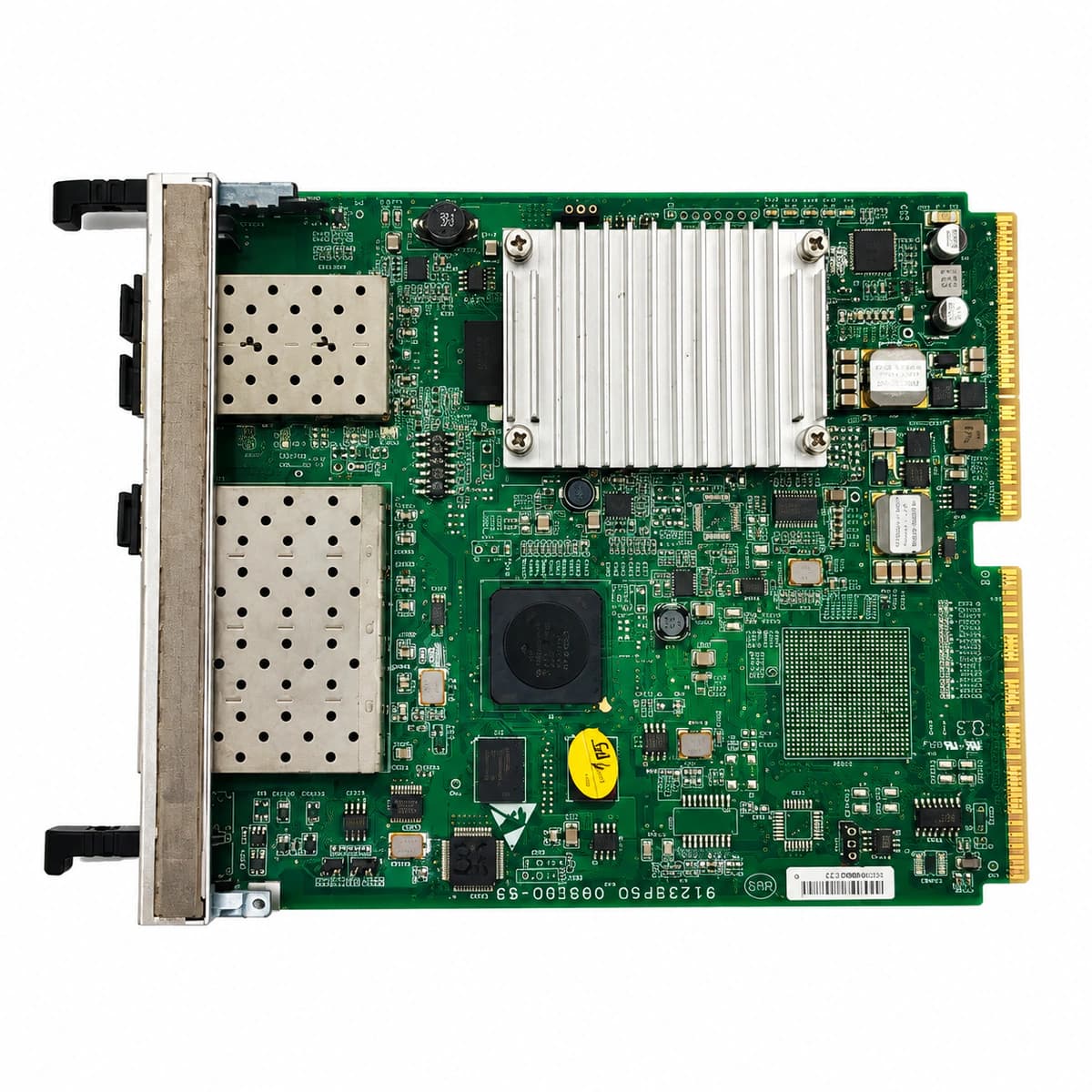
ZTE FS0 Fabric Switch Board Equipment information & support

The ZTE FS0 is the core fabric switching and clock synchronization line card for ZTE ZXSDR BBU subracks, delivering non-blocking inter-slot packet routing, high-precision timing reference distribution, and external transmission aggregation.

Equipment information

Brand
ZTE
Equipment model
ZTE FS0 Fabric Switch Board
Equipment type
ZTE
Controller / software version
Confirm against the installed equipment
View full product specifications
ZTE FS0 Fabric Switch Board Official Product View 4

Information below comes from the current product catalogue. Confirm the controller, software version and configuration of the installed equipment separately.

Board Type
Core high-speed switching matrix and clock synchronization control board for the BBU chassis
Port Density & Specs
Full-line-rate non-blocking backplane high-speed data switching bus
Supported Chassis
Master control slot of the ZTE ZXSDR B8200 / B8300 indoor baseband unit
Subscriber Capacity
Supports IEEE 1588v2 precision network clock and GPS/BeiDou satellite nanosecond-level clock synchronization
Typical Power Consumption
< 40 W
Operating Temperature
-10°C ~ +55°C

Alarms & troubleshooting

OPT_LOS (Optical RX Loss of Signal)
Port LINK LED Off, ALM LED solid Red
Optical fiber cut, excessive bend radius, loose connector, or remote transmitter failure
1. Verify patch cord connection at the ODF and re-seat the optical connector. 2. Measure incoming optical power with an optical power meter against receiver sensitivity. 3. Clean optical ferrule with a dedicated cleaning pen; replace the SFP module if fault persists.
FAB_SERDES_CRC (Fabric SERDES Link CRC Errors Over Threshold)
RUN LED fast flashing Green, ALM LED solid Amber
Backplane high-speed connector oxidation/bent pins, slot dust contamination, or SerDes PHY impedance degradation
1. Run CLI command 'show fabric serdes error' to identify specific degraded SerDes lanes. 2. Reseat the FS0 fabric board; inspect and clean backplane pins using compressed dry air. 3. Firmly seat and latch the board; if CRC error count continues to increment, replace the FS0 board.
SFP_BIAS_HIGH (Transceiver Laser Bias Current High)
Port LED solid Amber, Board ALM LED slow flashing Amber
Laser diode aging, transmitter driver circuit degradation, or prolonged exposure to high operating temperature
1. Query DDM parameters using 'show optical-transceiver detail' to log bias current and TX power. 2. Check chassis ventilation and ensure ambient intake temperature is within specification. 3. Schedule a maintenance window to proactively replace the degraded SFP transceiver.
BOARD_OVERTEMP (Fabric Board Over-Temperature)
ALM LED solid Red, RUN LED slow flashing Green
Chassis air filter clogged, fan tray failure or fan speed control fault, or equipment room HVAC failure
1. Inspect chassis air filters immediately; clean or replace dusty filter sub-assemblies. 2. Verify fan tray operating state via NMS/CLI; confirm fans ramp to maximum speed; replace faulty fan unit. 3. Check telecom room HVAC systems to maintain ambient intake temperature below 45°C.
PORT_FLAPPING (Port Optical Link Flapping)
Port LED rapidly toggling Green/Amber, ALM LED solid Amber
Marginal RX optical power hovering near threshold, contaminated optical ferrule, loose SFP latch, or clock slip
1. Check RX power stability; eliminate marginal attenuation issues by adjusting optical budget or replacing jumper. 2. Inspect fiber end-face with a fiber microscope, clean thoroughly, and firmly re-engage SFP cage latch. 3. Swap transceiver into an alternate port or replace SFP module; monitor link stability for at least 15 minutes.

Access Complete Maintenance & Full Alarm Troubleshooting Manual

This page lists high-frequency critical alarm codes commonly encountered in field maintenance. Comprehensive manufacturer troubleshooting matrices, board-level repair guides, detailed electrical schematics, and firmware commissioning manuals are delivered alongside equipment upon formal project procurement, accompanied by dedicated FAE technical support.

Share on-site information

  1. 01

    Identify the exact model

    Record the nameplate, system model and controller or module model.

  2. 02

    Keep the alarm details

    Record the full alarm text, indicator colour, timing and whether it persists.

  3. 03

    Describe recent changes

    Note recent replacements, software updates or configuration changes.

Record information visible in the existing interface. Electrical measurements, disassembly and replacement should follow the applicable manufacturer's manual and be performed by qualified personnel.

Your model and these details will be added to the enquiry form for you to review before sending.

Related technical articles

Browse the technical guides or send a question about this model.

View all articles

Need a replacement module or supporting equipment?

Confirm the full model, system configuration and compatibility requirements before enquiring about suitable products.

Ask about suitable products

Have a model and an on-site issue?

Share the exact model, alarm text and observed symptoms to help identify relevant information and compatibility requirements.

Request technical support