ZTE / ZTE

ZTE 1.25G SFP 10km Equipment information & support

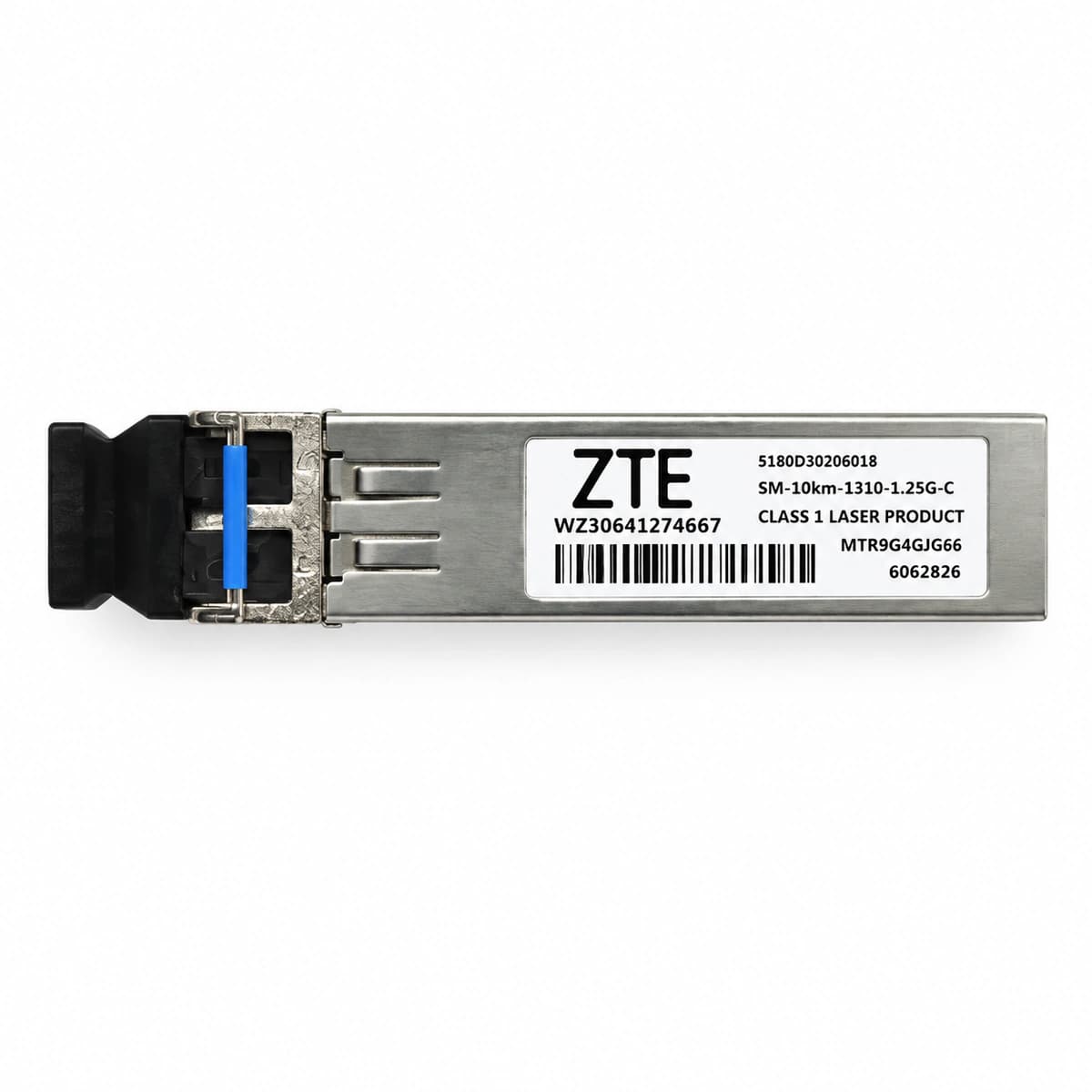
The ZTE 1.25G SFP 1310nm 10km (SM-10KM-1310-1.25G-C) is a carrier-grade Gigabit Ethernet optical transceiver engineered for reliable single-mode fiber links up to 10km with duplex LC connectors.

Equipment information

Brand
ZTE
Equipment model
ZTE 1.25G SFP 10km
Equipment type
ZTE
Controller / software version
Confirm against the installed equipment
View full product specifications
ZTE 1.25G SFP 10km Official Product View 4

Information below comes from the current product catalogue. Confirm the controller, software version and configuration of the installed equipment separately.

Physical Form Factor
SFP
Data Rate
1.25 Gbps
Central Wavelength
1310 nm
Maximum Distance
10 km
Fiber Type
Single-Mode Fiber (SMF) (SMF)
Optical Connector
Duplex LC Connector

Alarms & troubleshooting

OPT_LOS (Optical Loss of Signal Alarm)
Port Link/ACT LED Off, System Alarm LED Solid Red
Remote transmitter disabled, fiber cut/disconnected, contaminated LC optical connector, or link attenuation exceeding 10km power budget (Rx power < -20 dBm threshold).
1. Access ZTE host CLI and execute 'show optical-transceiver interface' to verify DDM status and current Rx optical power. 2. Use an optical power meter to measure input light at the LC patch cord, verifying it falls within the -3 dBm to -20 dBm operating window. 3. Clean the LC connectors and SFP transceiver bore using optical fiber cleaning pens, reseat firmly; trace ODF patch panels and trunk fiber if no optical power is detected.
TX_BIAS_HIGH (Transmitter Laser Bias Current High)
Port Link/ACT LED Solid Amber or Slow Blinking Amber, System Alarm LED Amber
Aging of internal 1310nm FP/DFB laser diode or automatic power control (APC) circuit degradation, driving bias current above factory threshold (typically > 45mA), indicating imminent transmitter failure.
1. Run CLI command 'show interface gei-x/x/x transceiver detail' to retrieve real-time Tx Bias Current and high alarm threshold flags. 2. Measure Tx Power via DDM; if bias current exceeds threshold while Tx optical power drops, laser degradation is confirmed. 3. Schedule a maintenance window to hot-swap the degraded ZTE 1.25G SFP 10km transceiver before hard failure.
TEMP_HIGH (Transceiver DDM High Temperature Alarm)
Chassis Alarm LED Solid Amber, Host System Fan Tray at Maximum Speed
Equipment room HVAC failure, ambient temp > 40°C, clogged chassis air filters blocking ventilation, fan module failure, or localized thermal buildup from adjacent high-power optics pushing SFP case temp > 75°C.
1. Execute 'show environment' and 'show optical-transceiver interface' to identify chassis internal temperatures and SFP DDM sensor readings. 2. Inspect data center HVAC and hot/cold aisle containment; clean or replace clogged chassis air filters immediately. 3. Check fan tray operational speed; if only a single SFP reports high temperature under good airflow, replace the module due to internal thermal sensor/circuit defect.
LINK_FLAPPING_CRC (Link Flapping and CRC Error Exceeded)
Port Link/ACT LED Rapidly Alternating Green/Amber, Interface Cycling Up/Down
Severe optical micro-bending loss, contaminated or scratched LC ferrule endface causing high optical return loss, optical power fluctuating near threshold boundary (~ -19 dBm), or high EMI causing bit errors.
1. Check interface error statistics using 'show interface gei-x/x/x' to verify CRC, FCS, input error rates, and flapping counts. 2. Inspect LC connector endfaces with a fiber scope; clean or replace damaged patch cords, ensuring bending radius exceeds 30mm without mechanical stress. 3. Measure optical stability with a power meter; if received power fluctuates erratically, test with an OTDR and replace the patch cord or SFP.
AUTONEG_MISMATCH (Wavelength Mismatch and Auto-negotiation Failure)
Port Link/ACT LED Off or Blinking Amber at 0.5Hz, Physical Link Down
Wavelength/mode mismatch (e.g., this 1310nm SMF 10km SFP connected to an 850nm MMF transceiver) or duplex/speed auto-negotiation configuration mismatch (forced 1000M full duplex vs. auto-negotiation enabled).
1. Verify optical transceivers at both ends match nominal specifications (1.25G, 1310nm, single-mode) connected through yellow G.652 SMF patch cords. 2. Align port configurations on both ZTE and remote switches: either set both sides to forced 1000M full duplex ('speed 1000', 'duplex full') or enable auto-negotiation on both sides. 3. Perform a port 'shutdown' followed by 'no shutdown' to re-initialize PHY state machines and verify solid green Link status.

Access Complete Maintenance & Full Alarm Troubleshooting Manual

This page lists high-frequency critical alarm codes commonly encountered in field maintenance. Comprehensive manufacturer troubleshooting matrices, board-level repair guides, detailed electrical schematics, and firmware commissioning manuals are delivered alongside equipment upon formal project procurement, accompanied by dedicated FAE technical support.

Share on-site information

  1. 01

    Identify the exact model

    Record the nameplate, system model and controller or module model.

  2. 02

    Keep the alarm details

    Record the full alarm text, indicator colour, timing and whether it persists.

  3. 03

    Describe recent changes

    Note recent replacements, software updates or configuration changes.

Record information visible in the existing interface. Electrical measurements, disassembly and replacement should follow the applicable manufacturer's manual and be performed by qualified personnel.

Your model and these details will be added to the enquiry form for you to review before sending.

Related technical articles

Browse the technical guides or send a question about this model.

View all articles

Need a replacement module or supporting equipment?

Confirm the full model, system configuration and compatibility requirements before enquiring about suitable products.

Ask about suitable products

Have a model and an on-site issue?

Share the exact model, alarm text and observed symptoms to help identify relevant information and compatibility requirements.

Request technical support