Vertiv / UPS power

Vertiv Liebert GXT5 48V Batkit Equipment information & support

The Vertiv Liebert GXT5 48V Batkit is a high-rate 48V DC 2U rack/tower drawer-style external battery module engineered with valve-regulated lead-acid (VRLA) technology, built to provide scalable, hot-swappable extended backup runtime and DC bus stabilization for Vertiv Liebert GXT5 1kVA–3kVA online UPS systems.

Equipment information

Brand
Vertiv
Equipment model
Vertiv Liebert GXT5 48V Batkit
Equipment type
UPS power
Controller / software version
Confirm against the installed equipment
View full product specifications
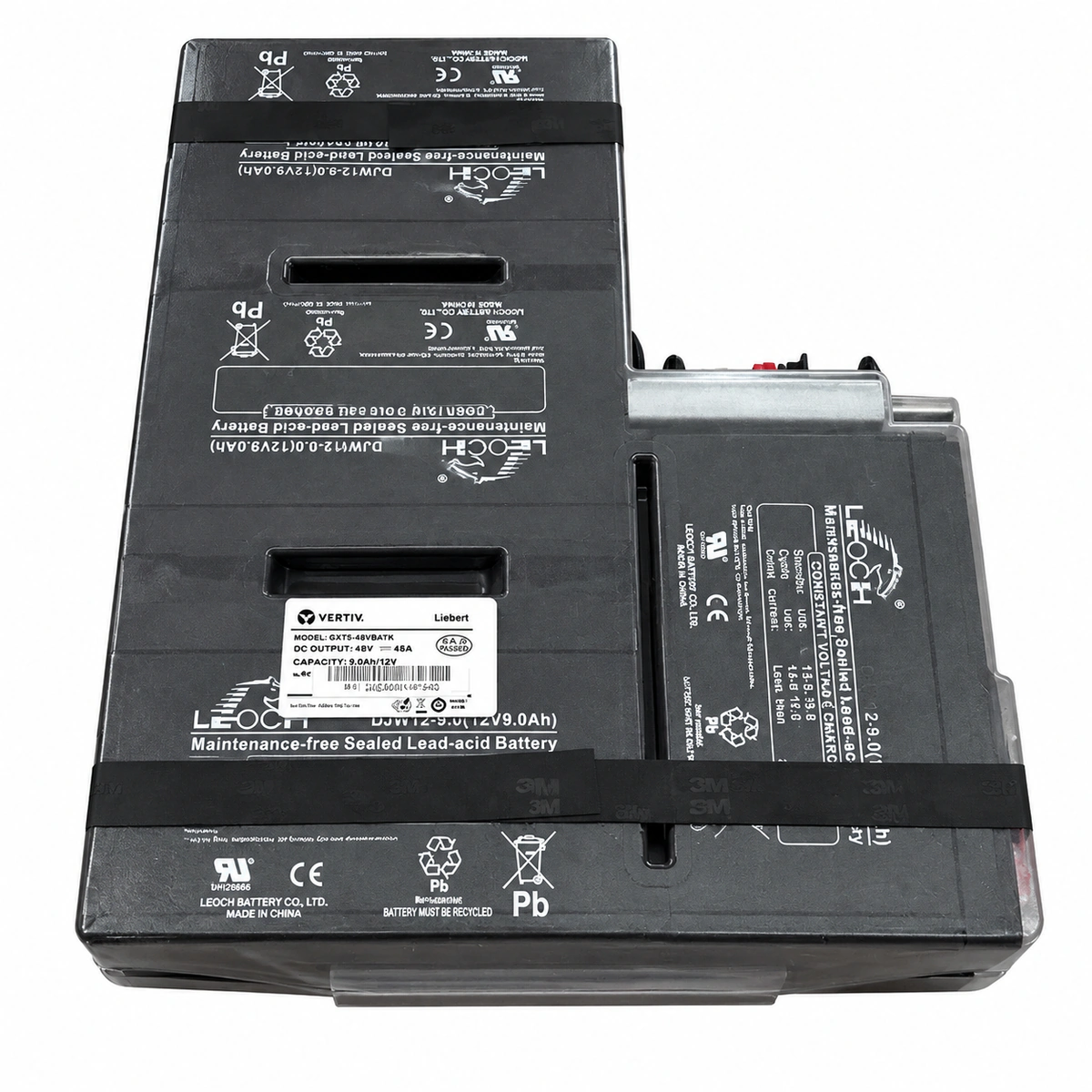
Vertiv Liebert GXT5 48V Batkit 2U Rack/Tower External Battery Cabinet (VTV-BAT-GXT5-48VBATKIT) Official Studio Photo 2

Information below comes from the current product catalogue. Confirm the controller, software version and configuration of the installed equipment separately.

Rated DC Operating Voltage
48V DC Nominal Battery Bus Voltage
Internal Battery Cell Type
High-Rate Sealed Maintenance-Free VRLA Battery
System Compatibility
Perfect Match for Liebert GXT5 1kVA ~ 3kVA UPS
Hot-Swap Capability
Hot-Swappable Tool-Less Quick Replacement
Electrical Safety Protection
Built-in Dedicated Breaker & Anti-Spark Protection
Physical Form Factor
2U 19-inch Standard Rack Drawer Battery Pack

Alarms & troubleshooting

BATT_DISCON (Battery Disconnected / Open Circuit)
Host Fault LED solid red, Battery status LED off, buzzer beeps once per second
48V DC Anderson connector loose or unseated; internal DC fuse blown; damaged or disconnected wiring harness pins
1. Inspect and firmly seat the Anderson DC connector between the UPS and 48V battery kit; 2. Measure open-circuit voltage at the connector terminals (nominal float 52-54 Vdc); 3. Disconnect module and test internal DC fuse continuity with a multimeter; 4. If voltage is normal and connections are secure, replace the DC wire harness or internal battery tray assembly.
BATT_REPLACE (Battery Test Fail / Replacement Needed)
Battery Warning LED solid amber, LCD displays battery maintenance icon, intermittent beep
Internal 48V string VRLA cells degraded with elevated internal resistance; voltage drop below threshold during scheduled battery self-test
1. Keep UPS on utility power to charge battery kit for 24 hours, then re-initiate manual battery test; 2. Open enclosure and measure voltage of each 12V block (imbalance >0.5V indicates defective block); 3. Measure internal impedance/conductance of each cell with a battery tester; 4. Replace the entire 48V cartridge with an authentic Vertiv Liebert GXT5 48V Batkit and reset the battery installation date via LCD/software.
BATT_OVERTEMP (Battery Module Over-Temperature)
Host Fault LED solid red, LCD over-temperature icon flashing, continuous audible alarm
Ambient rack temperature exceeds 40°C; thermal runaway inception in VRLA cells; blocked chassis ventilation or dust clogging; drifting NTC temperature sensor
1. Verify data center cooling and lower rack intake temperature below 25°C; 2. Inspect battery kit enclosure for bulging, electrolyte leakage, or acidic odor; 3. Inhibit charging and scan individual blocks with an infrared thermometer for localized hotspots; 4. If any cell exhibits physical swelling or severe overheating, isolate the battery kit immediately and replace the cartridge.
BATT_LOW_EOD (Battery Low Voltage / End of Discharge Pre-Alarm)
Battery status LED flashing amber rapidly (2Hz), audible buzzer beeps rapidly (twice per second)
Prolonged mains outage with battery discharging past low voltage pre-warning threshold (~42-44 Vdc); approaching End of Discharge (EOD) shutdown
1. Immediately initiate graceful shutdown of connected critical telecom loads and IT servers; 2. Start standby generator or transfer to alternate AC feed; 3. Upon AC recovery, verify UPS returns to normal inverter mode and initiates battery recharge; 4. If alarm occurs while mains are normal, test UPS DC sensing circuitry and battery terminal connection integrity.
BATT_OVERVOLT (Battery Overvoltage / Charger Output High)
Host Fault LED solid red, buzzer sounds continuously, charging circuitry disabled
UPS internal charger voltage regulation failure; DC bus float voltage exceeded 58 Vdc limit; open-circuit cell within string causing voltage imbalance
1. Unplug the 48V Anderson battery connector and measure UPS charger output voltage with a precision multimeter; 2. If open-circuit charger voltage exceeds 56.5 Vdc, service or replace the UPS internal charger board; 3. Measure disconnected battery kit terminal voltage and individual cell blocks to check for localized cell defects; 4. Reconnect the Batkit only after charger voltage stabilizes within nominal float window (54.0-54.8 Vdc).

Access Complete Maintenance & Full Alarm Troubleshooting Manual

This page lists high-frequency critical alarm codes commonly encountered in field maintenance. Comprehensive manufacturer troubleshooting matrices, board-level repair guides, detailed electrical schematics, and firmware commissioning manuals are delivered alongside equipment upon formal project procurement, accompanied by dedicated FAE technical support.

Share on-site information

  1. 01

    Identify the exact model

    Record the nameplate, system model and controller or module model.

  2. 02

    Keep the alarm details

    Record the full alarm text, indicator colour, timing and whether it persists.

  3. 03

    Describe recent changes

    Note recent replacements, software updates or configuration changes.

Record information visible in the existing interface. Electrical measurements, disassembly and replacement should follow the applicable manufacturer's manual and be performed by qualified personnel.

Your model and these details will be added to the enquiry form for you to review before sending.

Related technical articles

Browse the technical guides or send a question about this model.

View all articles

Need a replacement module or supporting equipment?

Confirm the full model, system configuration and compatibility requirements before enquiring about suitable products.

Ask about suitable products

Have a model and an on-site issue?

Share the exact model, alarm text and observed symptoms to help identify relevant information and compatibility requirements.

Request technical support