Vertiv / UPS power

Liebert GXE 1kVA/800W High Frequency Online UPS Equipment information & support

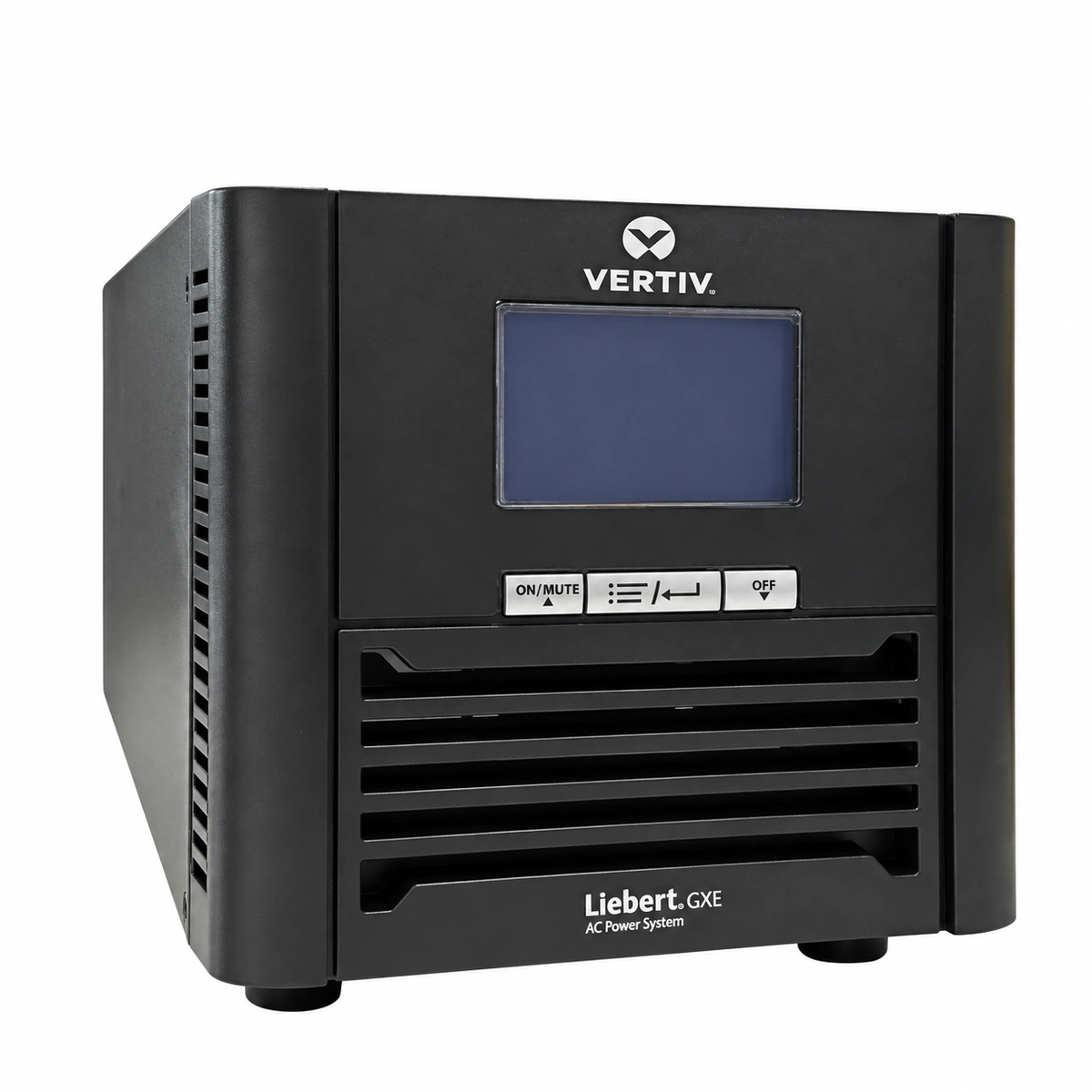
The Vertiv Liebert GXE 1kVA/800W is a single-phase high-frequency online double-conversion uninterruptible power supply engineered in a compact tower form factor. Utilizing advanced full-DSP digital control architecture, it continuously conditions unstable utility AC power into pure, low-distortion sine wave output, providing zero-transfer-time power protection for edge computing nodes, micro server rooms, and critical industrial automation terminals.

Equipment information

Brand
Vertiv
Equipment model
Liebert GXE 1kVA/800W High Frequency Online UPS
Equipment type
UPS power
Controller / software version
Confirm against the installed equipment
View full product specifications
Vertiv Liebert GXE 1kVA/800W Tower High-Frequency Online Double-Conversion UPS (220/230/240VAC, 36VDC)

Information below comes from the current product catalogue. Confirm the controller, software version and configuration of the installed equipment separately.

Rated Output Power
1000VA / 800W High-Frequency Online Double-Conversion Pure Sine Wave
Output Power Factor PF
Output Power Factor 0.8 (Reliable Inductive Load Handling)
Display & Control Interface
Backlit Graphical LCD Display + Dynamic LED Status Indicators
Internal Battery Spec
Built-in Sealed Maintenance-Free VRLA Batteries (36V DC)
AC Input Voltage Range
120V AC ~ 300V AC Ultra-Wide Single-Phase Input Range
Nominal DC Output Voltage
220V / 230V / 240V AC Pure Sine Wave Output

Alarms & troubleshooting

INV_FAULT (Inverter Fault Transfer to Bypass)
Fault LED Red solid, Bypass LED Amber on, Inverter LED off, continuous audible alarm
DC bus abnormal voltage, IGBT bridge failure, internal short circuit, or hardware fault in inverter control loop forcing static bypass transfer
1. Verify connected load does not exceed rated 800W capacity; 2. Disconnect non-critical loads and log LCD error code (e.g., Error 04); 3. Perform a controlled shutdown and cold restart; 4. If fault persists upon restart, isolate AC mains and replace the inverter power board.
BATT_EOD (Battery End of Discharge & Undervoltage)
Battery LED Amber flashing then off, Fault LED Red solid, rapid buzzer beeping until automatic shutdown
Prolonged mains outage depleted internal battery to end-of-discharge threshold, or battery string disconnected/aged with high internal resistance
1. Restore AC input mains and verify UPS automatically returns to normal inverter and charging mode; 2. If alarm persists on mains, measure string float voltage (nominal 36VDC, 3x12V cells); 3. Inspect internal battery quick-connect cable tension; 4. If open-circuit voltage remains below 30VDC without holding charge, replace battery set.
OUTPUT_OVERLOAD (Output Overload Fault)
Overload LED Red solid, Bypass LED Amber on, buzzer sounds twice every second or continuous tone
Connected telecom/IT equipment load exceeded 800W rated capacity, or high inrush current triggered inverse-time overload protection
1. Immediately identify and disconnect non-critical peripheral loads; 2. Check current load percentage on LCD and ensure total load remains below 80%; 3. Press Mute/Clear button to reset overload status; 4. Re-enable inverter mode to transfer back from static bypass to normal online operation.
OVER_TEMP (Overtemperature Thermal Shutdown)
Fault LED Red solid, cooling fan running at maximum speed or completely stalled, buzzer sounds every 0.5s
Ventilation grilles/air filters blocked by dust accumulation, ambient temperature exceeding 40°C, or cooling fan mechanical seizure/failure
1. Clear debris from front and rear ventilation grills, maintaining at least 150mm clearance; 2. Verify room HVAC/air conditioning operates within 20°C–25°C; 3. Inspect rear exhaust airflow to detect physical fan motion; 4. Allow UPS to cool down and power cycle; replace defective 12V DC cooling fan if fan fails to spin.
CHARGER_FAIL (Battery Charger Failure / High Float Voltage)
Fault LED Red flashing, Battery LED Amber solid, buzzer beeps once every two seconds
Internal charger switching circuit/MOSFET damaged, voltage feedback open loop, or battery charging voltage exceeding 42VDC overvoltage threshold
1. Measure battery charging terminal voltage with a multimeter during mains operation; 2. If voltage exceeds 42VDC or reads 0VDC continuously, isolate AC power and disconnect battery to prevent thermal runaway; 3. Inspect the charger PCB section for burnt components or damaged SMD resistors; 4. Replace the internal power stage board containing the charger module.

Access Complete Maintenance & Full Alarm Troubleshooting Manual

This page lists high-frequency critical alarm codes commonly encountered in field maintenance. Comprehensive manufacturer troubleshooting matrices, board-level repair guides, detailed electrical schematics, and firmware commissioning manuals are delivered alongside equipment upon formal project procurement, accompanied by dedicated FAE technical support.

Share on-site information

  1. 01

    Identify the exact model

    Record the nameplate, system model and controller or module model.

  2. 02

    Keep the alarm details

    Record the full alarm text, indicator colour, timing and whether it persists.

  3. 03

    Describe recent changes

    Note recent replacements, software updates or configuration changes.

Record information visible in the existing interface. Electrical measurements, disassembly and replacement should follow the applicable manufacturer's manual and be performed by qualified personnel.

Your model and these details will be added to the enquiry form for you to review before sending.

Related technical articles

Browse the technical guides or send a question about this model.

View all articles

Need a replacement module or supporting equipment?

Confirm the full model, system configuration and compatibility requirements before enquiring about suitable products.

Ask about suitable products

Have a model and an on-site issue?

Share the exact model, alarm text and observed symptoms to help identify relevant information and compatibility requirements.

Request technical support