Vertiv / Precision air conditioning

Liebert DataMate3000 DME07 Equipment information & support

The Vertiv Liebert DataMate3000 DME07 is an enterprise-grade 7.5kW vertical precision air conditioning unit engineered specifically for continuous 24/7/365 thermal management in micro edge data centers, telecommunication base stations, and electrical substation control rooms, featuring high sensible heat ratio (SHF ≥ 0.90) refrigeration, scroll compression, and native RS-485 Modbus remote telemetry integration.

Equipment information

Brand
Vertiv
Equipment model
Liebert DataMate3000 DME07
Equipment type
Precision air conditioning
Controller / software version
Confirm against the installed equipment
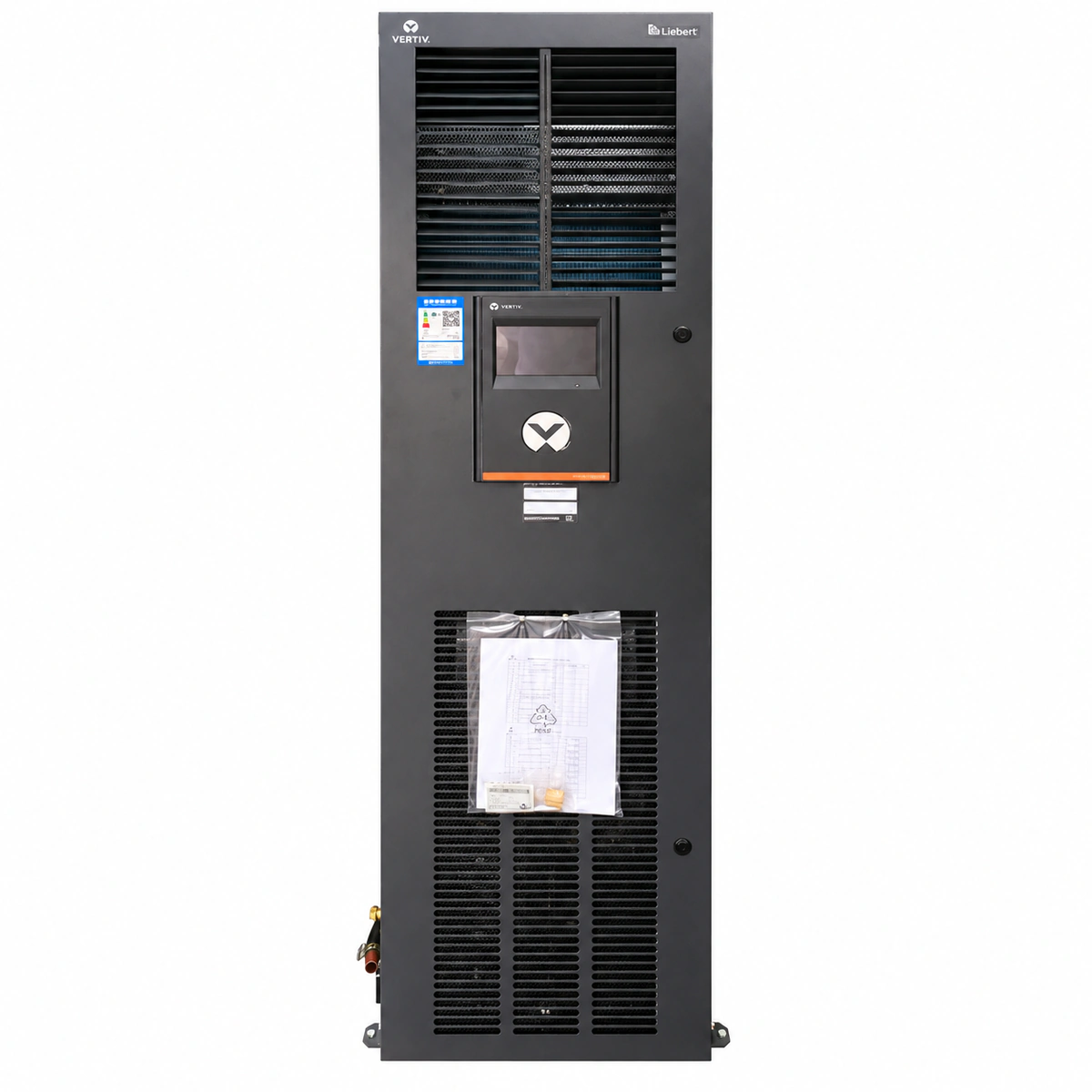
View full product specifications
Vertiv Liebert DataMate3000 DME07 7.5kW Precision Air Conditioner Official Studio Photo 1

Information below comes from the current product catalogue. Confirm the controller, software version and configuration of the installed equipment separately.

Rated Cooling Capacity
7.5 kW Rated Cooling Capacity
Sensible Heat Ratio (SHF)
≥ 0.90 (High Sensible Heat Ratio for Data Center)
Airflow Delivery & Fan Type
Upflow / Front Flow (High Airflow Small Enthalpy Design)
Refrigerant Type
R410A Eco-Friendly Refrigerant
Compressor Type
High-Efficiency Flexible Scroll Compressor
Physical Dimensions Spec
Compact Floor-Standing Design (Small Footprint) mm

Alarms & troubleshooting

HP_ALM (Compressor High Pressure Alarm)
Red Alarm LED solid on, buzzer sounding
Outdoor condenser fins clogged with debris; outdoor fan failure or speed controller fault; excessive refrigerant charge; high-pressure switch failure or loose wiring.
1. Inspect and clean dust and debris from outdoor condenser fins. 2. Verify outdoor fan power supply and speed controller output; confirm normal rotation and speed. 3. Connect manifold gauges to measure discharge pressure; check for overcharging or non-condensable gas. 4. If pressure is normal, check high-pressure switch continuity and reset manually if equipped.
LP_ALM (Compressor Low Pressure Alarm)
Red Alarm LED solid on, LCD displays LP code
Refrigerant leakage in cooling circuit; clogged air filter or iced/dirty evaporator coil restricting airflow; thermal expansion valve (TXV) clogged or failed; low-pressure switch malfunction.
1. Inspect return air filter and evaporator coil; clean clogged filter and defrost coil if iced. 2. Attach pressure gauges to verify compressor suction pressure. 3. Conduct leak detection using an electronic detector or bubbles at solder joints and service ports; repair any detected leak. 4. Evacuate the system with a vacuum pump, recharge nominal refrigerant according to nameplate, and verify LP switch operation.
AIR_LOSS (Air Flow Loss / Fan Failure)
Red Alarm LED blinking, unit stops for safety protection
Indoor blower motor circuit breaker tripped; fan run capacitor failure or motor winding burnt; airflow differential pressure switch tubing detached or pinched; extreme filter clogging.
1. Inspect indoor fan circuit breaker and contactor; check for tripping or burnt contacts. 2. Power down and manually rotate fan impeller to check for mechanical seizure or bearing noise; measure motor winding resistance and insulation to ground. 3. Verify airflow differential pressure switch sensing tubes are clear, firmly connected, and not pinched. 4. Clean or replace clogged filters, reset the alarm, and verify normal fan operation and static pressure.
HI_TEMP (Room High Temperature Alarm)
Amber Alarm LED solid on
IT thermal load exceeds unit cooling capacity; compressor locked out due to prior safety trips; setpoint or high temp alarm threshold configured too low; room airflow bypass or recirculation.
1. Check controller alarm log to verify if compressor is locked out by HP, LP, or overload protections. 2. Review configured temperature setpoint, deadband, and high temperature alarm threshold parameters. 3. Calculate active IT load against rated sensible cooling capacity; start standby unit if total heat dissipation exceeds single-unit capacity. 4. Inspect supply/return air containment to resolve cold/hot air recirculation or short-circuiting.
TH_SENS_ERR (Return Air Temp/Humidity Sensor Fault)
Amber Alarm LED flashing, LCD displays probe error
Return air temperature/humidity combo sensor wiring loose, inverted, or disconnected; communication cable broken or affected by EMI; internal sensing probe failure; main board analog/RS485 input port failure.
1. Inspect terminal block connections of return air TH sensor; confirm wires are tight and free of oxidation. 2. Measure DC voltage on sensor power terminals using a multimeter (typically 12V or 5V DC). 3. Check cable shielding and ground integrity to eliminate electromagnetic interference from power lines. 4. If power supply and wiring are intact but readouts remain invalid, replace the sensor probe assembly.

Access Complete Maintenance & Full Alarm Troubleshooting Manual

This page lists high-frequency critical alarm codes commonly encountered in field maintenance. Comprehensive manufacturer troubleshooting matrices, board-level repair guides, detailed electrical schematics, and firmware commissioning manuals are delivered alongside equipment upon formal project procurement, accompanied by dedicated FAE technical support.

Share on-site information

  1. 01

    Identify the exact model

    Record the nameplate, system model and controller or module model.

  2. 02

    Keep the alarm details

    Record the full alarm text, indicator colour, timing and whether it persists.

  3. 03

    Describe recent changes

    Note recent replacements, software updates or configuration changes.

Record information visible in the existing interface. Electrical measurements, disassembly and replacement should follow the applicable manufacturer's manual and be performed by qualified personnel.

Your model and these details will be added to the enquiry form for you to review before sending.

Related technical articles

Browse the technical guides or send a question about this model.

View all articles

Need a replacement module or supporting equipment?

Confirm the full model, system configuration and compatibility requirements before enquiring about suitable products.

Ask about suitable products

Have a model and an on-site issue?

Share the exact model, alarm text and observed symptoms to help identify relevant information and compatibility requirements.

Request technical support