Nokia / SFP optical transceivers

Nokia NSN Flexi Multiradio 2219 RRU Equipment information & support

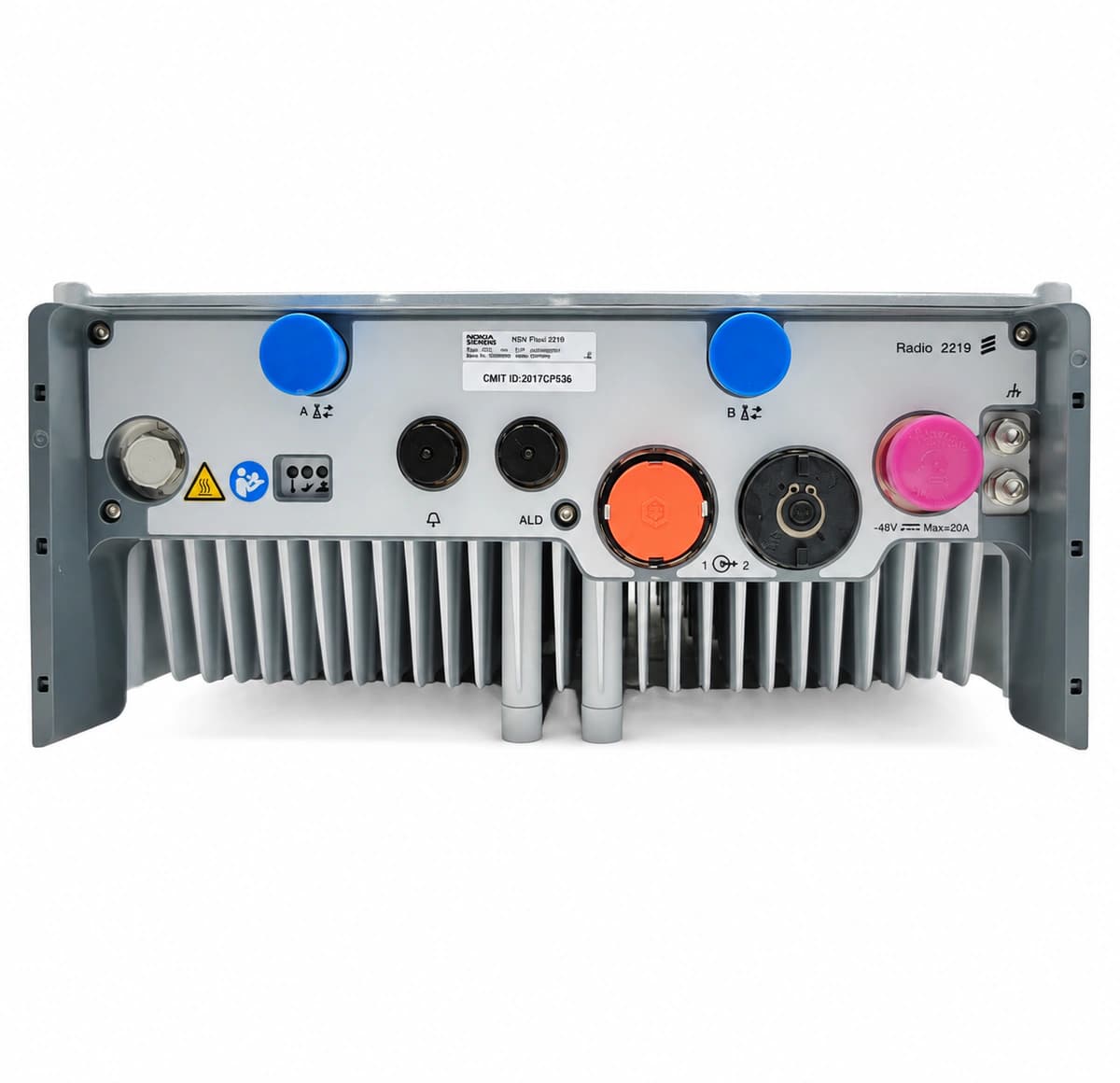
The Nokia Siemens (NSN) Flexi Multiradio 2219 is an outdoor carrier-grade Remote Radio Unit (RRU/RRH) supporting 2T2R multi-carrier transmission with digital pre-distortion (DPD) power amplification, optical CPRI baseband interfacing, and IP65 ruggedized cast-aluminum weatherproofing.

Equipment information

Brand
Nokia
Equipment model
Nokia NSN Flexi Multiradio 2219 RRU
Equipment type
SFP optical transceivers
Controller / software version
Confirm against the installed equipment
View full product specifications
Nokia NSN Flexi Multiradio 2219 RRU Official Product View 4

Information below comes from the current product catalogue. Confirm the controller, software version and configuration of the installed equipment separately.

Board Type
Outdoor distributed base station multimode remote radio unit (RRU/RRH 2T2R)
Port Density & Specs
2 RF antenna feeder outputs (7/16 DIN or 4.3-10) + dual high-bandwidth CPRI optical fiber ports
Supported Chassis
Compatible with Nokia Flexi Multiradio BTS / AirScale system baseband units
Subscriber Capacity
Supports GSM / WCDMA / LTE multi-carrier integrated RF amplified output
Typical Power Consumption
Typical operating power consumption: approximately 380W (-48V DC power supply)
Operating Temperature
-40°C ~ +55°C (IP65 naturally cooled corrosion-resistant cast-aluminum enclosure)

Alarms & troubleshooting

7653 OPT_LOS (CPRI/OBSAI Optical RX Loss of Signal)
OPT/RF LED solid Red, STATUS LED solid Red
RRU optical RX power dropped below sensitivity threshold (<-15 dBm), optical fiber broken, excessive bending loss, or remote BBU SFP transmitter failure.
1. Measure optical RX power using an optical power meter to confirm it falls within standard range (-14 dBm to -3 dBm); 2. Inspect and clean LC optical connectors and SFP transceiver barrel using a fiber scope and click cleaner; 3. Inspect outdoor optical cable run for pinching or damage and replace jumper if needed; 4. Reseat or swap the SFP transceiver on the RRU; if alarm persists, verify remote BBU SFP status.
7654 SFP_TX_FAIL (SFP Laser Bias Current Fault / TX Failure)
OPT/RF LED solid Amber, STATUS LED solid Amber
SFP laser diode degradation causing laser bias current to exceed operating limit, optical transmit power drop, or TX_FAULT assertion due to internal circuit defect.
1. Query SFP DDM diagnostics via BTS Site Manager/NetAct to verify real-time TX Bias Current and TX Output Power levels; 2. Inspect RRU cage and contacts for pin damage or unstable internal 3.3V SFP supply; 3. Replace the degraded SFP transceiver with a Nokia-approved industrial-grade module; 4. Monitor transmission alarms in NetAct to confirm TX fault clearance.
7655 SFP_TEMP_HIGH (SFP Module Operating Temperature High)
OPT/RF LED blinking Amber at 1Hz, STATUS LED solid Green
SFP internal DDM temperature sensor exceeded upper operating threshold (>+85°C) caused by RRU solar radiation, blocked heat-sink airflow, or deployment of commercial-grade (0~70°C) instead of industrial-grade optics.
1. Access BTS Site Manager to read current SFP internal DDM temperature reading and historical peaks; 2. Inspect RRU optical connector cavity and clear dust/debris from chassis cooling fins; 3. Check SFP label and verify it is an industrial temperature range module (-40°C to +85°C); 4. If environment and module rating are valid, replace SFP due to faulty internal thermal sensor.
7651 CPRI_BER_FAIL (CPRI/OBSAI Optical Link High BER / Flapping)
OPT/RF LED blinking Red at 2Hz, STATUS LED solid Red
CPRI/OBSAI framing synchronization loss, fiber connector end-face scratches/contamination causing Fresnel reflections, optical dispersion, or degraded SFP eye pattern resulting in high CRC/BER.
1. Check CPRI frame error counters and synchronization loss logs in NetAct/Site Manager; 2. Inspect optical ferrules with a digital fiber scope and clean thoroughly with an approved dry cleaner; 3. Check fiber cable with an OTDR or fault locator to identify micro-bends and re-route properly; 4. Replace SFP modules at both RRU and BBU ends to eliminate transmitter jitter or receiver clock recovery defects.
7659 SFP_TYPE_INVALID (Unsupported SFP / CPRI Rate Mismatch)
OPT/RF LED blinking Amber at 0.5Hz, STATUS LED solid Amber
Insertion of non-Nokia qualified SFP, corrupted EEPROM vendor data, or line rate mismatch between SFP capability and commissioned RRU CPRI/OBSAI line rate (e.g. 9.8G vs 6.1G).
1. Query Hardware Inventory via BTS Site Manager to read SFP vendor, part number, and supported speed ratings; 2. Verify RRU commissioning file to ensure CPRI line rate matches the optical port configuration; 3. Remove non-compliant SFP and verify Nokia genuine spare part number; 4. Install a Nokia-certified multi-rate or matching CPRI/OBSAI industrial SFP and trigger port restart.

Access Complete Maintenance & Full Alarm Troubleshooting Manual

This page lists high-frequency critical alarm codes commonly encountered in field maintenance. Comprehensive manufacturer troubleshooting matrices, board-level repair guides, detailed electrical schematics, and firmware commissioning manuals are delivered alongside equipment upon formal project procurement, accompanied by dedicated FAE technical support.

Share on-site information

  1. 01

    Identify the exact model

    Record the nameplate, system model and controller or module model.

  2. 02

    Keep the alarm details

    Record the full alarm text, indicator colour, timing and whether it persists.

  3. 03

    Describe recent changes

    Note recent replacements, software updates or configuration changes.

Record information visible in the existing interface. Electrical measurements, disassembly and replacement should follow the applicable manufacturer's manual and be performed by qualified personnel.

Your model and these details will be added to the enquiry form for you to review before sending.

Related technical articles

Browse the technical guides or send a question about this model.

View all articles

Need a replacement module or supporting equipment?

Confirm the full model, system configuration and compatibility requirements before enquiring about suitable products.

Ask about suitable products

Have a model and an on-site issue?

Share the exact model, alarm text and observed symptoms to help identify relevant information and compatibility requirements.

Request technical support