Huawei / SFP optical transceivers

Huawei SXCSA Cross-Connect Board Equipment information & support

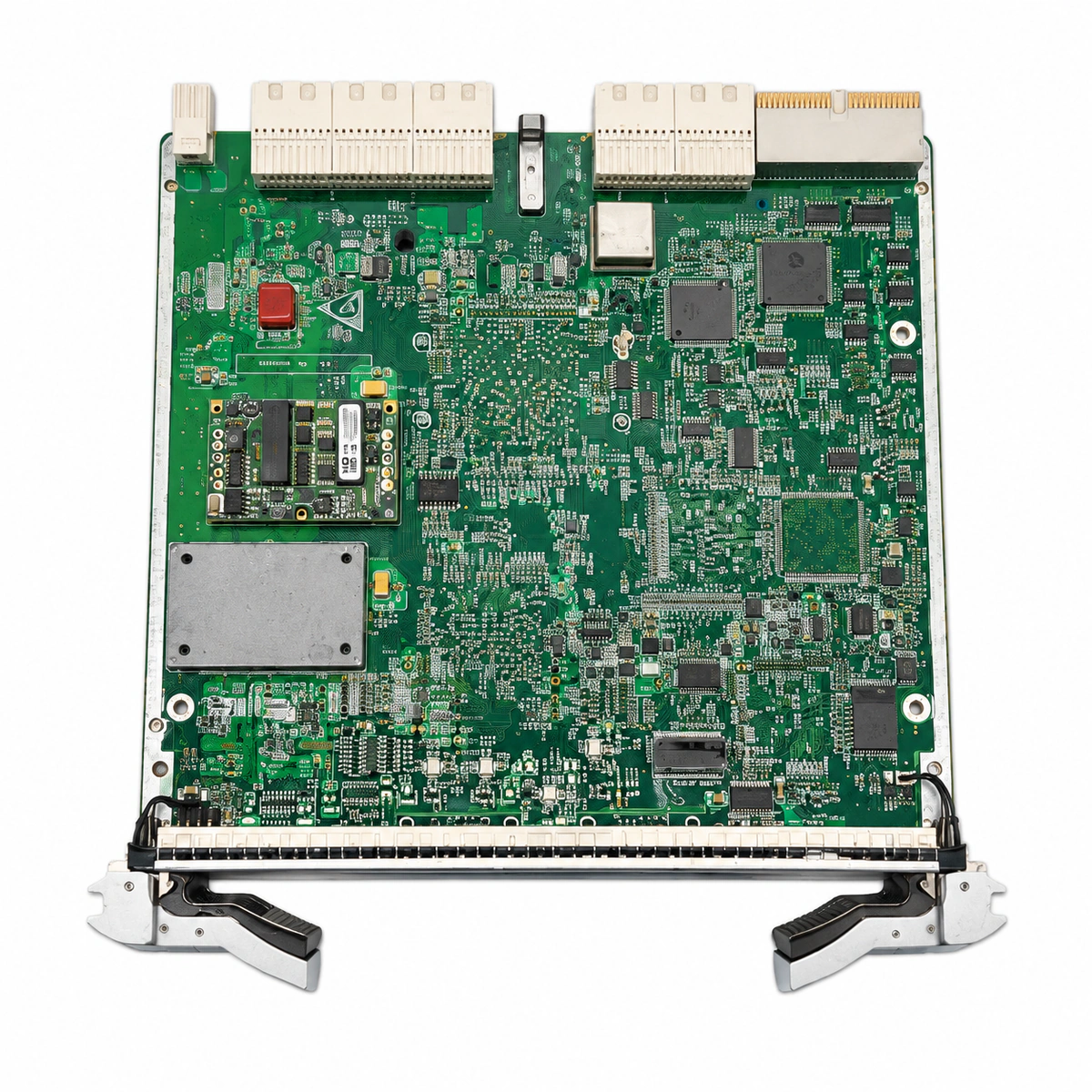
The Huawei SXCSA is a higher-order non-blocking cross-connect and master clock timing board engineered for Huawei OptiX OSN optical transport platforms, delivering granular service matrix switching and ITU-T G.813 compliant clock distribution.

Equipment information

Brand
Huawei
Equipment model
Huawei SXCSA Cross-Connect Board
Equipment type
SFP optical transceivers
Controller / software version
Confirm against the installed equipment
View full product specifications
Huawei SXCSA Cross-Connect Board Official Product View 4

Information below comes from the current product catalogue. Confirm the controller, software version and configuration of the installed equipment separately.

Board Type
High-order space cross-connect matrix and system clock main control board
Port Density & Specs
Fully hardware-based granular high-speed non-blocking space cross-connect backplane slot
Supported Chassis
Core slot of the Huawei OptiX OSN series optical transport platform
Subscriber Capacity
Built-in high-stability oven-controlled crystal oscillator (OCXO), supporting 1+1 millisecond-level hitless hot-standby switchover
Typical Power Consumption
< 40 W
Operating Temperature
0°C ~ +45°C

Alarms & troubleshooting

HARD_BAD (Hardware Failure)
STAT LED steady red, ACT LED off
SXCSA main FPGA/ASIC chip self-test failure, on-board DC/DC power circuit fault, or Flash memory read/write corruption.
1. Verify that 1+1 protection switching to the standby SXCSA board succeeded without traffic interruption. 2. Perform a software reset via NMS; if ineffective, execute a cold reset. 3. Remove the board and inspect backplane golden fingers and pins for physical damage or contamination. 4. Reseat the board securely; if the alarm persists, replace the SXCSA board.
XC_BUS_ERR (Cross-Connect Bus Error)
STAT LED flashing yellow rapidly (2Hz), SRV LED steady red
High-speed cross-connect bus parity mismatch on SXCSA, backplane bus pin poor contact, or inter-slot bus communication errors with line boards.
1. Query NMS active alarms to identify corresponding service slots reporting bus errors. 2. Run an on-demand cross-connect bus diagnostic test between line boards and SXCSA. 3. If multiple slots report bus degradation, force switchover to the redundant SXCSA plane. 4. Reseat both SXCSA boards and inspect the chassis slot; replace the faulty SXCSA board if errors persist.
SYNC_FAIL (Clock Synchronization PLL Lock Failure)
STAT LED steady green, ACT LED flashing slowly (1Hz)
SXCSA on-board PLL unlocked, frequency deviation of reference source out of locking range, or all clock reference sources lost forcing holdover mode.
1. Log in to the NMS to check the clock subsystem status and clock source quality level (SSM/QL). 2. Inspect primary and secondary external BITS or line-derived clock references for signal errors. 3. Force clock switching to a valid alternate timing source or allow stable holdover. 4. If upstream references are healthy but the PLL cannot lock, the oscillator on the SXCSA is degraded; replace the SXCSA.
COMMUN_FAIL (Inter-Board Communication Failure)
STAT LED steady yellow, SRV LED off
Internal Ethernet/CAN control bus handshake timeout or physical channel break between SXCSA and the system control/communication board (SCC/AUX).
1. Check the operating status of the system control board (SCC) and auxiliary units. 2. Confirm via NMS whether communication loss affects the entire chassis or only this specific SXCSA slot. 3. Execute 1+1 protection switchover and reseat the affected SXCSA board to clean backplane connectors. 4. If reseating fails and the SCC is normal, the on-board communication transceiver on the SXCSA is faulty; replace the board.
TEMP_OVER (Board Temperature High Over-Threshold)
STAT LED flashing yellow slowly (1Hz)
Subrack air filter clogged restricting airflow, fan tray module failure/speed abnormality, ambient room temp >45°C, or faulty on-board thermal sensor on the SXCSA.
1. Query the NMS for fan tray status, fan speeds, and real-time temperature readings of the SXCSA. 2. Inspect and clean the subrack air filter; verify unobstructed air intake and exhaust pathways. 3. Check equipment room HVAC operation to lower ambient temperature to standard range (20°C–25°C). 4. If ventilation and ambient conditions are normal but the high-temp alarm persists, the thermal sensor is defective; replace the SXCSA.

Access Complete Maintenance & Full Alarm Troubleshooting Manual

This page lists high-frequency critical alarm codes commonly encountered in field maintenance. Comprehensive manufacturer troubleshooting matrices, board-level repair guides, detailed electrical schematics, and firmware commissioning manuals are delivered alongside equipment upon formal project procurement, accompanied by dedicated FAE technical support.

Share on-site information

  1. 01

    Identify the exact model

    Record the nameplate, system model and controller or module model.

  2. 02

    Keep the alarm details

    Record the full alarm text, indicator colour, timing and whether it persists.

  3. 03

    Describe recent changes

    Note recent replacements, software updates or configuration changes.

Record information visible in the existing interface. Electrical measurements, disassembly and replacement should follow the applicable manufacturer's manual and be performed by qualified personnel.

Your model and these details will be added to the enquiry form for you to review before sending.

Related technical articles

Browse the technical guides or send a question about this model.

View all articles

Need a replacement module or supporting equipment?

Confirm the full model, system configuration and compatibility requirements before enquiring about suitable products.

Ask about suitable products

Have a model and an on-site issue?

Share the exact model, alarm text and observed symptoms to help identify relevant information and compatibility requirements.

Request technical support