Huawei / DC power systems

Huawei RRU3971 Equipment information & support

High-capacity 4T4R MIMO RF transceiver module providing 160W total output power, engineered for dense urban LTE and 5G cell sites.

Equipment information

Brand
Huawei
Equipment model
Huawei RRU3971
Equipment type
DC power systems
Controller / software version
Confirm against the installed equipment
View full product specifications
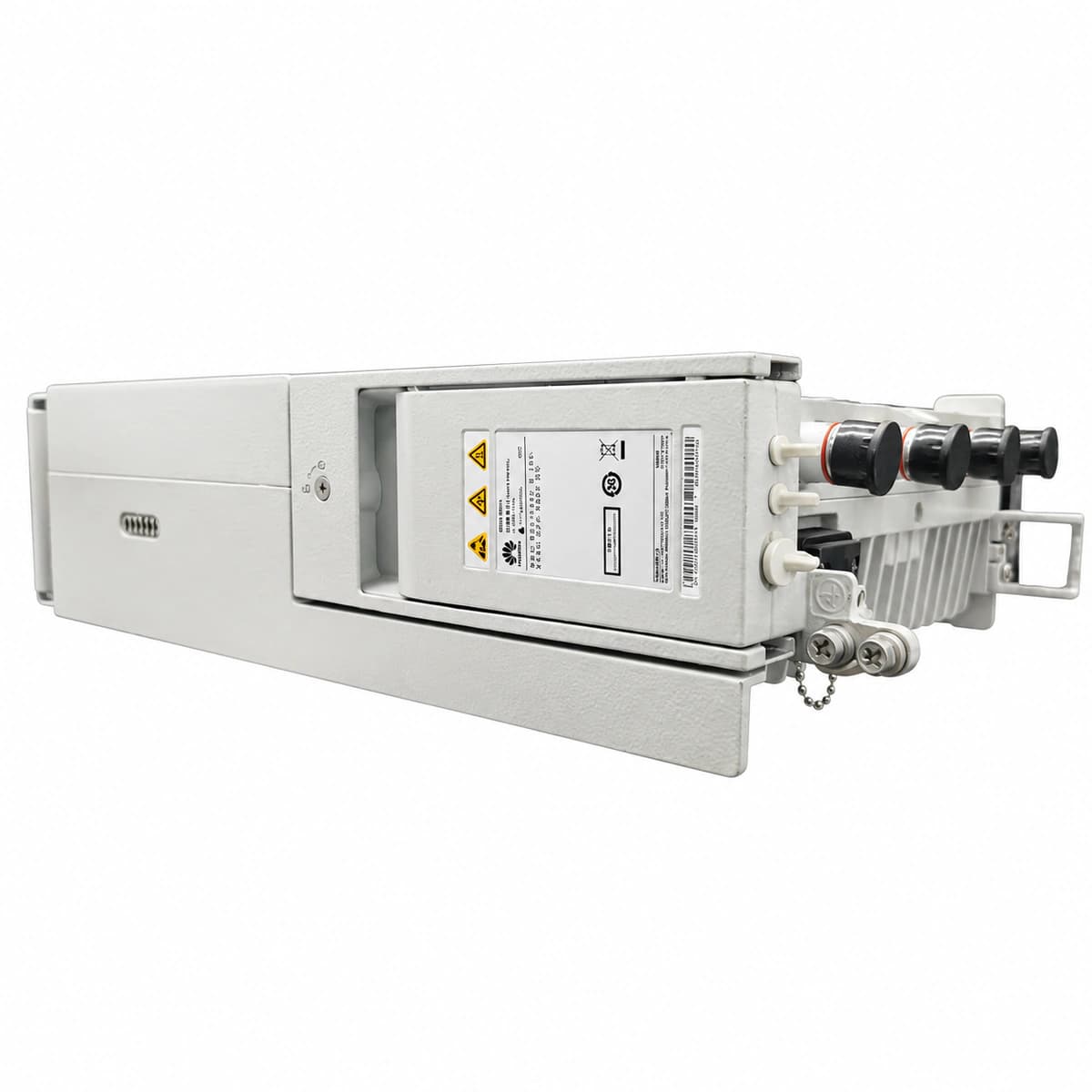
Huawei RRU3971 authentic hardware perspective 3

Information below comes from the current product catalogue. Confirm the controller, software version and configuration of the installed equipment separately.

RF Transceiver Channels
4T4R four transmit and four receive channels
RF Output Power
4 × 40W (160W total RF output power)
Frequency Agility
1800MHz / 2100MHz wideband agility
Optical Interface Rate
Dual SFP+ ports supporting 9.8G/10.1G CPRI
RF Antenna Connectors
4 × 4.3-10 female low-PIM connectors
DC Supply Characteristics
-48V DC with integrated lightning surge suppression

Alarms & troubleshooting

ALM-26522 RF Unit CPRI Interface Error
CPRI0/1 indicator Steady OFF or Steady RED, ALM indicator Steady RED
Optical fiber broken, disconnected, or bent beyond limit; SFP transceiver faulty, loose, or RX optical power below sensitivity threshold; BBU baseband port fault.
1. Inspect optical patch cords between RRU and BBU; clean optical end-faces and reseat SFP transceivers. 2. Measure optical RX power with an optical power meter; ensure RX power is within standard range (-15 dBm to -2 dBm). 3. Execute MML command 'DSP SFP' to query optical module parameters; replace SFP transceiver if failed. 4. Swap optical fiber connection to an alternate BBU CPRI port or replace the baseband processing board if the fault persists.
ALM-26529 RF Unit VSWR Threshold Crossed
ALM indicator blinking RED at 1Hz or Steady RED, RF port status degraded
RF jumper, connector, or lightning surge arrester loose, damaged, or ingress of water; damaged antenna port; excessive reflected power exceeding configured VSWR threshold (typically > 1.5 or 2.0).
1. Inspect RF port jumpers, waterproof sealing tape, and connectors for physical damage or water ingress. 2. Tighten RF connectors (DIN or 4.3-10 type) to specified torque using an RF torque wrench. 3. Connect an antenna/feeder line analyzer (Site Master) to perform Distance-to-Fault (DTF) and VSWR sweeps. 4. Replace defective RF jumpers, surge arresters, or antenna elements as pinpointed by DTF analysis.
ALM-26521 RF Unit Hardware Fault
ALM indicator Steady RED, RUN indicator OFF or abnormal
Internal hardware failure of the power amplifier (PA), low-noise amplifier (LNA), intermediate frequency (IF) processor, or internal power module.
1. Perform a software reset on the RRU using MML command 'RST RRU' via the EMS/NMS and verify if the fault clears. 2. Disconnect external -48V DC power supply to cold-reboot the unit; wait 5 minutes and re-energize. 3. Check firmware compatibility and verify RRU software consistency in the BBU maintenance terminal. 4. If ALM indicator remains steady red after cold boot, replace the faulty RRU3971 unit.
ALM-26533 RF Unit High Temperature Alarm
ALM indicator blinking RED at 1Hz, turning Steady RED under extreme overtemperature
RRU heatsink fins blocked by debris, dust, or nests; solar radiation shield missing; ambient environment exceeds +55°C; prolonged maximum power transmission without adequate passive airflow.
1. Inspect RRU natural convection heatsink fins; clean accumulated dust, leaves, or debris using compressed air or a non-metallic brush. 2. Ensure the solar shield is securely installed and clearance of at least 300 mm around the RRU is maintained. 3. Run MML command 'DSP RRUTEMP' to monitor real-time temperature readings and rule out sensor errors. 4. If the ambient environment is within limits and cooling is unblocked but the reported temperature remains abnormal (>85°C), replace the RRU.
ALM-26523 RF Unit Power Supply Input Abnormal
RUN indicator flashing abnormally or OFF, ALM indicator Steady RED
-48V DC input voltage out of operational tolerance (< -36V DC undervoltage or > -57V DC overvoltage); severe voltage drop across undersized DC cables; DCDU circuit breaker tripped or terminal loose.
1. Measure the DC voltage at the RRU power input connector using a calibrated multimeter; verify reading is between -36V DC and -57V DC. 2. Inspect the tower-bottom power distribution unit (DCDU/APM30) circuit breaker and monitor rectifier bus voltage. 3. Check DC power cable lugs (OT terminals / easy-power connectors) for loose connections, corrosion, or incorrect crimping. 4. If input voltage is verified normal but the undervoltage alarm persists, inspect cable gauge for excessive voltage drop or replace the RRU.

Access Complete Maintenance & Full Alarm Troubleshooting Manual

This page lists high-frequency critical alarm codes commonly encountered in field maintenance. Comprehensive manufacturer troubleshooting matrices, board-level repair guides, detailed electrical schematics, and firmware commissioning manuals are delivered alongside equipment upon formal project procurement, accompanied by dedicated FAE technical support.

Share on-site information

  1. 01

    Identify the exact model

    Record the nameplate, system model and controller or module model.

  2. 02

    Keep the alarm details

    Record the full alarm text, indicator colour, timing and whether it persists.

  3. 03

    Describe recent changes

    Note recent replacements, software updates or configuration changes.

Record information visible in the existing interface. Electrical measurements, disassembly and replacement should follow the applicable manufacturer's manual and be performed by qualified personnel.

Your model and these details will be added to the enquiry form for you to review before sending.

Related technical articles

Browse the technical guides or send a question about this model.

View all articles

Need a replacement module or supporting equipment?

Confirm the full model, system configuration and compatibility requirements before enquiring about suitable products.

Ask about suitable products

Have a model and an on-site issue?

Share the exact model, alarm text and observed symptoms to help identify relevant information and compatibility requirements.

Request technical support