Huawei / DC power systems

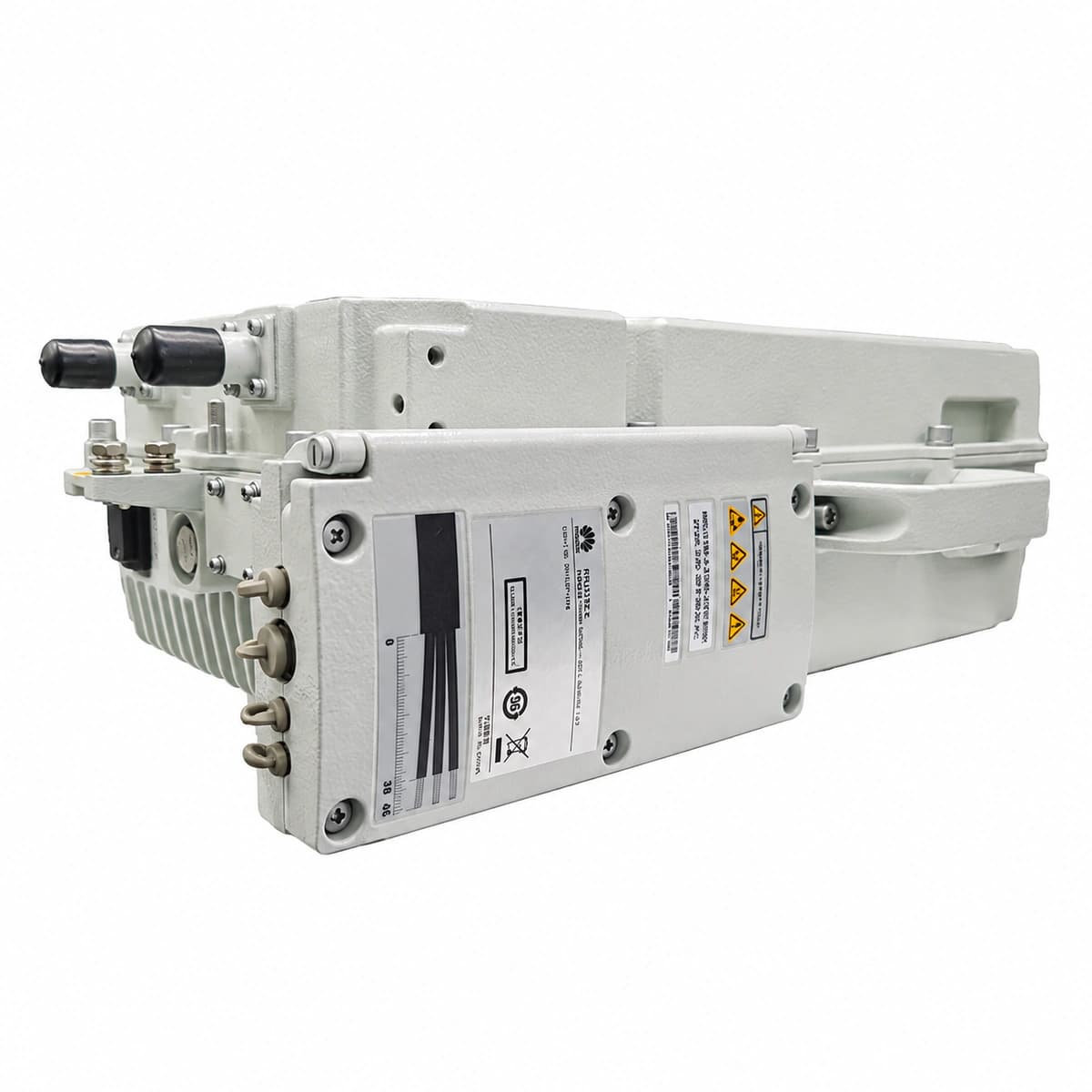
Huawei RRU3182E 5G Remote Radio Unit Equipment information & support

The Huawei RRU3182E is an industrial-grade outdoor 5G Remote Radio Unit (RRU) engineered for macro cellular base stations. Utilizing advanced Digital Pre-Distortion (DPD) and Doherty power amplifiers, it converts baseband data received via dual eCPRI/CPRI optical links into amplified 4T4R RF signals across 1800MHz and 2100MHz multi-carrier frequencies, housed in an IP65-rated die-cast aluminum passive-cooling chassis for tower and pole deployment.

Equipment information

Brand
Huawei
Equipment model
Huawei RRU3182E 5G Remote Radio Unit
Equipment type
DC power systems
Controller / software version
Confirm against the installed equipment
View full product specifications
Huawei RRU3182E 5G Outdoor Macro Remote Radio Unit -48V DC 4T4R 1800M/2100M Dual-Band IP65 Die-Cast

Information below comes from the current product catalogue. Confirm the controller, software version and configuration of the installed equipment separately.

Power Unit Type
5G Cellular Macro Base Station Outdoor Remote Radio Unit (RRU)
Operating Frequency & Bandwidth
Supports 1800MHz / 2100MHz Wideband Multi-Carrier Aggregation
Tx/Rx Channel Architecture
Multi-Channel RF Power Output (Supports 4T4R MIMO)
High-Speed Optical Baseband Interface
Dual CPRI / eCPRI 10G/25G High-Speed Optical Interfaces
Protection Rating
IP65 Sealed Die-Cast Aluminum Heavy-Duty Outdoor Housing
DC Power Supply Voltage
-48V DC (-36V DC ~ -57V DC) Wide Telecom Voltage Range

Alarms & troubleshooting

ALM-26521 / eCPRI_INTERFACE_ERROR (eCPRI Optical Port Link Failure)
RUN LED solid green, ALM LED solid red, CPRI0/1 LED off or solid red
Optical fiber broken/bent, faulty or rate-mismatched SFP+ transceiver (10G/25G), degraded optical transmit power from BBU, or received optical power below receiver sensitivity (<-15 dBm).
1. Verify SFP+ transceiver is securely latched and matches configured line rate (10G/25G). 2. Measure RX optical power at the fiber connector using an optical power meter; ensure it is between -14 dBm and -2 dBm. 3. Clean optical ferrule connectors and inspect for tight bend radiuses; replace the SFP+ transceiver or patch cord if optical loss persists.
ALM-26522 / RF_VSWR_ALM (RF Unit VSWR Out of Threshold)
RUN LED solid or blinking green, ALM LED solid red or blinking red (1Hz)
Loose or water-ingress in 4.3-10 RF jumper connectors, feeder cable damaged, impedance mismatch in antenna array/RET system, or measured VSWR exceeding threshold (>2.0).
1. Inspect 4.3-10 RF connector torque (nominal 5 N·m) and verify cold-shrink/waterproof tape integrity. 2. Use an antenna/cable analyzer (SiteMaster) in Distance-to-Fault (DTF) mode to isolate feeder discontinuity. 3. Replace water-damaged RF jumpers, re-terminate connectors, or swap antenna RF port/RET unit.
ALM-26520 / RF_OVERTEMP (RF Unit High Temperature Threshold Exceeded)
RUN LED solid green, ALM LED solid red, PA shuts down under extreme thermal protection
Ambient temperature exceeding operational limit (+55°C), heatsink fins blocked by debris/dust, missing solar radiation shield, or insufficient ventilation clearance (<300mm top/bottom).
1. Clean dirt, debris, and dust accumulation from the RRU cooling fins to restore natural convection airflow. 2. Verify the sunshield is installed securely to prevent thermal saturation from solar radiation. 3. Check clearance surrounding the RRU, ensuring minimum 300mm unobstructed vertical spacing above and below.
ALM-26523 / DC_POWER_FAIL (RRU DC Input Power Abnormal)
RUN LED off or fast blinking (4Hz), ALM LED solid red or completely off (voltage cutout)
DC input voltage out of specification (below -36V DC or above -57V DC), loose terminal crimp on quick-lock power connector, tripped PDU circuit breaker, or excessive cable drop under full RF transmit load.
1. Measure DC voltage across power connector terminals under load using a digital multimeter; ensure it is between -36V DC and -57V DC. 2. Inspect the upstream power distribution unit (DCDU/PDU) circuit breaker and fuse integrity. 3. Reseat the DC quick-connector securely; calculate line drop and replace power cables with higher cross-section gauge if voltage drop exceeds 3V.
ALM-26524 / RF_PA_FAULT (RF Power Amplifier Hardware Malfunction)
RUN LED solid green, ACT LED off, ALM LED solid red
PA quiescent bias current anomaly, internal LDMOS/GaN power transistor puncture/failure, RF filtering circuitry defect, or Digital Pre-Distortion (DPD) adaptation divergence.
1. Execute MML command `RST BRD` via NMS (U2020/NCE) to perform a software reset and re-initialize PA self-tests. 2. Verify antenna VSWR to confirm PA shutdown was not triggered by severe antenna impedance mismatch. 3. If the alarm persists after reboot, the internal RF PA hardware has suffered physical damage; replace the RRU3182E unit.

Access Complete Maintenance & Full Alarm Troubleshooting Manual

This page lists high-frequency critical alarm codes commonly encountered in field maintenance. Comprehensive manufacturer troubleshooting matrices, board-level repair guides, detailed electrical schematics, and firmware commissioning manuals are delivered alongside equipment upon formal project procurement, accompanied by dedicated FAE technical support.

Share on-site information

  1. 01

    Identify the exact model

    Record the nameplate, system model and controller or module model.

  2. 02

    Keep the alarm details

    Record the full alarm text, indicator colour, timing and whether it persists.

  3. 03

    Describe recent changes

    Note recent replacements, software updates or configuration changes.

Record information visible in the existing interface. Electrical measurements, disassembly and replacement should follow the applicable manufacturer's manual and be performed by qualified personnel.

Your model and these details will be added to the enquiry form for you to review before sending.

Related technical articles

Browse the technical guides or send a question about this model.

View all articles

Need a replacement module or supporting equipment?

Confirm the full model, system configuration and compatibility requirements before enquiring about suitable products.

Ask about suitable products

Have a model and an on-site issue?

Share the exact model, alarm text and observed symptoms to help identify relevant information and compatibility requirements.

Request technical support