Huawei / SFP optical transceivers

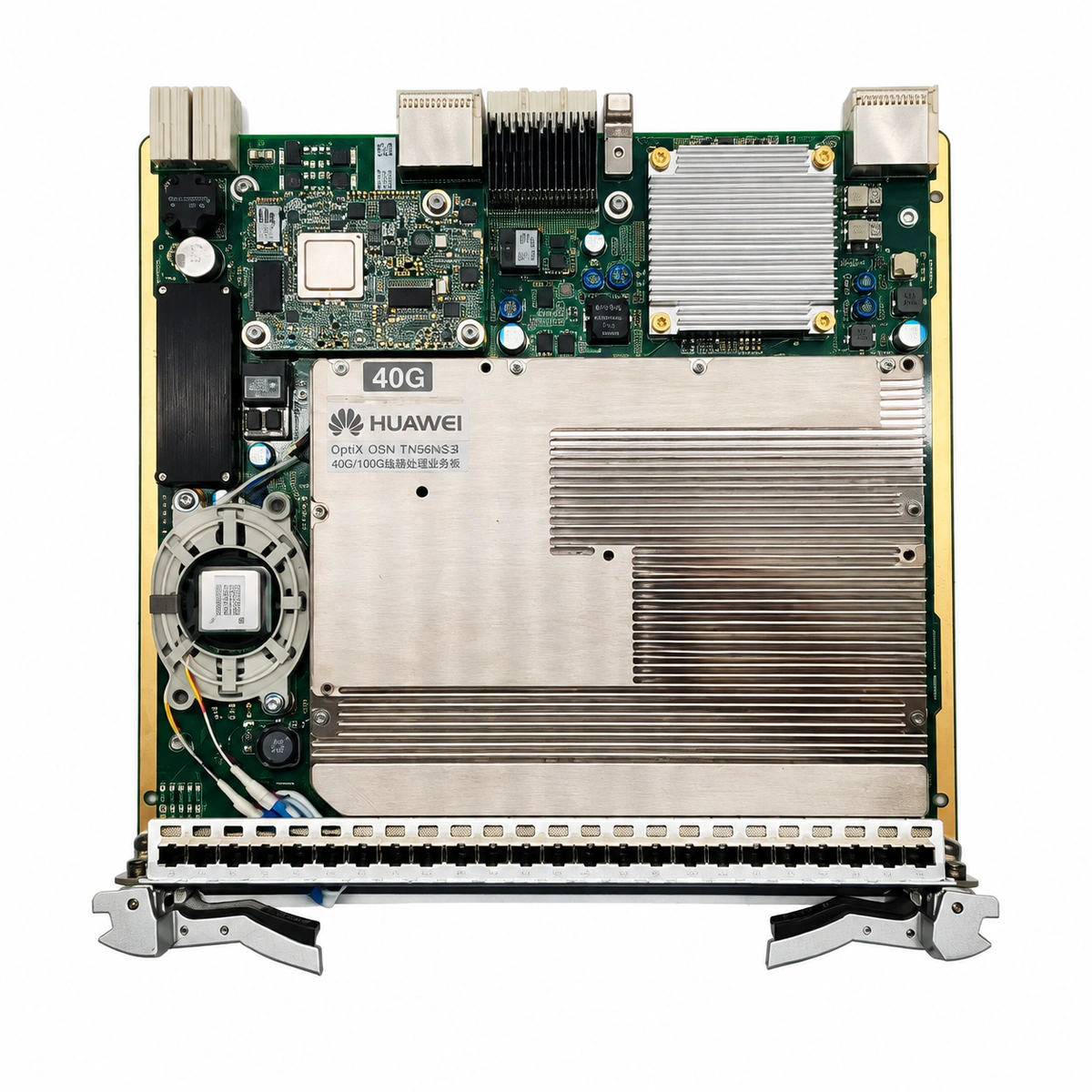
Huawei OptiX OSN TN56NS3 Optical Board Equipment information & support

The Huawei TN56NS3 is a high-performance 40G/100G coherent optical line service board engineered for Huawei OptiX OSN 6800 and OSN 8800 DWDM/OTN platforms, supporting advanced ePDM-QPSK coherent detection, SDFEC algorithms, and ultra-long haul unrepeatered transmission.

Equipment information

Brand
Huawei
Equipment model
Huawei OptiX OSN TN56NS3 Optical Board
Equipment type
SFP optical transceivers
Controller / software version
Confirm against the installed equipment
View full product specifications
Huawei OptiX OSN TN56NS3 Optical Board Official Product View 4

Information below comes from the current product catalogue. Confirm the controller, software version and configuration of the installed equipment separately.

Board Type
40G/100G high-capacity coherent optical transmission line processing service board
Port Density & Specs
1-channel 100G OTU4 / 40G OTU3 coherent optical line interface
Supported Chassis
Huawei OptiX OSN 6800 / 8800 series high-capacity wavelength-division multiplexing chassis
Subscriber Capacity
Supports ePDM-QPSK / ePDM-BPSK coherent modulation and ultra-long-distance transmission without powered repeaters
Typical Power Consumption
< 95 W
Operating Temperature
0°C ~ +45°C (telecommunications equipment room operating conditions)

Alarms & troubleshooting

R_LOS (Rx Optical Signal Loss)
STAT steady red, SRV steady red
Fiber link disconnection, excessive optical line attenuation exceeding Rx sensitivity threshold, or remote transmitter shutdown/failure.
1. Measure Rx optical power at IN port using an optical power meter; verify it is within range (-18 dBm to 0 dBm). 2. Inspect and clean optical patch cords and LC connectors using a fiber scope to eliminate contamination or micro-bends. 3. Log in to the NMS (NCE) and verify the remote board's OUT port laser state and output power.
OTU_LOF (OTU Loss of Frame)
STAT steady red, SRV blinking red
Severe optical signal-to-noise ratio (OSNR) degradation, mismatched FEC mode configuration between endpoints, or coherent receiver framer synchronization failure.
1. Verify in NCE that the FEC mode (e.g., SDFEC vs HFEC) matches identically on both line endpoints. 2. Query the MCA/OSC spectrum data to check OSNR; re-tune OA gain and channel flattening if below threshold. 3. Perform a warm reset on the board; if the alarm persists despite normal optical performance, replace the TN56NS3 board.
BIAS_HIGH (Laser Bias Current High)
STAT steady green, SRV steady amber
Aging of the coherent transmitter laser diode, causing the internal driver circuit to elevate bias current to maintain target optical output power.
1. Retrieve DDM parameters via NCE and compare current Laser Bias Current against historical baseline data. 2. Verify board operating temperature and subrack fan status to rule out high-temperature thermal compensation. 3. Since this indicates hardware aging, schedule a maintenance window and replace the TN56NS3 optical board.
OTU_FEC_EXC (OTU Pre-FEC Bit Error Rate Excessive)
STAT steady green, SRV blinking amber
Accumulated chromatic dispersion exceeding compensation limits, PMD transient bursts, optical non-linear effects, or borderline OSNR degradation.
1. Review Pre-FEC BER performance curves in NCE to see if error surges correlate with optical power drops. 2. Verify multiplexer/demultiplexer (M40/D40) and WSS channel attenuation settings; re-equalize channel optical power. 3. Execute OTDR testing along the fiber span to pinpoint high-loss splices or severe bend points and resplice.
TEMP_OVER (Board and Optical Module Over-Temperature)
STAT blinking amber slowly, SRV steady amber
Chassis fan tray failure, severely clogged air filters restricting cooling airflow, or equipment room HVAC failure causing ambient intake air to exceed 50°C.
1. Check the chassis FAN tray LED status to confirm all fans run properly; replace fan assembly if stalled. 2. Inspect and clean the chassis dust filters to restore unobstructed airflow across slots. 3. Measure data center cold aisle temperature; if ambient is normal but board DSP/optical module exceeds 75°C, replace the TN56NS3 board.

Access Complete Maintenance & Full Alarm Troubleshooting Manual

This page lists high-frequency critical alarm codes commonly encountered in field maintenance. Comprehensive manufacturer troubleshooting matrices, board-level repair guides, detailed electrical schematics, and firmware commissioning manuals are delivered alongside equipment upon formal project procurement, accompanied by dedicated FAE technical support.

Share on-site information

  1. 01

    Identify the exact model

    Record the nameplate, system model and controller or module model.

  2. 02

    Keep the alarm details

    Record the full alarm text, indicator colour, timing and whether it persists.

  3. 03

    Describe recent changes

    Note recent replacements, software updates or configuration changes.

Record information visible in the existing interface. Electrical measurements, disassembly and replacement should follow the applicable manufacturer's manual and be performed by qualified personnel.

Your model and these details will be added to the enquiry form for you to review before sending.

Related technical articles

Browse the technical guides or send a question about this model.

View all articles

Need a replacement module or supporting equipment?

Confirm the full model, system configuration and compatibility requirements before enquiring about suitable products.

Ask about suitable products

Have a model and an on-site issue?

Share the exact model, alarm text and observed symptoms to help identify relevant information and compatibility requirements.

Request technical support