Huawei / SFP optical transceivers

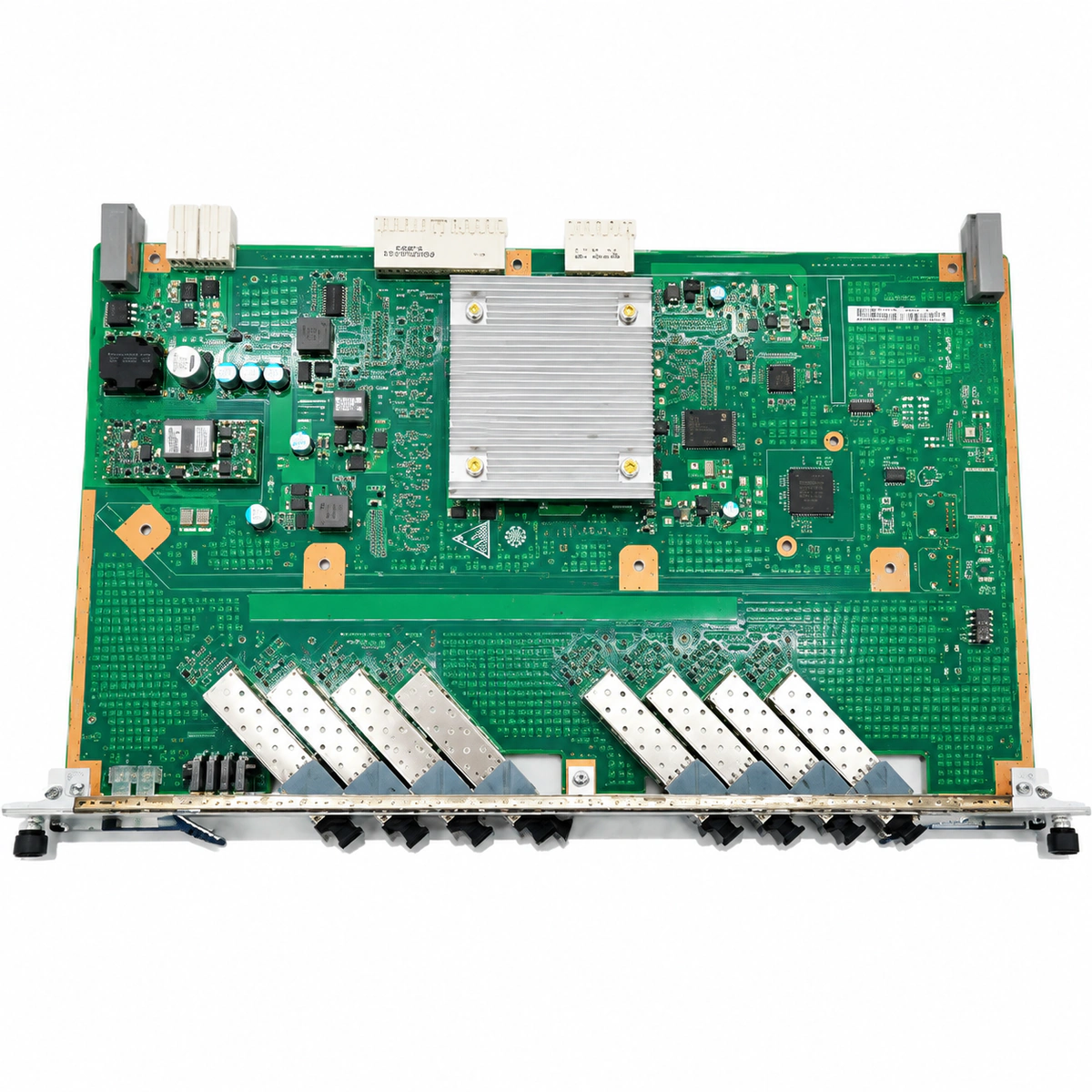
Huawei H807GPBD 8-Port GPON Board Equipment information & support

The Huawei H807GPBD is an 8-port GPON service interface line card designed for Huawei SmartAX MA5680T, MA5683T, and MA5608T OLT platforms, supporting up to 1,024 FTTH subscribers with a 1:128 split ratio and Class B+/C+/C++ optical modules.

Equipment information

Brand
Huawei
Equipment model
Huawei H807GPBD 8-Port GPON Board
Equipment type
SFP optical transceivers
Controller / software version
Confirm against the installed equipment
View full product specifications
Huawei H807GPBD 8-Port GPON Board Official Product View 4

Information below comes from the current product catalogue. Confirm the controller, software version and configuration of the installed equipment separately.

Board Type
Classic, highly stable 8-port GPON OLT central-office service board
Port Density & Specs
8 standard GPON SFP slots
Supported Chassis
Huawei SmartAX MA5680T / MA5683T / MA5608T
Subscriber Capacity
Each board supports access for up to 1024 broadband subscribers
Split Ratio
Supports a high split ratio of 1:128
Typical Power Consumption
Static 25W / full load 45W

Alarms & troubleshooting

LOS (Loss of GPON Optical Signal)
Port ACT LED Off, RUN/ALM LED Solid Red
ODN trunk or drop fiber cut, damaged optical splitter, contaminated SC/UPC connector, or failed SFP receiver module.
1. Measure optical power at the ODN port using an optical power meter to verify range (-8 dBm to -28 dBm). 2. Inspect and clean optical connectors with a fiber scope. 3. Run OTDR test on the ODN link to locate fiber break or high-loss bending. 4. If the fiber plant is normal, execute 'display port info' and replace the Class C+/B+ GPON SFP transceiver if defective.
ROGUE_ONT (Rogue ONT Continuous Transmission)
Port ACT LED Blinking Irregularly/Rapidly, RUN/ALM LED Blinking Yellow
An ONT under the PON port has a faulty laser operating in continuous transmission mode, jamming upstream timeslots and dropping all ONTs on the port.
1. Log in to OLT CLI and execute 'anti-rogueont locate start' on the affected port. 2. Run 'display anti-rogueont detail' to identify the rogue ONT SN and ONU-ID. 3. Isolate or reset the faulty ONT logically from the OLT, or dispatch field staff to disconnect its fiber drop. 4. Replace the defective ONT hardware and terminate the rogue ONT check.
OPT_TEMP_HIGH / LASER_BIAS_HIGH (Optical Module DDM Threshold Alarm)
RUN/ALM LED Blinking Green 1Hz, NMS Reports Yellow WARNING Event
Chassis air filter clogged, fan tray restricted causing board overheating, or internal LD aging requiring excessive bias current compensation.
1. Run 'display port ddm-info' to inspect module temperature, TX/RX power, and laser bias current. 2. Verify subrack fan status via 'display fan 0' and clean the chassis dust filters. 3. If temperature is within bounds but bias current exceeds threshold (>80-90 mA), schedule replacement of the aging GPON SFP. 4. Verify the alarm clears in NMS after transceiver replacement.
BD_STATUS_FAIL (H807GPBD Board Hardware Fault / Offline)
RUN/ALM LED Solid Red, All Port ACT LEDs Off
Backplane connector pin misalignment, communication bus loss with control board (MPU), onboard DC-DC converter failure, or FPGA self-check failure.
1. Run 'display board 0/x' on the MPU to check board state and error flags. 2. Execute 'board reset 0/x' to attempt a software reboot of the line card. 3. If unresolved, unlatch and reseat the board; inspect backplane pins for bends or foreign objects before re-inserting firmly. 4. If the RUN/ALM LED remains solid red, replace the H807GPBD board and restore configuration.
GPON_BER_EXCEED (GPON Bit Error Rate Degradation)
Port ACT LED Intermittent Amber/Green Blinking, RUN/ALM LED Blinking Green
ODN link operating at marginal optical sensitivity threshold (low optical power), macrobending, dirty adapter sleeve, or external RF interference exceeding FEC threshold.
1. Run 'display ont optical-info' to locate ONTs with marginal RX power (<-27 dBm). 2. Execute 'display port fec-statistics' to verify correctable and uncorrectable FEC error blocks. 3. Rectify optical distribution plant: clean fiber bulkheads, re-splice high-attenuation fusion points, eliminate fiber bends. 4. If RX power is optimal yet uncorrectable errors persist, swap the GPON SFP transceiver.

Access Complete Maintenance & Full Alarm Troubleshooting Manual

This page lists high-frequency critical alarm codes commonly encountered in field maintenance. Comprehensive manufacturer troubleshooting matrices, board-level repair guides, detailed electrical schematics, and firmware commissioning manuals are delivered alongside equipment upon formal project procurement, accompanied by dedicated FAE technical support.

Share on-site information

  1. 01

    Identify the exact model

    Record the nameplate, system model and controller or module model.

  2. 02

    Keep the alarm details

    Record the full alarm text, indicator colour, timing and whether it persists.

  3. 03

    Describe recent changes

    Note recent replacements, software updates or configuration changes.

Record information visible in the existing interface. Electrical measurements, disassembly and replacement should follow the applicable manufacturer's manual and be performed by qualified personnel.

Your model and these details will be added to the enquiry form for you to review before sending.

Related technical articles

Browse the technical guides or send a question about this model.

View all articles

Need a replacement module or supporting equipment?

Confirm the full model, system configuration and compatibility requirements before enquiring about suitable products.

Ask about suitable products

Have a model and an on-site issue?

Share the exact model, alarm text and observed symptoms to help identify relevant information and compatibility requirements.

Request technical support