Huawei / SFP optical transceivers

Huawei H802EX2 2-Port 10GE Board Equipment information & support

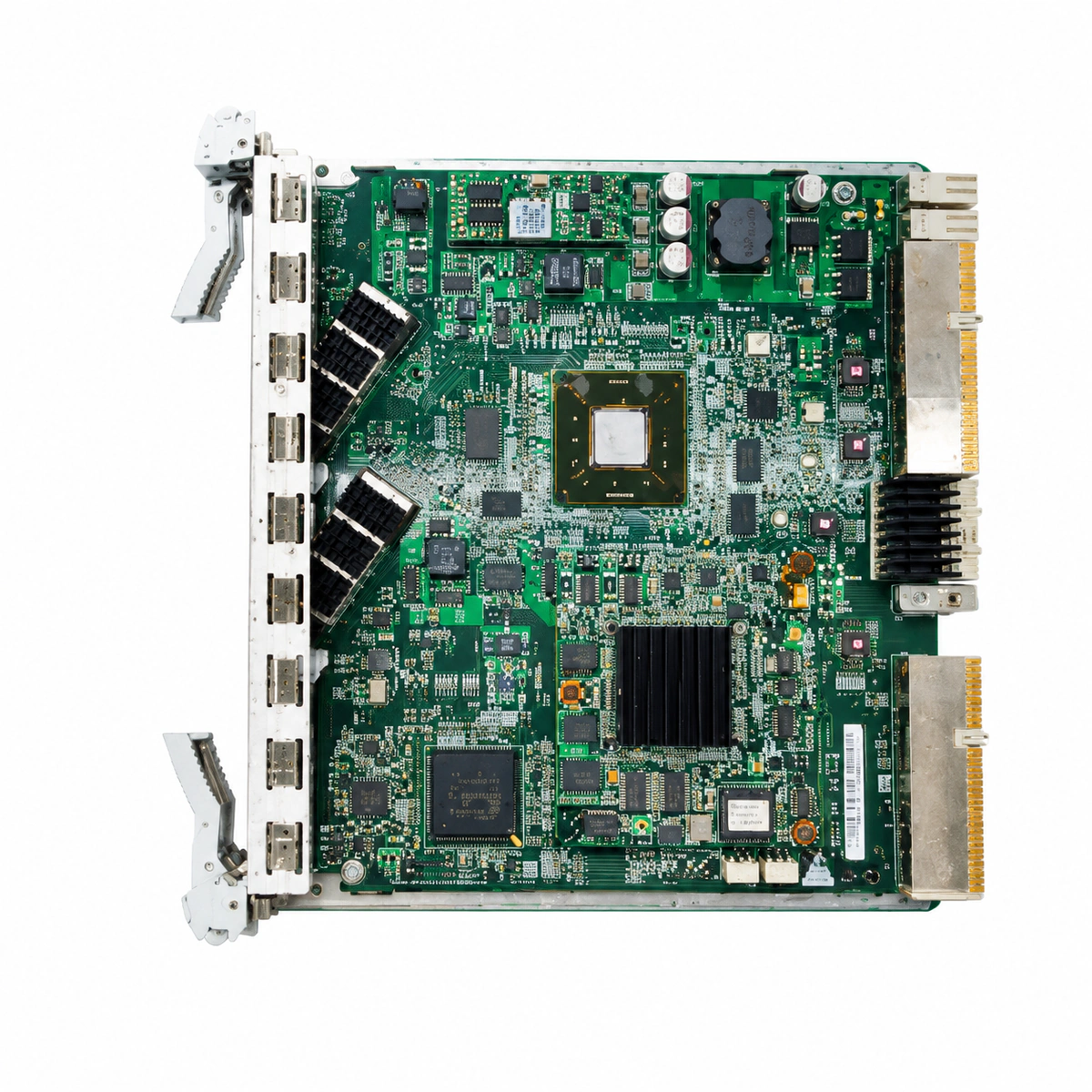
The Huawei H802EX2 is a dual-port 10GE Ethernet uplink interface line card designed for Huawei SmartAX MA5680T, MA5683T, and MA5608T OLT platforms, providing two 10 Gigabit optical ports (XFP/SFP+) for robust high-capacity upstream transport.

Equipment information

Brand
Huawei
Equipment model
Huawei H802EX2 2-Port 10GE Board
Equipment type
SFP optical transceivers
Controller / software version
Confirm against the installed equipment
View full product specifications
Huawei H802EX2 2-Port 10GE Board Official Product View 4

Information below comes from the current product catalogue. Confirm the controller, software version and configuration of the installed equipment separately.

Board Type
Dual-port 10GE uplink interface board
Port Density & Specs
2 10GE XFP/SFP+ 10-gigabit fiber-optic slots
Supported Chassis
Huawei SmartAX MA5680T / MA5683T / MA5608T
Subscriber Capacity
Provides 20Gbps non-blocking 10GE uplink bandwidth
Typical Power Consumption
< 25 W
Operating Temperature
-40°C to +65°C

Alarms & troubleshooting

OPT_LOS (Loss of Optical Receive Signal)
RUN/ALM steady green, corresponding 10GE port ACT LED is OFF
Optical fiber broken or excessively bent; remote laser disabled or faulty; local SFP+/XFP transceiver loose or damaged.
1. Execute 'display port ddm-info' to verify RX optical power. 2. Measure input power with an optical power meter, inspect ODF patch cords, and clean optical ferrule endfaces. 3. Reseat or replace the 10GE optical transceiver and confirm remote port laser emission is enabled.
OPT_RX_POW_LOW (Optical RX Power Below Threshold)
RUN/ALM steady green, ACT LED blinking slowly (unstable link) or steady
Excessive optical link attenuation or squashed jumper; dirty transceiver ferrule; aging remote transmitter causing degraded TX power.
1. Run 'display port ddm-info' to inspect Rx Power against Low Alarm Threshold. 2. Clean the LC fiber connectors and transceiver optical bore with a fiber reel cleaner. 3. Use an OTDR to detect high-loss splice points or macrobends along the fiber route.
OPT_TEMP_OVER_HIGH (Optical Module DDM Temperature High)
RUN/ALM blinking yellow or red (0.5Hz), ACT LED steady on
OLT chassis fan tray failure or dust filter clogged; ambient room temperature exceeds +55°C; internal transceiver IC heat dissipation failure.
1. Run 'display fan' to verify fan tray operational status and fan speeds; clean the air filter. 2. Check ambient equipment room HVAC cooling to ensure rack inlet air temperature is within limits. 3. If other transceivers are normal, replace the single overheating 10GE optical transceiver immediately.
ETH_CRC_ERR (Ethernet Port CRC Error Over Threshold)
RUN/ALM steady green, ACT LED flashing irregularly at high frequency
Optical power near sensitivity threshold causing bit errors; chromatic dispersion or jitter on long fiber; degraded TX eye diagram; board PHY interface interference.
1. Run 'display port statistics' to monitor the rate of incoming CRC error frames. 2. Confirm RX optical power is well within the linear dynamic range above sensitivity. 3. Reseat fiber connectors, replace high-attenuation patch cords, or replace the optical transceiver.
HARD_BAD (H802EX2 Board Hardware Fault)
RUN/ALM steady red, all ACT LEDs are OFF
Power-on self-test (POST) failed; onboard DC-DC power converter failure; backplane SerDes bus communication lost or backplane pin damage.
1. Run 'display board 0/<slot>' to query board status and check fault reset logs. 2. Extract the board, inspect the backplane connector pins for damage or debris, and firmly reseat the board with ejector levers locked. 3. Test the board in an alternate spare uplink slot; if steady red persists, replace the H802EX2 board.

Access Complete Maintenance & Full Alarm Troubleshooting Manual

This page lists high-frequency critical alarm codes commonly encountered in field maintenance. Comprehensive manufacturer troubleshooting matrices, board-level repair guides, detailed electrical schematics, and firmware commissioning manuals are delivered alongside equipment upon formal project procurement, accompanied by dedicated FAE technical support.

Share on-site information

  1. 01

    Identify the exact model

    Record the nameplate, system model and controller or module model.

  2. 02

    Keep the alarm details

    Record the full alarm text, indicator colour, timing and whether it persists.

  3. 03

    Describe recent changes

    Note recent replacements, software updates or configuration changes.

Record information visible in the existing interface. Electrical measurements, disassembly and replacement should follow the applicable manufacturer's manual and be performed by qualified personnel.

Your model and these details will be added to the enquiry form for you to review before sending.

Related technical articles

Browse the technical guides or send a question about this model.

View all articles

Need a replacement module or supporting equipment?

Confirm the full model, system configuration and compatibility requirements before enquiring about suitable products.

Ask about suitable products

Have a model and an on-site issue?

Share the exact model, alarm text and observed symptoms to help identify relevant information and compatibility requirements.

Request technical support