Huawei / SFP optical transceivers

Huawei GPON OLT Class C++ Equipment information & support

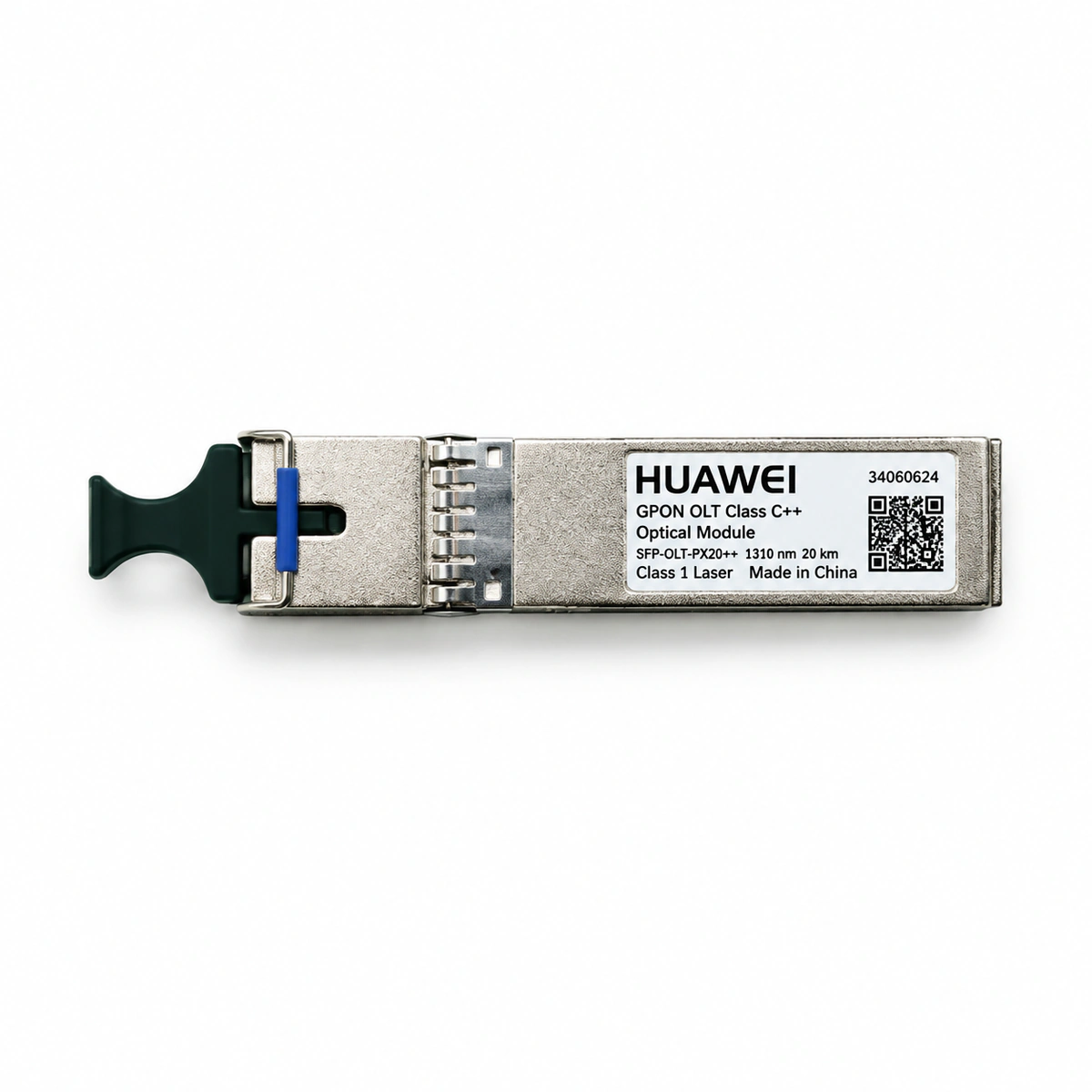
The Huawei GPON OLT Class C++ is a carrier-grade high-power single-fiber bidirectional (BiDi) optical transceiver engineered for FTTH access networks, delivering a 35dB optical power budget supporting up to 1:128 optical split ratio with SC/UPC interface.

Equipment information

Brand
Huawei
Equipment model
Huawei GPON OLT Class C++
Equipment type
SFP optical transceivers
Controller / software version
Confirm against the installed equipment
View full product specifications
Huawei GPON OLT Class C++ Official Product View 1

Information below comes from the current product catalogue. Confirm the controller, software version and configuration of the installed equipment separately.

Physical Form Factor
SFP (Class C++ ultra-high optical power)
Data Rate
Downlink 2.488Gbps / uplink 1.244Gbps (asymmetric)
Central Wavelength
Tx 1490nm / Rx 1310nm (single-fiber bidirectional BOSA)
Maximum Distance
20 (supports a high 1:128 split ratio) km
Fiber Type
Single-mode single-fiber (BiDi)
Optical Connector
SC/UPC single optical receptacle

Alarms & troubleshooting

OPT_LOS (Loss of Optical Signal)
PON port ACT LED is OFF; Main control board ALM LED is solid red
Trunk optical fiber break, disconnected or contaminated optical splitter connector, or internal receiver (PIN/APD) optical component failure on the Class C++ SFP
1. Log in to the OLT CLI and run 'display port ddm-info' to verify RX optical power and threshold limits. 2. Inspect the ODN path using an optical power meter and OTDR to pinpoint fiber break or macro-bend locations, then re-splice. 3. Clean the SC/UPC optical connector using a fiber endface cleaner; if RX power is still abnormal and external ODN is verified healthy, replace the Class C++ SFP transceiver.
OPT_BIAS_HIGH (Transmitter Laser Bias Current High)
PON port ACT LED blinks amber slowly; Main control board ALM LED is solid amber
Aging of the internal DFB laser diode or failure of the internal automatic power control (APC) circuit inside the Class C++ SFP, causing bias current to exceed the upper threshold (typically >90 mA)
1. Run 'display port ddm-info' to verify the exact Laser Bias Current value against the alarm threshold. 2. Check chassis fan tray status and optical transceiver operating temperature to rule out heat-induced bias drift. 3. Schedule a maintenance window to proactively replace the degrading Class C++ SFP module before complete transmitter burnout occurs.
OPT_TEMP_HIGH (Optical Module Temperature High)
PON board ALM LED is solid red; Chassis FAN tray LED blinks red rapidly
Data center HVAC failure, clogged chassis dust filters, fan tray motor failure, or inadequate thermal dissipation under high-density Class C++ transceiver deployments
1. Run 'display environment' to evaluate shelf ambient temperatures and 'display fan' to inspect fan rotation speed and operating state. 2. Clean or replace the chassis air filter and remove any airflow obstructions; restore ambient room temperature to 20°C–25°C. 3. If a single Class C++ transceiver shows abnormal DDM temperatures (>85°C) while adjacent ports are normal, replace the defective transceiver.
ROGUE_ONT_DETECTED (Rogue ONT Continuous Emission Detected)
PON port ACT LED blinks green/red alternately; other ONUs on the same PON port go offline simultaneously
A connected subscriber ONT experiences burst-mode laser driver breakdown or firmware fault, continuously emitting 1310nm light outside its allocated upstream TDMA time slot and jamming the Class C++ receiver
1. Run 'anti-rogue-ont locate' on the OLT interface to trigger automated upstream rogue ONT detection and isolation. 2. Execute 'display rogue-ont' to identify the specific ONT logical ID and MAC, then issue a force-deactivation command. 3. If automated isolation fails, perform binary disconnection on branch ports at the optical splitter using an optical power meter, locate the malfunctioning ONT, and replace it.
OPT_ILLEGAL (Unauthorized or Mismatched SFP Module)
PON port ACT LED is solid amber; the physical port is administratively forced Down
Insertion of an unauthorized third-party transceiver lacking valid Huawei vendor cryptographic signature, or corrupted I2C EEPROM (A0h/A2h tables) checksum data
1. Run 'display port optical-module' to review serial number, vendor identification, and BOM part number. 2. Eject the transceiver and visually inspect the golden finger connectors for dirt, oxidation, bent pins, or mechanical damage. 3. Replace with a genuine Huawei-certified GPON OLT Class C++ transceiver (e.g., matching the official Huawei spare part BOM) to restore link operation.

Access Complete Maintenance & Full Alarm Troubleshooting Manual

This page lists high-frequency critical alarm codes commonly encountered in field maintenance. Comprehensive manufacturer troubleshooting matrices, board-level repair guides, detailed electrical schematics, and firmware commissioning manuals are delivered alongside equipment upon formal project procurement, accompanied by dedicated FAE technical support.

Share on-site information

  1. 01

    Identify the exact model

    Record the nameplate, system model and controller or module model.

  2. 02

    Keep the alarm details

    Record the full alarm text, indicator colour, timing and whether it persists.

  3. 03

    Describe recent changes

    Note recent replacements, software updates or configuration changes.

Record information visible in the existing interface. Electrical measurements, disassembly and replacement should follow the applicable manufacturer's manual and be performed by qualified personnel.

Your model and these details will be added to the enquiry form for you to review before sending.

Related technical articles

Browse the technical guides or send a question about this model.

View all articles

Need a replacement module or supporting equipment?

Confirm the full model, system configuration and compatibility requirements before enquiring about suitable products.

Ask about suitable products

Have a model and an on-site issue?

Share the exact model, alarm text and observed symptoms to help identify relevant information and compatibility requirements.

Request technical support