Huawei / SFP optical transceivers

Huawei GPON OLT Class C+ Equipment information & support

The Huawei GPON OLT Class C+ is a carrier-standard single-fiber bidirectional (BiDi) optical transceiver engineered for FTTH gigabit access, providing a 32dB link budget supporting 1:64 split ratios up to 20km with SC/UPC interface.

Equipment information

Brand
Huawei
Equipment model
Huawei GPON OLT Class C+
Equipment type
SFP optical transceivers
Controller / software version
Confirm against the installed equipment
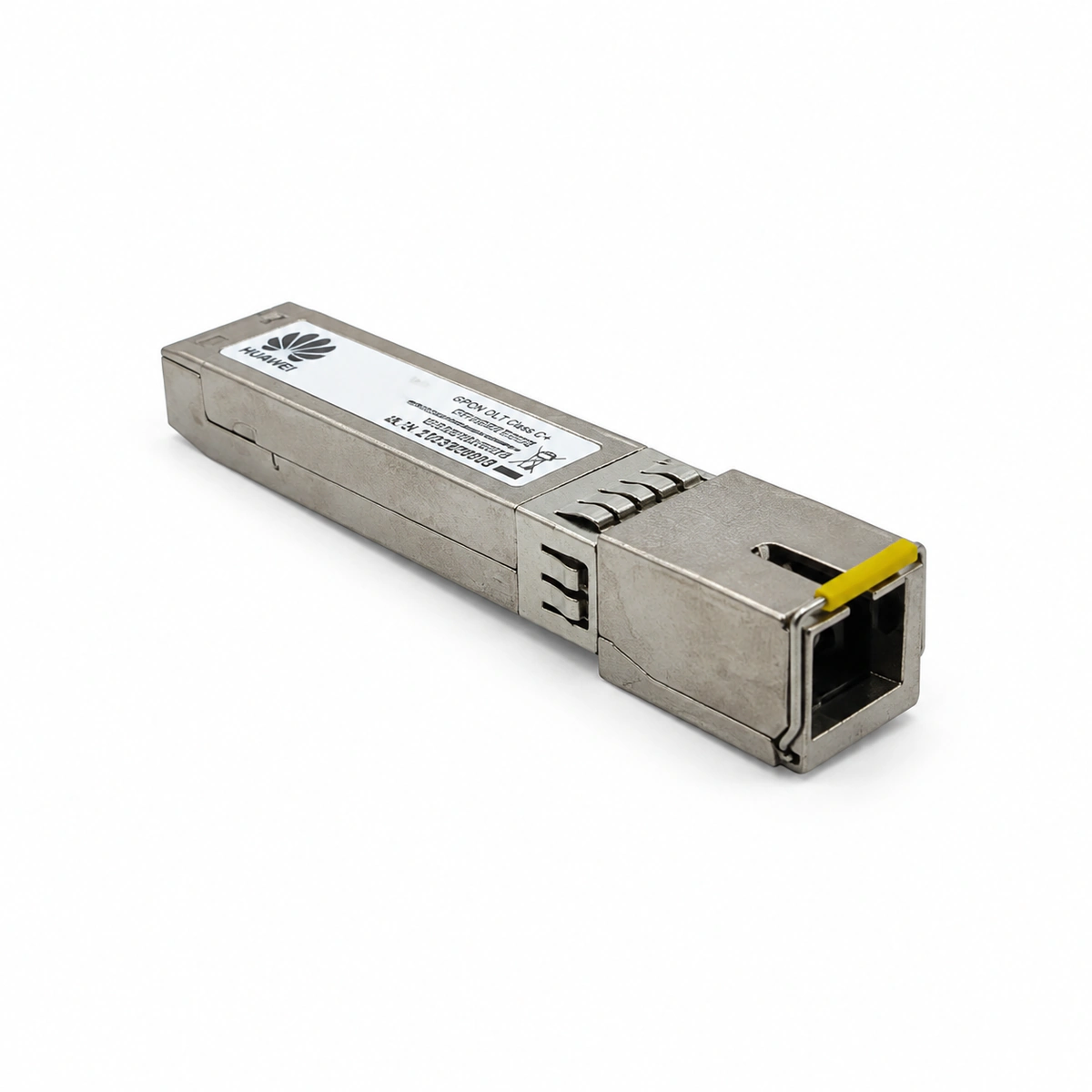
View full product specifications
Huawei GPON OLT Class C+ Official Product View 2

Information below comes from the current product catalogue. Confirm the controller, software version and configuration of the installed equipment separately.

Physical Form Factor
SFP (Class C+)
Data Rate
Downstream 2.488Gbps / upstream 1.244Gbps
Central Wavelength
Tx 1490nm / Rx 1310nm
Maximum Distance
20 (supports 1:64 / 1:128 split ratios) km
Fiber Type
Single-mode single-fiber (BiDi)
Optical Connector
SC/UPC

Alarms & troubleshooting

OPT_LOS (Loss of Optical Signal)
PON port LINK LED off, service board ALM LED solid red
ODN trunk fiber break, disconnected SC/UPC patch cord at ODF, defective optical splitter, or faulty burst-mode RX detector with RX power below sensitivity threshold (-32 dBm).
1. Log in to OLT CLI and run 'display port info' to check PON port administrative and physical state. 2. Use an optical power meter and OTDR to trace ODN trunk fiber and splitter for cuts or excessive attenuation. 3. Clean the SC/UPC optical interface and reseat connector; if ODN tests normal and alarm persists, replace the Class C+ SFP module.
TX_BIAS_HIGH (Laser Bias Current High)
PON service board ALM LED blinking amber slowly, port LED remains solid green
Internal 1490nm DFB laser diode degradation or thermal failure of the driver IC, causing the bias current to exceed the upper threshold (>80 mA).
1. Run 'display port optical-module info' to read the real-time DDM Bias Current parameter. 2. Inspect subrack airflow and verify operating ambient temperature is within normal range. 3. The laser transmitter is reaching end-of-life; schedule maintenance window and hot-swap with a spare Huawei GPON Class C+ module.
TEMP_OVER (Optical Module High Temperature)
Subrack FAN tray ALM LED on, service board ALM LED solid amber
Data center HVAC failure, severely clogged air filter, or fan tray malfunction causing internal SFP thermal sensor to exceed 85°C.
1. Run 'display environment temperature' to check subrack inlet/outlet and board temperatures. 2. Inspect and clean the OLT chassis air filters to restore unobstructed airflow. 3. Run 'display fan' to verify fan speed control; if environmental conditions are normal, replace the SFP module with faulty thermistor.
TX_PWR_LOW (Optical Transmit Power Low)
Service board ALM LED blinking amber slowly, PON port LED flashing or steady green
Class C+ optical transmitter assembly (TOSA) optical coupling misalignment, contaminated fiber endface, or transmitter degradation dropping below +3 dBm standard minimum.
1. Use an optical connector dry-clean pen to clean the SFP internal SC/UPC ferrule bore. 2. Connect an optical power meter directly to the PON port and verify 1490nm TX power is between +3 dBm and +7 dBm. 3. If TX power remains below +3 dBm after cleaning, TOSA degradation has occurred; replace the Class C+ SFP module.
ROGUE_ONT (Rogue ONT Continuous Emission)
PON port LINK LED blinking rapidly/abnormally, service board ALM LED solid red, all ONTs under port dropping offline
A connected ONT's laser driver circuit shorted or firmware crashed, continuously transmitting upstream light at 1310nm, jamming the Class C+ burst-mode receiver for all other ONTs.
1. Run 'anti-rogueont start' on the OLT CLI to trigger the automated rogue ONT isolation mechanism. 2. Run 'display rogue-ont port' to identify the specific faulty ONT ID, SN, and MAC address. 3. Execute 'ont isolate' or issue remote laser shutdown; if unresponsive, unplug drop fibers at the optical splitter one by one to isolate and disconnect the faulty terminal.

Access Complete Maintenance & Full Alarm Troubleshooting Manual

This page lists high-frequency critical alarm codes commonly encountered in field maintenance. Comprehensive manufacturer troubleshooting matrices, board-level repair guides, detailed electrical schematics, and firmware commissioning manuals are delivered alongside equipment upon formal project procurement, accompanied by dedicated FAE technical support.

Share on-site information

  1. 01

    Identify the exact model

    Record the nameplate, system model and controller or module model.

  2. 02

    Keep the alarm details

    Record the full alarm text, indicator colour, timing and whether it persists.

  3. 03

    Describe recent changes

    Note recent replacements, software updates or configuration changes.

Record information visible in the existing interface. Electrical measurements, disassembly and replacement should follow the applicable manufacturer's manual and be performed by qualified personnel.

Your model and these details will be added to the enquiry form for you to review before sending.

Related technical articles

Browse the technical guides or send a question about this model.

View all articles

Need a replacement module or supporting equipment?

Confirm the full model, system configuration and compatibility requirements before enquiring about suitable products.

Ask about suitable products

Have a model and an on-site issue?

Share the exact model, alarm text and observed symptoms to help identify relevant information and compatibility requirements.

Request technical support