Huawei / Indoor power systems

Huawei ETP48600-C5A8 Equipment information & support

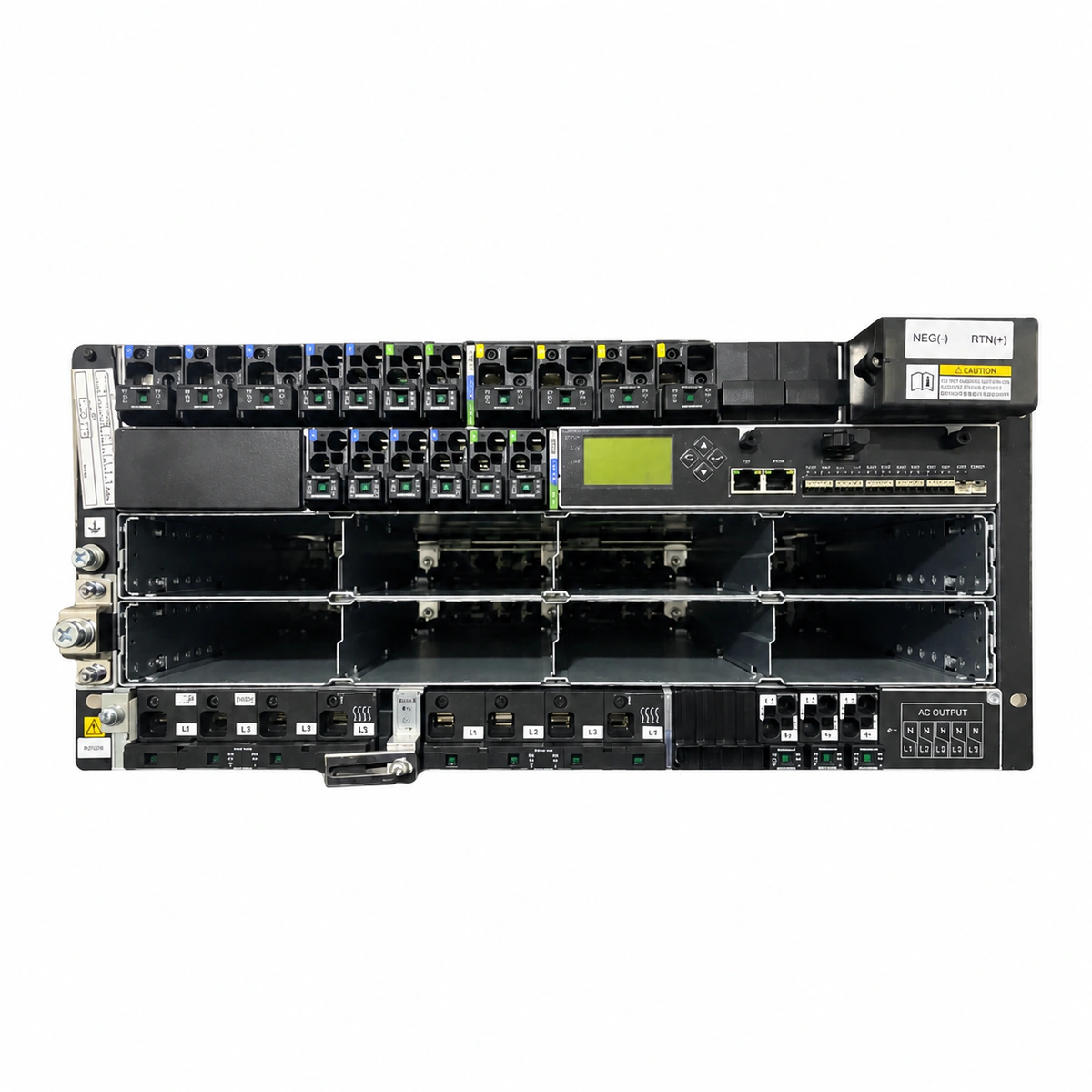
Huawei ETP48600-C5A8 is a heavy-duty 11U 19-inch rack-mounted embedded DC power subrack designed for central telecom offices and large-scale sites, providing 600A/-48V DC output capacity across 12 high-efficiency rectifier slots managed by an SMU02C intelligent controller with comprehensive multi-level battery disconnection protection.

Equipment information

Brand
Huawei
Equipment model
Huawei ETP48600-C5A8
Equipment type
Indoor power systems
Controller / software version
Confirm against the installed equipment
View full product specifications
Huawei ETP48600-C5A8 11U 600A Embedded DC Power System (12×R4850G2 Slots, SMU02C) Official Studio Photo 1

Information below comes from the current product catalogue. Confirm the controller, software version and configuration of the installed equipment separately.

System Output Capacity
600A (-48V DC)
AC Input Voltage Range
85V AC ~ 300V AC (3-Phase 5-Wire 380V/220V)
Physical Form Factor
11U 19-inch Heavy-Duty Embedded Subrack
Rectifier Module Slots
12 Slots (Compatible with 12×R4850G2 50A Rectifiers)
System Monitoring Controller
SMU02C Intelligent Network Controller Unit
System Comprehensive Efficiency
≥ 96% (High Efficiency Switching Rectification)

Alarms & troubleshooting

AC_FAIL (AC Mains Input Failure)
SMU Controller: Red ALM LED steady on; Rectifier modules: Green RUN LED off, AC input LED off or flashing.
Mains outage, upstream AC breaker tripping, phase loss, or AC voltage out of range (< 85 VAC or > 300 VAC).
1. Measure L1/L2/L3-N line and phase voltages on the AC distribution terminal to check for outage or phase loss. 2. Inspect the AC input circuit breaker and upstream ATS; reset only after ruling out short circuits. 3. Verify grid voltage returns to normal range (85-300 VAC); rectifiers will resume automatically.
DC_OVER_VOLT (DC Output Overvoltage Lockout)
Rectifier modules: Red FAULT LED steady on, Green RUN LED off; SMU Controller: Red ALM LED steady on.
Internal rectifier voltage loop failure triggering HVSD latch (> 58.5–60.5 VDC), incorrect float/boost settings in SMU, or external DC backfeed.
1. Measure DC bus voltage with a calibrated multimeter to confirm true overvoltage. 2. Verify float and boost voltage parameters on the SMU (typically 53.5 VDC float, 56.4 VDC boost). 3. Identify and remove the locked module (red LED on); power cycle it. If it locks out again immediately, replace the faulty rectifier.
LLVD_ACTION (Load Low Voltage Disconnect Active)
SMU Controller: Red ALM LED steady on, audible alarm active, LCD displays LLVD disconnected; LLVD contactor open.
Prolonged mains outage causing deep battery discharge down to the LLVD disconnect threshold (default 43.2–44.0 VDC), or LLVD contactor control coil/driver failure.
1. Immediately connect emergency mobile generator or restore utility AC. 2. If AC cannot be quickly restored, prioritize critical transmission loads and prepare battery replacement or site rescue. 3. Once AC is restored and DC voltage rises above the reconnect threshold (> 48.0 VDC), confirm the contactor auto-recloses; if not, test coil signals via SMU diagnostics or use emergency bypass.
RECT_OVER_TEMP (Rectifier Over-Temperature & Derating)
Rectifier modules: Yellow ALM LED steady on or flashing; SMU Controller: Yellow or Red ALM LED on.
High ambient temperature in room/cabinet (> 55°C–65°C), clogged cabinet air filter restricting airflow, internal PWM cooling fan failure/blockage, or prolonged full-load stress.
1. Check room air conditioning status and lower intake air temperature below 40°C. 2. Clean cabinet dust filters and remove debris from rectifier intake grilles. 3. Inspect the module fan operation; if the fan is stalled or damaged, hot-swap the faulted rectifier module with a healthy unit.
RECT_COMM_FAIL (Rectifier Communication Failure)
Rectifier modules: Yellow ALM LED flashing; SMU Controller: Yellow ALM LED steady on.
Rectifier not fully seated causing poor backplane connector contact, loose or oxidized CAN bus ribbon cable, faulty SMU communication port, or defective module CAN transceiver.
1. Unlock the handle, pull the rectifier module out about 10 cm, reseat it firmly, lock the handle, and verify if the yellow LED turns off. 2. Inspect CAN bus cables behind the SMU and backplane for bent pins, oxidation, or loose connectors. 3. Swap the affected module into an empty/working slot: if the fault follows the module, replace it; if the fault stays in the slot, inspect backplane pins or replace the SMU.

Access Complete Maintenance & Full Alarm Troubleshooting Manual

This page lists high-frequency critical alarm codes commonly encountered in field maintenance. Comprehensive manufacturer troubleshooting matrices, board-level repair guides, detailed electrical schematics, and firmware commissioning manuals are delivered alongside equipment upon formal project procurement, accompanied by dedicated FAE technical support.

Share on-site information

  1. 01

    Identify the exact model

    Record the nameplate, system model and controller or module model.

  2. 02

    Keep the alarm details

    Record the full alarm text, indicator colour, timing and whether it persists.

  3. 03

    Describe recent changes

    Note recent replacements, software updates or configuration changes.

Record information visible in the existing interface. Electrical measurements, disassembly and replacement should follow the applicable manufacturer's manual and be performed by qualified personnel.

Your model and these details will be added to the enquiry form for you to review before sending.

Related technical articles

Browse the technical guides or send a question about this model.

View all articles

Need a replacement module or supporting equipment?

Confirm the full model, system configuration and compatibility requirements before enquiring about suitable products.

Ask about suitable products

Have a model and an on-site issue?

Share the exact model, alarm text and observed symptoms to help identify relevant information and compatibility requirements.

Request technical support