HEFENGQI / Cabinet air conditioning

Cabinet AC 600W Equipment information & support

The Cabinet AC 600W is a lightweight compact industrial enclosure air conditioner delivering 600W of refrigeration with IP55 closed-loop internal isolation for small outdoor electrical and telecom junction boxes.

Equipment information

Brand
HEFENGQI
Equipment model
Cabinet AC 600W
Equipment type
Cabinet air conditioning
Controller / software version
Confirm against the installed equipment
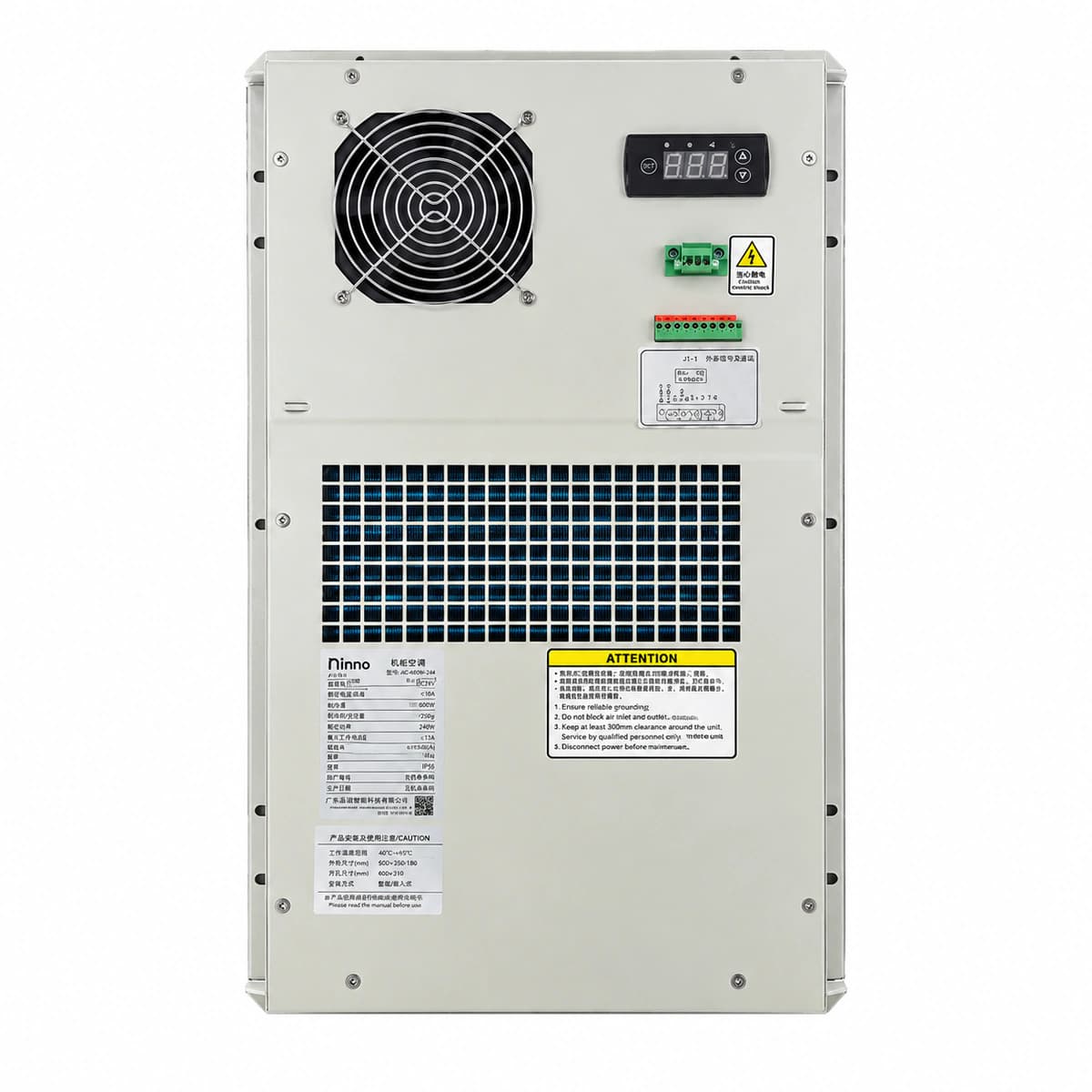
View full product specifications
Cabinet AC 600W Official Product View 3

Information below comes from the current product catalogue. Confirm the controller, software version and configuration of the installed equipment separately.

Rated Cooling Capacity
600 W
Grid Power Supply System
220VAC / 50Hz (Single Phase) V AC
Rated Input Power
280 W
Max Operating Current
1.6 A
Refrigerant Type
R134a Eco Refrigerant
Ingress Protection (IP Rating)
Internal Loop IP55 / External Loop IP34 (Sealed Dust & Water Proof)

Alarms & troubleshooting

E01: HP_ALM (High Discharge Pressure Lockout)
ALM LED solid Red, RUN LED off
Condenser coil heavily fouled, external condenser fan locked/failed, refrigerant overcharge, or ambient temperature exceeds upper operating limit (>55°C)
1. Inspect external air passage and clean debris/dust from condenser fins. 2. Measure external fan supply voltage and winding resistance to confirm fan rotation. 3. Connect manifold gauges to verify discharge pressure levels. 4. Once heat dissipation recovers, power cycle unit to reset pressure lockout.
E02: IFAN_FAIL (Internal Evaporator Fan Failure)
ALM LED flashing Red (2Hz), RUN LED off
Internal evaporator fan mechanically seized, worn bearing, missing tachometer/FG feedback pulse, or defective controller driver output
1. Disconnect AC input and manually rotate fan impeller to check for mechanical obstruction. 2. Inspect wiring connector and verify integrity of the FG speed feedback pin. 3. Measure power output from main controller to the fan. 4. If power is correct but fan does not run or send speed signal, replace internal fan assembly.
E03: CAB_TEMP_HI (Cabinet Over-Temperature Alarm)
ALM LED solid Amber
Cabinet equipment heat load exceeds 600W cooling capacity, door seal gasket breached, slow refrigerant leak reducing COP, or setpoint incorrectly configured
1. Verify cabinet door is tightly sealed with undamaged gaskets to prevent ambient infiltration. 2. Calculate total heat dissipation of active telecom gear to verify it does not exceed 600W rating. 3. Measure temperature differential across evaporator (normal ΔT should be 5°C to 10°C). 4. If ΔT is significantly low while compressor runs, test for refrigerant leakage and recharge system.
E04: T_SENS_ERR (Return Air Temp Sensor Open/Short)
ALM LED flashing Amber (0.5Hz)
NTC temperature sensor shorted, lead wire fractured/open, terminal connector oxidized/loose, or controller ADC channel damaged
1. Check the temperature sensor terminals on the main control board for looseness or corrosion. 2. Unplug probe and measure resistance using a multimeter (standard NTC is typically 10kΩ at 25°C). 3. If reading is infinite (open) or zero (short), replace with matching NTC sensor probe. 4. If probe resistance is within tolerance but fault persists, repair or replace controller board.
E05: COND_LVL_HI (Condensate High Water Level Alarm)
ALM LED slow flashing Amber (1Hz), RUN LED solid Green
Condensate drain pipe kinked/clogged, collection pan clogged with silt, drain pump inoperative, or liquid level float switch stuck in high position
1. Inspect external drain tubing, straighten bends, and clear silt/blockages from drain port. 2. Open lower maintenance cover to clean dirt and algae from the condensate tray. 3. Inspect mechanical motion of the float switch and clean the sliding stem. 4. For units equipped with condensate evaporation heaters or pumps, verify electrical supply and operation.

Access Complete Maintenance & Full Alarm Troubleshooting Manual

This page lists high-frequency critical alarm codes commonly encountered in field maintenance. Comprehensive manufacturer troubleshooting matrices, board-level repair guides, detailed electrical schematics, and firmware commissioning manuals are delivered alongside equipment upon formal project procurement, accompanied by dedicated FAE technical support.

Share on-site information

  1. 01

    Identify the exact model

    Record the nameplate, system model and controller or module model.

  2. 02

    Keep the alarm details

    Record the full alarm text, indicator colour, timing and whether it persists.

  3. 03

    Describe recent changes

    Note recent replacements, software updates or configuration changes.

Record information visible in the existing interface. Electrical measurements, disassembly and replacement should follow the applicable manufacturer's manual and be performed by qualified personnel.

Your model and these details will be added to the enquiry form for you to review before sending.

Related technical articles

Browse the technical guides or send a question about this model.

View all articles

Need a replacement module or supporting equipment?

Confirm the full model, system configuration and compatibility requirements before enquiring about suitable products.

Ask about suitable products

Have a model and an on-site issue?

Share the exact model, alarm text and observed symptoms to help identify relevant information and compatibility requirements.

Request technical support