Eltek / Site energy systems

Eltek Smartpack S Equipment information & support

The Eltek Smartpack S (Part No. 242100.120) is an intelligent compact supervisory controller designed for Eltek Flatpack2 and Flatpack S DC power systems, offering integrated web server, SNMP, and high-precision battery monitoring.

Equipment information

Brand
Eltek
Equipment model
Eltek Smartpack S
Equipment type
Site energy systems
Controller / software version
Confirm against the installed equipment
View full product specifications
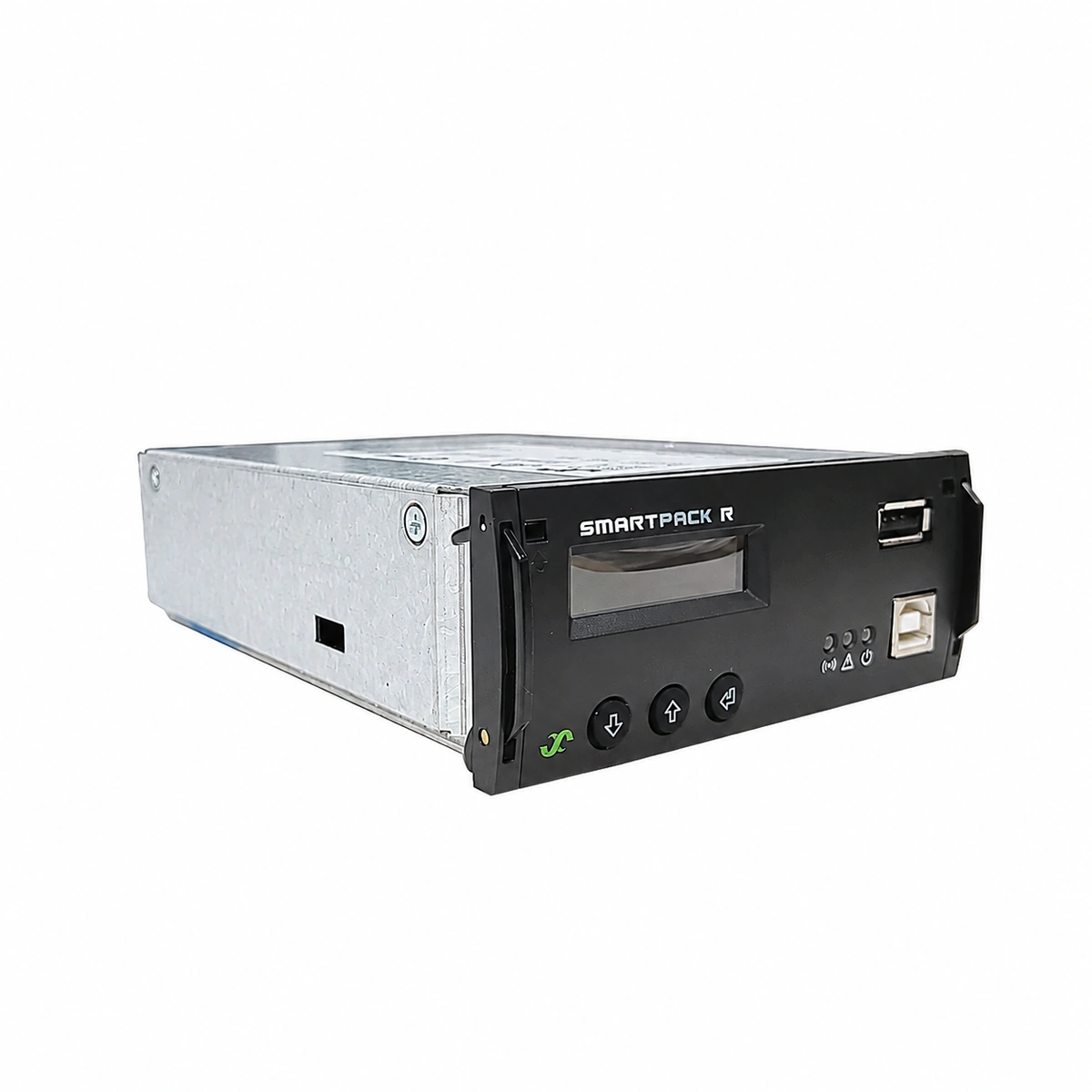
Eltek Smartpack S Official Product View 1

Information below comes from the current product catalogue. Confirm the controller, software version and configuration of the installed equipment separately.

System Output Capacity
Manages up to 24 rectifier modules and 2 battery banks A
Nominal Output Voltage
12V / 24V / 48V / 60V adaptive detection VDC
Output Voltage Range
Full support for high- and low-voltage battery disconnect protection (LVD) VDC
AC Input Voltage Range
Direct connection to the internal DC bus for power supply (18 ~ 75 VDC) VAC
Rectifier Module Slots
Standard 1U modular panel embedded installation Slots
System Monitoring Controller
Smartpack S (242100.120) Full Digital Color Display

Alarms & troubleshooting

HIGH_DC_VOLT (High DC Voltage Shutdown / HVSD)
Smartpack S Red 'Alarm' LED solid ON; Rectifier Red LED solid ON, Green 'Power' LED OFF
System DC bus voltage exceeded pre-configured HVSD threshold; internal rectifier feedback loop failure caused overvoltage latch; temperature compensation calibration drift or external power feed
1. Measure actual DC bus voltage at battery/load terminals with a calibrated DMM; compare against Smartpack S display. 2. Disconnect/unseat rectifiers sequentially to isolate the runaway module causing the overvoltage. 3. Verify 'Overvoltage Shutdown' thresholds and battery boost charging settings in Smartpack S web/display menu. 4. Replace the defective rectifier module and execute 'Clear Alarms / Unlatch' from controller UI.
LVD_OPEN (Low Voltage Disconnect Tripped / LVD Open)
Smartpack S Red 'Alarm' LED solid ON; Enclosure 'Battery Disconnected' indicator solid ON
Prolonged AC outage drained batteries below disconnect limit (BLVD/LLVD triggered); LVD contactor coil circuit open or driver burned; voltage sensing lead damaged causing false reading
1. Restore AC grid power or engage mobile generator; ensure rectifiers power on and deliver DC output. 2. Inspect Smartpack S LVD control output and associated control relay/fuse. 3. Execute 'LVD Manual Reconnect / Override' in controller menu if auto-reconnect conditions are met. 4. If voltage is nominal but contactor remains open, test contactor coil resistance and replace damaged hardware.
CAN_COMM_FAIL (CAN Bus Communication Failure)
Smartpack S Yellow 'Warning' or Red 'Alarm' LED blinking; Rectifiers Yellow LED flashing (0.5Hz/1Hz)
Physical break or loose connector on CAN-bus ribbon cable between Smartpack S and rectifiers/IO units; missing/damaged 120-ohm CAN end-terminator resistor; faulty CAN transceiver locking the bus
1. Inspect CAN-bus RJ45 connectors/ribbon cables behind Smartpack S and backplane for loose seating. 2. Power down signal rail and measure resistance between CAN_H and CAN_L; nominal terminated loop is ~60 ohms (~120 ohms per end). 3. Sequentially remove rectifiers/IO nodes to identify the specific unit pulling down CAN bus lines. 4. Verify the end-of-line 120-ohm termination jumper/resistor is installed; power-cycle the Smartpack S.
BATT_TEMP_HIGH (Battery High Temperature Alarm)
Smartpack S Yellow 'Warning' LED solid ON (or Red 'Alarm' LED if critical threshold breached)
Cabinet or battery room HVAC air conditioning failure; thermal runaway due to internal battery cell short-circuit; NTC temperature probe detached, touching heat source, or defective
1. Measure battery block skin temperatures with an infrared thermometer to detect localized thermal runaway. 2. Inspect the NTC temperature probe mounting position; check for probe cable integrity and resistance curve. 3. Temporarily lower Smartpack S float voltage and disable Boost charging if battery current is rising uncontrollably. 4. Restore site HVAC/ventilation; isolate swollen, leaking, or damaged battery cells immediately.
MAINS_FAIL (AC Mains Failure / Supply Loss)
Smartpack S Yellow 'Warning' LED solid ON; All Rectifier Green 'Power' LEDs flashing or OFF, Yellow LEDs ON
Utility grid blackout or tripped upstream AC distribution breaker; input AC MCB tripped; input AC phase voltage below 85Vac or phase missing; tripped AC surge protection (SPD) breaker
1. Check the main AC distribution panel (ACDU) breaker and individual rectifier branch breakers. 2. Measure line-to-neutral (L-N) and line-to-line (L-L) voltages with a true-RMS DMM (nominal range: 85Vac-300Vac). 3. Inspect the AC surge protector (SPD) visual flags (green=healthy, red=replace) and reset tripped auxiliary fuses. 4. If prolonged grid outage persists, ensure ATS transfers cleanly to the standby diesel generator to prevent battery depletion.

Access Complete Maintenance & Full Alarm Troubleshooting Manual

This page lists high-frequency critical alarm codes commonly encountered in field maintenance. Comprehensive manufacturer troubleshooting matrices, board-level repair guides, detailed electrical schematics, and firmware commissioning manuals are delivered alongside equipment upon formal project procurement, accompanied by dedicated FAE technical support.

Share on-site information

  1. 01

    Identify the exact model

    Record the nameplate, system model and controller or module model.

  2. 02

    Keep the alarm details

    Record the full alarm text, indicator colour, timing and whether it persists.

  3. 03

    Describe recent changes

    Note recent replacements, software updates or configuration changes.

Record information visible in the existing interface. Electrical measurements, disassembly and replacement should follow the applicable manufacturer's manual and be performed by qualified personnel.

Your model and these details will be added to the enquiry form for you to review before sending.

Related technical articles

Browse the technical guides or send a question about this model.

View all articles

Need a replacement module or supporting equipment?

Confirm the full model, system configuration and compatibility requirements before enquiring about suitable products.

Ask about suitable products

Have a model and an on-site issue?

Share the exact model, alarm text and observed symptoms to help identify relevant information and compatibility requirements.

Request technical support