Dpc / Outdoor power systems

DPC DYS 50H3 2.1m Outdoor Power Cabinet Equipment information & support

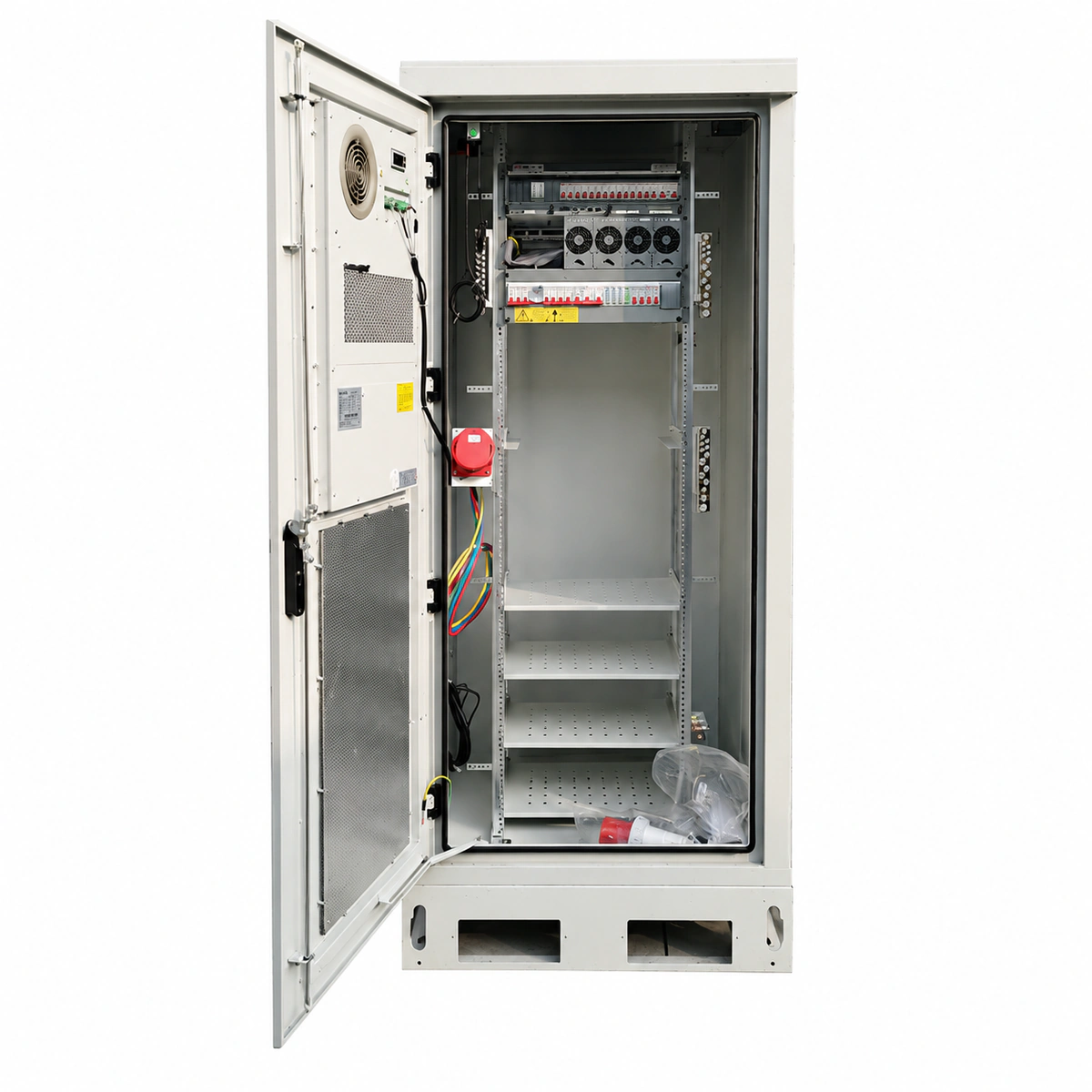
The DPC DYS 50H3 is a 2.1-meter industrial-grade outdoor integrated telecom power cabinet system combining high-efficiency switch-mode rectifiers, AC/DC power distribution, dynamic environmental monitoring, and heavy-duty battery compartments. Delivering -48V DC output with scalable capacity from 300A to 600A and IP55 sealed enclosure protection, it guarantees continuous mission-critical power for global macro cell sites and transport networks in harsh terrains.

Equipment information

Brand
Dpc
Equipment model
DPC DYS 50H3 2.1m Outdoor Power Cabinet
Equipment type
Outdoor power systems
Controller / software version
Confirm against the installed equipment
View full product specifications
DPC DYS 50H3 2.1m Outdoor Telecom Power Cabinet System -48V 300A-600A IP55

Information below comes from the current product catalogue. Confirm the controller, software version and configuration of the installed equipment separately.

System Output Capacity
300A ~ 600A Flexible Expandable Total DC Capacity
Cabinet Structure Spec
2.1m Heavy-Duty Double-Wall Insulated Outdoor Cabinet (IP55 Sealed)
Compatible Rectifiers
Equipped with DYS-4850H 50A High-Frequency Switchmode Rectifiers
Heat Exchange Tech
Dual High-Efficiency Heat Exchangers + Self-Cleaning Dust Filter Ducts
Environment Monitoring Unit
Large Digital Supervisory Controller (SNMP & Modbus Compatible)
AC/DC Distribution Unit
Heavy-Duty Copper Busbars + Multi-Channel Output Branch Breakers

Alarms & troubleshooting

AC_MAINS_FAIL (AC Mains Failure / Phase Loss)
Controller ALM LED solid red; Rectifier AC green LED off / amber LED blinking
Utility grid outage, AC input circuit breaker trip, or three-phase input phase imbalance/severe undervoltage.
1. Measure AC Distribution Unit (ACDU) input phase-to-phase and phase-to-neutral voltages using a digital multimeter; 2. Inspect the main AC breaker and surge protection circuit breakers for tripping; clear downstream faults and reset; 3. If grid power is lost, verify that the site standby diesel generator (DG) or ATS has engaged properly.
DC_LOW_LLVD (DC Under-Voltage / LLVD Load Shedding)
Controller ALM LED flashing red; audible alarm active; LLVD contactor tripped/de-energized
Prolonged AC power outage caused battery discharge to drop below the LLVD threshold (typically 46.0V–47.0V), triggering non-critical load disconnection.
1. Check remaining battery runtime and verify critical equipment status on BLVD bus; 2. Deploy an emergency mobile power generator or restore utility AC power immediately; 3. Upon AC recovery, confirm rectifiers enter boost charge, bus voltage rises above reconnect threshold (>50.4V), and LLVD contactor recloses.
RECT_HVSD (Rectifier Output High Voltage Shutdown)
Faulty rectifier FAULT red LED solid on; RUN green LED off; Controller reports RECT_FAULT
Rectifier internal feedback loop failure, current-sharing runaway, or output voltage sensing circuit malfunction exceeding hardware shutdown limit (>59.5V).
1. Identify the faulty module slot, unlatch and extract the rectifier or toggle its input breaker; 2. Wait 30 seconds to discharge internal capacitors, reinsert firmly and observe if HVSD recurs; 3. If the module re-enters HVSD lockout, replace it with a spare module and verify current-sharing parameters on the controller.
SPD_FAULT (Surge Protective Device Degradation / Tripped)
SPD mechanical indicator turned from green to red; Controller reports SPD_ALM yellow/amber warning
Lightning impulse strike or severe utility transient overvoltage caused metal-oxide varistor (MOV) breakdown or disconnected remote signaling contacts.
1. Inspect the AC distribution panel visually to confirm which SPD module plug-in indicator shows red; 2. Verify the remote alarm signal wiring connected between the SPD auxiliary contact and the controller digital input; 3. Open the SPD protective MCB, replace the damaged pluggable surge cartridge with an identical rating module, and reclose MCB.
CAB_TEMP_HIGH (Cabinet Internal High Temperature)
Controller ALM LED yellow blinking / red solid; Cabinet cooling fan/heat exchanger operating at 100% full speed
Air filters/heat exchanger clogged with dust/debris, door cooling fan failure, damaged door gasket, or ambient temperature exceeding thermal limits during heavy rectifier load.
1. Inspect external airflow louvers and intake/exhaust filter mats; clean dust build-up or replace clogged air filters; 2. Access the controller "Thermal Test" menu to force manual fan/heat exchanger operation and inspect fan speed/current feedback; 3. Verify cabinet door seals are intact; replace stalled cooling fan modules if RPM fails to reach rated speed until cabinet drops below 45°C.

Access Complete Maintenance & Full Alarm Troubleshooting Manual

This page lists high-frequency critical alarm codes commonly encountered in field maintenance. Comprehensive manufacturer troubleshooting matrices, board-level repair guides, detailed electrical schematics, and firmware commissioning manuals are delivered alongside equipment upon formal project procurement, accompanied by dedicated FAE technical support.

Share on-site information

  1. 01

    Identify the exact model

    Record the nameplate, system model and controller or module model.

  2. 02

    Keep the alarm details

    Record the full alarm text, indicator colour, timing and whether it persists.

  3. 03

    Describe recent changes

    Note recent replacements, software updates or configuration changes.

Record information visible in the existing interface. Electrical measurements, disassembly and replacement should follow the applicable manufacturer's manual and be performed by qualified personnel.

Your model and these details will be added to the enquiry form for you to review before sending.

Related technical articles

Browse the technical guides or send a question about this model.

View all articles

Need a replacement module or supporting equipment?

Confirm the full model, system configuration and compatibility requirements before enquiring about suitable products.

Ask about suitable products

Have a model and an on-site issue?

Share the exact model, alarm text and observed symptoms to help identify relevant information and compatibility requirements.

Request technical support